
Shower Tally
Aggiornata
Versione corrente
1.1.6
Offerta da

Non devi più preoccuparti dei sovraccarichi durante l'utilizzo di Shower Tally sul tuo cellulare, liberati dal piccolo schermo e goditi dell'App su uno schermo molto più grande. D'ora in poi, sperimenta la tua App a schermo intero con tastiera e mouse. MEmu ti offre tutte le sorprendenti funzioni che ti aspettavi: installazione rapida e impostazione semplice, controlli intuitivi, niente più limitazioni di batteria, dati mobili e chiamate fastidiose. Il MEmu 9 nuovo di zecca è la prima scelta per utilizzare Shower Tally sul tuo computer. Codificato con il nostro assorbimento, il gestore multi-istanza consente di aprire 2 o più account contemporaneamente. E soprattutto, il nostro esclusivo motore di emulazione può sbloccare il pieno potenziale del tuo PC, rendendo tutto liscio e piacevole.
Mostra altro
Goditi un'esperienza straordinaria con Shower Tally su PC con MEmu Play. È un potente emulatore Android gratuito che ti offre migliaia di app Android per la versione desktop. Divertiti a connetterti con gli amici e a perfezionare il tuo lavoro con maggiore efficienza! Shower Tally is a family shower tracker: one shared board that answers "did you shower today?
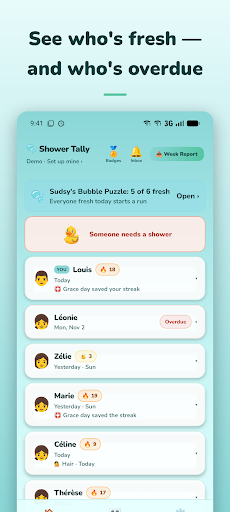
Shower Tally is a family shower tracker: one shared board that answers "did you shower today?" for the whole house. Think of the fridge whiteboard, but bubbly, a bit silly, and on everyone's phone.
See at a glance who's Fresh, who's Due Soon, and who's Overdue. Log a shower with one tap and watch the bubbles burst. Build streaks. Nudge the stragglers. Share your weekly report to the family group chat for a little friendly accountability.
WHAT'S ON THE BOARD
• One-tap shower logging with a bubble celebration
• A board that lists overdue people first
• Streaks to keep going (⭐ → )
• Friendly nudges: " Time to shower!" Anyone who gets a nudge can report it or mute the sender.
• A shareable Week Report with a silly headline: "It was a rough week for soap "
• No sign-up to start: your family joins with one household code
HOW IT WORKS
1. Create your family and name it
2. Add each person with a name and emoji
3. Share your household code with anyone who has a phone
4. Tap to log showers, for yourself or anyone in the family
5. Get a reminder when you're overdue
Nudges and shower notices from your family arrive as notifications, and also wait in the app's Inbox, so a nudge is still waiting with notifications off.
FREE
• Track one person
• One-tap shower logging
• 3-day "due" schedule
• Streaks and badges
• Sudsy's awards every Sunday
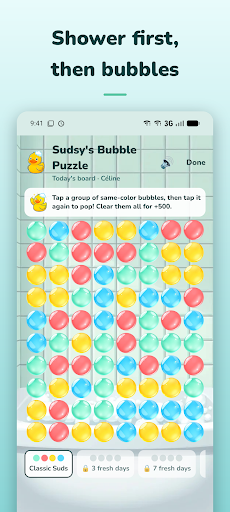
• Sudsy's Bubble Puzzle: a daily family game that opens when the family's fresh
• Last 4 weeks of shower history
• Weekly shareable report
• Real-time shared board across devices
SHOWER TALLY PRO
Upgrade when your family grows or you want more fun:
• Add your whole household (up to 6 people)
• Everyone in the family plays the daily bubble game
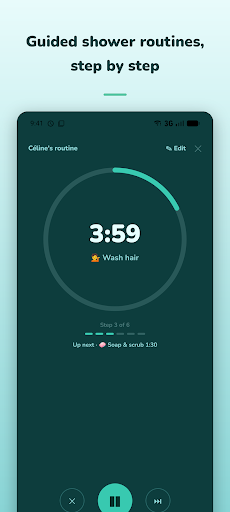
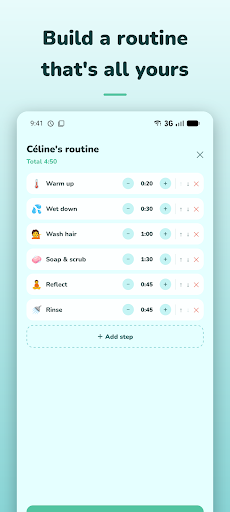
• Guided routine timer: build your own shower steps and follow along
• Hair-wash tracking
• Add pets with their own grooming schedules
• Custom overdue days per person (1, 2, 3 or 5)
• Write your own nudge messages: "Noah. Seriously. Now."
• A daily alert when a pet or anyone without the app is overdue
• Two households: your home plus one more (for co-parents or grandparents)
• Full emoji pack: skin tones and animals
SUBSCRIPTION DETAILS
Shower Tally Pro is an auto-renewing subscription. One subscription covers everyone in your household.
• Shower Tally Pro (Monthly): $4.99/month
• Shower Tally Pro (Annual): $29.99/year
• New subscribers to the annual plan get a 7-day free trial. When it ends, the annual price is charged unless you cancel before then.
Payment is charged to your Google Play account when you confirm the purchase. The subscription renews automatically at the end of each period until you cancel. You can cancel any time before the renewal date in the Google Play Store under Payments and subscriptions, or from Manage subscription in the app's Settings.
ACCOUNTS
You don't need an email or password to start. Your account begins anonymous, and your family joins with a household code. If you want your family to survive a phone reset, you can link a Google account; that gives us the email address on it. You can delete your account any time in Settings.
PRIVACY
We store what the board needs: the names and emojis you add, shower dates and times, hair washes and routines if you use them, nudges, Sudsy's Bubble Puzzle scores and cheers, each card's badges and running counts, a push token if you turn on notifications, the email on a linked Google account, and app-wide usage totals that hold no names. Anyone with your household code can see your board, so share it like a house key. No ads. No third-party trackers. We don't sell your data.
Privacy Policy: https://twilight-celestite-fdb.notion.site/Shower-Tally-Privacy-Policy-36ed96d65d8e8167a465d5d5c234eb56
Support: https://twilight-celestite-fdb.notion.site/Shower-Tally-Help-Support-36ed96d65d8e81f7ae4fcbe37759f027
Terms: https://twilight-celestite-fdb.notion.site/Shower-Tally-Terms-of-Service-3e6d96d65d8e815aaddac1613d1aa1d1
Stay fresh.
Mostra altro

1. Scarica il programma di installazione di MEmu e completa l'installazione

2. Avvia il Memu e apri il Google Play sulla homepage

3. Cerca Shower Tally in Google Play
Install
4. Scarica e installa Shower Tally
5. Al termine dell'installazione, fai clic sull'icona per avviar

6. Divertiti giocando a Shower Tally su PC con MEmu
MEmu App Player è il miglior emulatore Android gratuito, utilizzato da 50 milioni di persone per ottenere un'esperienza di gioco Android superba. La tecnilogia di virtualizzazione MEmu ti permette di giocare a migliaia di giochi Android con semplicità sul tuo computer, anche i giochi con la grafica più esigente.
Schermo più grande con una grafica migliore; Lunga durata, senza limitazione di batteria o dati mobili.
Supporto completo per mappa di tastiera per un controllo preciso di tastiera e mouse o gamepad.
Multipli account di gioco o attività su un singolo PC contemporaneamente con il gestore di multi istanza.
Use Shower Tally on PC by following steps: