SUZUKI RIDE CONNECT+ App
Aggiornata
Versione corrente
1.0.5
Offerta da

Non devi più preoccuparti dei sovraccarichi durante l'utilizzo di SUZUKI RIDE CONNECT+ App sul tuo cellulare, liberati dal piccolo schermo e goditi dell'App su uno schermo molto più grande. D'ora in poi, sperimenta la tua App a schermo intero con tastiera e mouse. MEmu ti offre tutte le sorprendenti funzioni che ti aspettavi: installazione rapida e impostazione semplice, controlli intuitivi, niente più limitazioni di batteria, dati mobili e chiamate fastidiose. Il MEmu 9 nuovo di zecca è la prima scelta per utilizzare SUZUKI RIDE CONNECT+ App sul tuo computer. Codificato con il nostro assorbimento, il gestore multi-istanza consente di aprire 2 o più account contemporaneamente. E soprattutto, il nostro esclusivo motore di emulazione può sbloccare il pieno potenziale del tuo PC, rendendo tutto liscio e piacevole.
Mostra altro
Goditi un'esperienza straordinaria con SUZUKI RIDE CONNECT+ App su PC con MEmu Play. È un potente emulatore Android gratuito che ti offre migliaia di app Android per la versione desktop. Divertiti a connetterti con gli amici e a perfezionare il tuo lavoro con maggiore efficienza! If the app (Ver.
If the app (Ver. 1.0.4) does not start, follow the steps below.
1, Add [English (United States)] to the language settings on your smartphone. Do not change the default language.
2, Uninstall and reinstall the app.
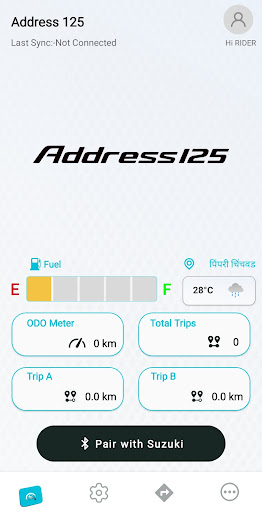
Once downloaded and installed, you can use Suzuki Ride Connect+ App to connect your smartphone running Android OS access a variety of useful information and services on the dashboard and your smartphone.
Smartphone Interfacing
When your smartphone is connected, enjoy the convenience of checking its signal strength and remaining battery level, along with the Bluetooth® connection status right on the dashboard.
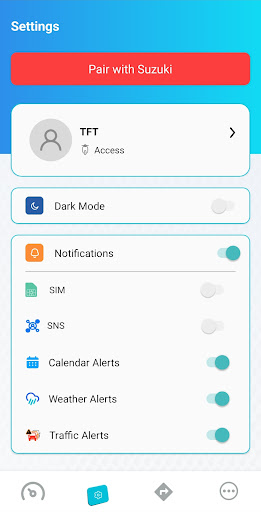
Incoming Notifications
Enjoy getting notified of incoming calls and messages, as well as scheduled calendar events as you ride, and being to respond immediately.
Speed Warning
This function helps you ride more confidently by alerting you when your speed of travel exceeds the preset limit selected in the app.
Ambient Weather
Enjoy the convenience of seeing the current temperature and weather conditions on your App screen and the cluster wherever you are travelling.
Rainfall and Traffic Jam Alert
When using the navigation system, this convenient function alerts you when there are rain clouds or traffic problems along your route.
A wealth of information at your fingertips
You can view a variety of useful information on your smartphone screen. This includes data pertaining to the current status of your vehicle, such as the parking location, odometer, tripmeter, daily, monthly and single trip, single trip average speed, oil, tire and 12V battery maintenance information and more.
Auto Reply
Ride without worrying about missing a call. Auto Reply automatically declines incoming calls on your behalf and sends the caller a pre-set response message instead.
Full Navigation
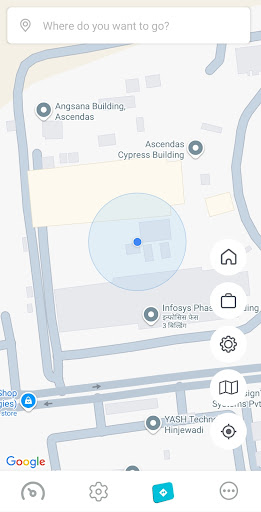
The app displays your current position along with route guidance on a map of the area that also indicates points of interest and other useful information.
Quick Charging Spot Information (available only on electric models)
Nearby fast-charging spots are displayed on the screen, and the information is automatically updated on a regular basis.
Parking Position*
The location where your smartphone was last paired with your vehicle is recorded as its parking position. This makes it easy to find your vehicle later, even in large parking areas.
*If the vehicle is moved from the last parking position without starting the engine, there is no tracking function.
Note
· Screen designs and functions are subject to change or discontinuance without prior notice.
· You will be responsible for any communication costs associated with downloading and using the application.
· Operation is checked under certain conditions, and the application may not operate correctly on some smartphones.
Warning
· Please make sure to stop the vehicle before operating the smartphone.
· Please keep your hands on the handlebars while riding.
· Always please follow traffic rules, pay attention to traffic conditions and concentrate on driving.
· Please read the owner's manual carefully before using the vehicle.
· SUZUKI Ride Connect can only be connected to models that support this function.
· SUZUKI Ride Connect uses the mobile data communication of the smartphone, and communication fee will be borne by the customer. Check the contents of your smartphone contract before use.
· SUZUKI Ride Connect can only be used on smartphones, not tablets.
· SUZUKI Ride Connect may not work properly on some smartphones under certain operating conditions.
* Bluetooth ® is a registered trademark of Bluetooth SIG, Inc.
* Google Play and the Google Play logo are trademarks of Google LLC.
Mostra altro

1. Scarica il programma di installazione di MEmu e completa l'installazione

2. Avvia il Memu e apri il Google Play sulla homepage

3. Cerca SUZUKI RIDE CONNECT+ App in Google Play
Install
4. Scarica e installa SUZUKI RIDE CONNECT+ App
5. Al termine dell'installazione, fai clic sull'icona per avviar

6. Divertiti giocando a SUZUKI RIDE CONNECT+ App su PC con MEmu
MEmu App Player è il miglior emulatore Android gratuito, utilizzato da 50 milioni di persone per ottenere un'esperienza di gioco Android superba. La tecnilogia di virtualizzazione MEmu ti permette di giocare a migliaia di giochi Android con semplicità sul tuo computer, anche i giochi con la grafica più esigente.
Schermo più grande con una grafica migliore; Lunga durata, senza limitazione di batteria o dati mobili.
Supporto completo per mappa di tastiera per un controllo preciso di tastiera e mouse o gamepad.
Multipli account di gioco o attività su un singolo PC contemporaneamente con il gestore di multi istanza.
Use SUZUKI RIDE CONNECT+ App on PC by following steps: