Techno Maker: DJ Beat Creator
Aggiornata
Versione corrente
1.0.0
Offerta da

Non devi più preoccuparti dei sovraccarichi durante l'utilizzo di Techno Maker: DJ Beat Creator sul tuo cellulare, liberati dal piccolo schermo e goditi dell'App su uno schermo molto più grande. D'ora in poi, sperimenta la tua App a schermo intero con tastiera e mouse. MEmu ti offre tutte le sorprendenti funzioni che ti aspettavi: installazione rapida e impostazione semplice, controlli intuitivi, niente più limitazioni di batteria, dati mobili e chiamate fastidiose. Il MEmu 9 nuovo di zecca è la prima scelta per utilizzare Techno Maker: DJ Beat Creator sul tuo computer. Codificato con il nostro assorbimento, il gestore multi-istanza consente di aprire 2 o più account contemporaneamente. E soprattutto, il nostro esclusivo motore di emulazione può sbloccare il pieno potenziale del tuo PC, rendendo tutto liscio e piacevole.
Mostra altro
Goditi un'esperienza straordinaria con Techno Maker: DJ Beat Creator su PC con MEmu Play. È un potente emulatore Android gratuito che ti offre migliaia di app Android per la versione desktop. Divertiti a connetterti con gli amici e a perfezionare il tuo lavoro con maggiore efficienza! Experience the Ultimate Mobile Techno Studio.
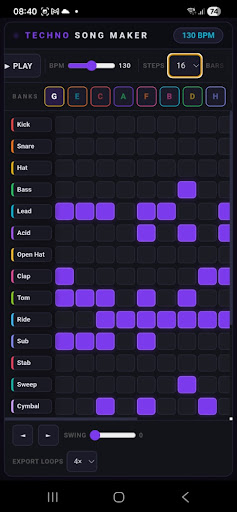
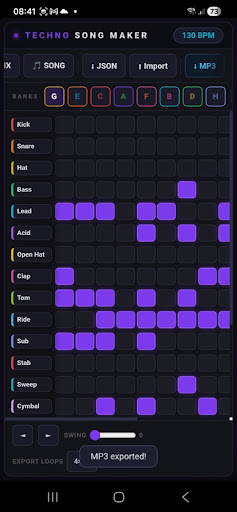
Experience the Ultimate Mobile Techno Studio
Turn your mobile device into a powerful electronic music workstation. Designed for music producers, live performers, and electronic music enthusiasts, this app provides all the essential tools to build, mix, and arrange professional techno tracks anywhere, anytime. Whether you want to draft a quick drum pattern or compose a full structural loop, the intuitive interface puts complete sonic control at your fingertips.
Advanced Step Sequencer and Bank System
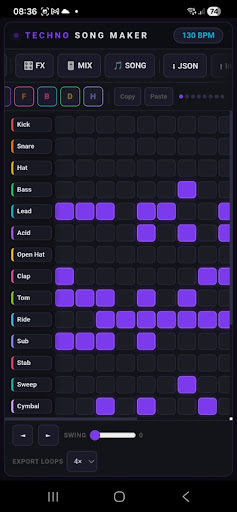
The core layout features a responsive step sequencer supporting multiple drum and synth layers, including Kick, Snare, Hat, Bass, Lead, Acid, and special sound FX. With an integrated multi-bank system, you can compose separate patterns across different slots. Switch seamlessly between banks to create dynamic variations, smooth build-ups, and dramatic drops during a live mix or production session.
Complete Sound Customization and Channel Mixing
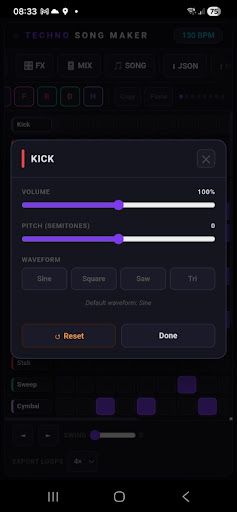
Every sound can be tailored to fit your style. Access detailed per-instrument settings to modify volume levels and pitch parameters. Choose from classic synthesizer waveforms such as Sine, Square, Sawtooth, and Triangle to shape your basslines and leads. The dedicated mixer mode includes individual Mute and Solo buttons for each track, allowing you to manage layers dynamically and test different arrangements effortlessly.
Powerful Studio Effects and Intelligent Randomization
Enhance your tracks with built-in audio processors designed for electronic music. Adjust spatial depth using the Reverb controls, or create rhythmic echoes with the adjustable Delay system. If you experience a creative block, use the smart randomizer function to generate fresh patterns and unexpected rhythmic combinations instantly, providing immediate inspiration for your next project.
Full Song Arrangement and Seamless Export
Go beyond basic loops by utilizing the structural song mode. Combine your saved pattern banks, specify the number of bars for each section, and arrange them into a complete cohesive track. Fine-tune the overall groove with the global Swing slider and adjust the precise tempo using the BPM control. Once your project is complete, export your high-quality loops or full arrangements directly to MP3 format to share with friends, upload to social media, or use in other audio software.
Key Features Explained
Multi-Layer Sequencer: Control up to forty specialized instruments and electronic elements simultaneously.
Pattern Banks: Build varied sections using dedicated memory slots for versatile track development.
Sound Engine Controls: Adjust pitch, volume, and waveform geometry for every individual sound source.
Live Mixer: Solo or mute specific channels instantly to control the audio density in real time.
Studio Effects: Apply adjustable Reverb and Delay processors to add space and character to your music.
Creative Tools: Utilize the global swing adjustment and intelligent pattern generator for quick workflow variations.
Audio Export: Save your final audio compositions directly to your device as standard MP3 files.
Data Portability: Access raw JSON data functionality for advanced project management.
Download now to start producing, arranging, and exporting your own unique electronic sounds.
Mostra altro

1. Scarica il programma di installazione di MEmu e completa l'installazione

2. Avvia il Memu e apri il Google Play sulla homepage

3. Cerca Techno Maker: DJ Beat Creator in Google Play
Install
4. Scarica e installa Techno Maker: DJ Beat Creator
5. Al termine dell'installazione, fai clic sull'icona per avviar

6. Divertiti giocando a Techno Maker: DJ Beat Creator su PC con MEmu
MEmu App Player è il miglior emulatore Android gratuito, utilizzato da 50 milioni di persone per ottenere un'esperienza di gioco Android superba. La tecnilogia di virtualizzazione MEmu ti permette di giocare a migliaia di giochi Android con semplicità sul tuo computer, anche i giochi con la grafica più esigente.
Schermo più grande con una grafica migliore; Lunga durata, senza limitazione di batteria o dati mobili.
Supporto completo per mappa di tastiera per un controllo preciso di tastiera e mouse o gamepad.
Multipli account di gioco o attività su un singolo PC contemporaneamente con il gestore di multi istanza.
Use Techno Maker: DJ Beat Creator on PC by following steps: