TVMob Pro
Aggiornata
Versione corrente
Offerta da

Non devi più preoccuparti dei sovraccarichi durante l'utilizzo di TVMob Pro sul tuo cellulare, liberati dal piccolo schermo e goditi dell'App su uno schermo molto più grande. D'ora in poi, sperimenta la tua App a schermo intero con tastiera e mouse. MEmu ti offre tutte le sorprendenti funzioni che ti aspettavi: installazione rapida e impostazione semplice, controlli intuitivi, niente più limitazioni di batteria, dati mobili e chiamate fastidiose. Il MEmu 9 nuovo di zecca è la prima scelta per utilizzare TVMob Pro sul tuo computer. Codificato con il nostro assorbimento, il gestore multi-istanza consente di aprire 2 o più account contemporaneamente. E soprattutto, il nostro esclusivo motore di emulazione può sbloccare il pieno potenziale del tuo PC, rendendo tutto liscio e piacevole.
Mostra altro
Goditi un'esperienza straordinaria con TVMob Pro su PC con MEmu Play. È un potente emulatore Android gratuito che ti offre migliaia di app Android per la versione desktop. Divertiti a connetterti con gli amici e a perfezionare il tuo lavoro con maggiore efficienza! Explore a world of television entertainment with TVMob Pro.
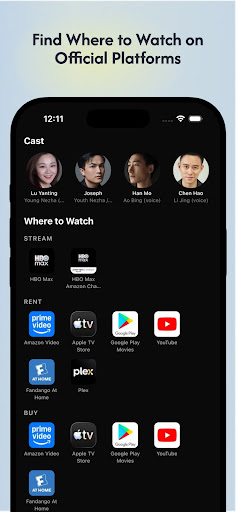
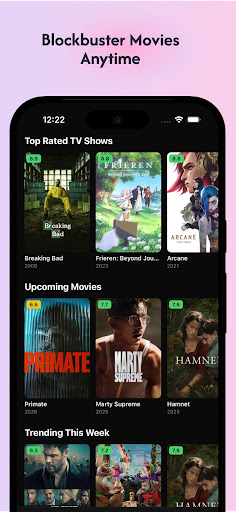
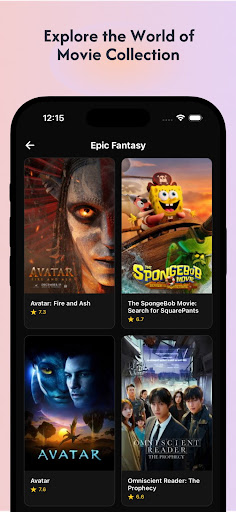
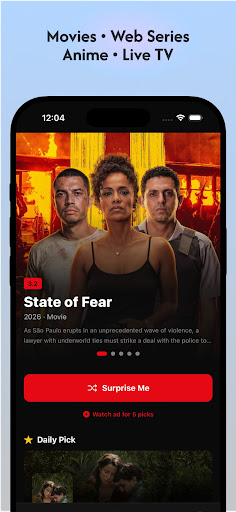
Explore a world of television entertainment with TVMob Pro. Discover live TV channels, news, sports, movies, and a variety of entertainment programming through a convenient viewing experience designed for compatible devices.
Whether you enjoy keeping up with current events, following your favorite sports, watching movies, or exploring international television, TVMob Pro helps bring different entertainment categories together.
Explore Live TV Channels
Discover television channels across different categories and explore available programming. Browse channels based on your interests and find entertainment for different moments throughout the day.
Stay Connected with News
Explore available news channels to follow current affairs, world events, business updates, and other important developments. Stay informed through television programming from supported sources.
Sports & Live Events
Follow sports-related television programming and explore available channels covering sporting events, competitions, and sports news. Channel availability and live coverage depend on the supported source.
Movies & Entertainment
Discover entertainment channels featuring movies, shows, and other television programming. Explore different types of content and find options that suit your interests.
Explore International Channels
Browse available television channels from different regions and discover programming across languages and entertainment categories. Availability varies according to supported services and your location.
Convenient Viewing Experience
TVMob Pro is designed to make browsing television channels convenient on compatible Android devices and supported streaming hardware. Depending on the available features, users may also be able to choose an external media player for playback.
⭐ Entertainment for Different Interests
From news and sports to movies and general entertainment, explore a variety of television programming in one convenient place.
TVMob Pro — Explore channels. Discover entertainment. Stay connected.
Content notice: Channel availability and playback quality depend on the supported service and internet connection. Use only authorized streams and content sources. Access to specific channels or programs is not guaranteed.
Mostra altro

1. Scarica il programma di installazione di MEmu e completa l'installazione

2. Avvia il Memu e apri il Google Play sulla homepage

3. Cerca TVMob Pro in Google Play
Install
4. Scarica e installa TVMob Pro
5. Al termine dell'installazione, fai clic sull'icona per avviar

6. Divertiti giocando a TVMob Pro su PC con MEmu
MEmu App Player è il miglior emulatore Android gratuito, utilizzato da 50 milioni di persone per ottenere un'esperienza di gioco Android superba. La tecnilogia di virtualizzazione MEmu ti permette di giocare a migliaia di giochi Android con semplicità sul tuo computer, anche i giochi con la grafica più esigente.
Schermo più grande con una grafica migliore; Lunga durata, senza limitazione di batteria o dati mobili.
Supporto completo per mappa di tastiera per un controllo preciso di tastiera e mouse o gamepad.
Multipli account di gioco o attività su un singolo PC contemporaneamente con il gestore di multi istanza.
Use TVMob Pro on PC by following steps: