
Wakie Voice Chat: Make Friends
Aggiornata
Versione corrente
6.20.2
Offerta da

Non devi più preoccuparti dei sovraccarichi durante l'utilizzo di Wakie Voice Chat: Make Friends sul tuo cellulare, liberati dal piccolo schermo e goditi dell'App su uno schermo molto più grande. D'ora in poi, sperimenta la tua App a schermo intero con tastiera e mouse. MEmu ti offre tutte le sorprendenti funzioni che ti aspettavi: installazione rapida e impostazione semplice, controlli intuitivi, niente più limitazioni di batteria, dati mobili e chiamate fastidiose. Il MEmu 9 nuovo di zecca è la prima scelta per utilizzare Wakie Voice Chat: Make Friends sul tuo computer. Codificato con il nostro assorbimento, il gestore multi-istanza consente di aprire 2 o più account contemporaneamente. E soprattutto, il nostro esclusivo motore di emulazione può sbloccare il pieno potenziale del tuo PC, rendendo tutto liscio e piacevole.
Mostra altro
Scarica Wakie Voice Chat: Make Friends su PC con MEmu Android Emulator. Divertiti giocando sul grande schermo. Tap a button and instantly find the right person to talk to.
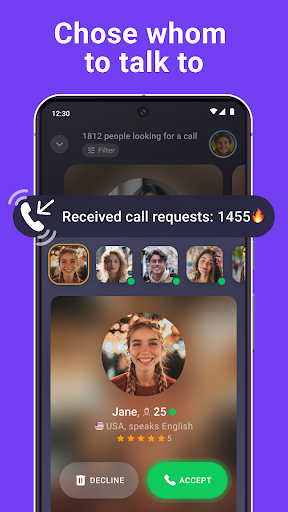
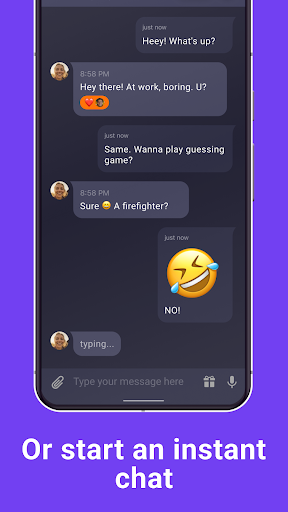
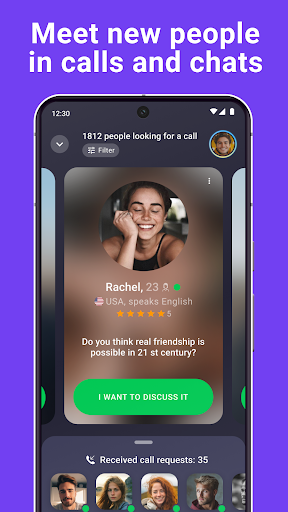
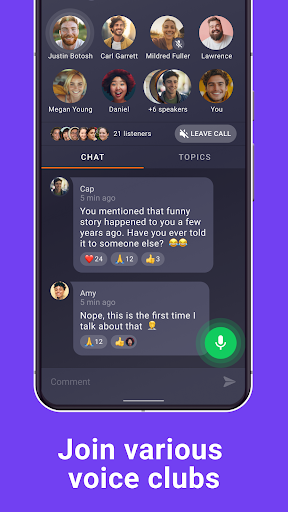
Tap a button and instantly find the right person to talk to. Wakie is the place where you can feel safe expressing your thoughts and feelings with people who eventually may turn into your real friends. Chat on any topic or start a free phone call with people all over the world!
Whether you want to get rid of boredom, practice a foreign language, or even share your personal experience and problems, on Wakie you can get it within a few seconds!
CREATE AND FIND TOPICS YOU CARE ABOUT
● Search through the Live Feed to find a topic you’d love to discuss with real people. Movies, music, ideas for gifts, parenting, business, or favorite recipes — with Wakie, you’ll never feel alone;
● Create your own topics to discuss things that matter to you personally or get a piece of life advice from someone who’s dealing with the same issues;
● Use a special Carousel section where you can choose among people who want to have a call right now. Just swipe their profiles and topics to find a perfect one;
● Stay in touch with people you like or enjoyed a conversation before by adding them to your favorite list. That’s how you also get instant access to their topics.
GET ON A PHONE CALL WITH PEOPLE ACROSS THE GLOBE
● Start a call with just one tap by sending requests to persons in whose topics you’re interested in. The world is full of like-minded people who haven’t got to know each other yet;
● You can also disable calls when creating topics. Express your true feelings in the chat if you are comfortable with text conversations only;
● Feel free to accept requests from other people only after you check out their profiles and are ready to start a dialogue.
A SAFE PLACE WHERE YOU CAN BE YOUR TRUE SELF
● Feel safe to openly share your issues and thoughts with others. Don’t be afraid that your relatives or friends will find your profile online;
● Set any nickname if you don’t want to show your real name to the global community where millions of people can feel like home;
● Wakie is a discrimination-free space. Our algorithms detect and report harmful content to hundreds of moderators who review and, if necessary, ban violating users;
● Discuss things that you were afraid to share with your closest friends. Sometimes Wakie’s members can give you the best advice, so you can see that the world is full of kind people.
COMPLIMENT OTHERS WITH SPECIAL GIFTS
● Send some special compliments to other people by choosing from dozens of colorful and meaningful stickers;
● Loved your conversation with the someone? Send them one of the thematic gifts to show your gratitude, say thank you, or just make someone a little happier;
● Receive compliments from other people. It not only can make your day brighter but lead to new conversations and friendships.
JOIN CLUBS TO MAKE YOUR CONNECTIONS DEEPER
● Search through thousands of clubs where people unite based on their interests and goals;
● Choose groups that suits you the most — whether it’d be a community of gamers, a place for book lovers or a language club
● Create your clubs and invite your friends and strangers to always stay in touch on things that bother you the most.
GET THE MOST OUT OF WAKIE
● Choose our Wakie Plus subscription if you want to make your profile and conversations even more personal;
● Create a unique form of your profile picture, add some fancy badges, and choose a background of any color you want;
● Promote your topics and get them to the top of the Live Feed, so even more people could see them;
● Get an even deeper experience by choosing people from the feed or carousel based on personal filters. With Wakie Plus you can also see who visited your profile and get back to a topic you’ve already swiped.
Mostra altro

1. Scarica il programma di installazione di MEmu e completa l'installazione

2. Avvia il Memu e apri il Google Play sulla homepage

3. Cerca Wakie Voice Chat: Make Friends in Google Play
Install
4. Scarica e installa Wakie Voice Chat: Make Friends
5. Al termine dell'installazione, fai clic sull'icona per avviar

6. Divertiti giocando a Wakie Voice Chat: Make Friends su PC con MEmu
MEmu App Player è il miglior emulatore Android gratuito, utilizzato da 50 milioni di persone per ottenere un'esperienza di gioco Android superba. La tecnilogia di virtualizzazione MEmu ti permette di giocare a migliaia di giochi Android con semplicità sul tuo computer, anche i giochi con la grafica più esigente.
Schermo più grande con una grafica migliore; Lunga durata, senza limitazione di batteria o dati mobili.
Supporto completo per mappa di tastiera per un controllo preciso di tastiera e mouse o gamepad.
Multipli account di gioco o attività su un singolo PC contemporaneamente con il gestore di multi istanza.
Use Wakie Voice Chat: Make Friends on PC by following steps: