Zelus Wallet: Crypto & NFTs
Aggiornata
Versione corrente
1.5.3
Offerta da

Non devi più preoccuparti dei sovraccarichi durante l'utilizzo di Zelus Wallet: Crypto & NFTs sul tuo cellulare, liberati dal piccolo schermo e goditi dell'App su uno schermo molto più grande. D'ora in poi, sperimenta la tua App a schermo intero con tastiera e mouse. MEmu ti offre tutte le sorprendenti funzioni che ti aspettavi: installazione rapida e impostazione semplice, controlli intuitivi, niente più limitazioni di batteria, dati mobili e chiamate fastidiose. Il MEmu 9 nuovo di zecca è la prima scelta per utilizzare Zelus Wallet: Crypto & NFTs sul tuo computer. Codificato con il nostro assorbimento, il gestore multi-istanza consente di aprire 2 o più account contemporaneamente. E soprattutto, il nostro esclusivo motore di emulazione può sbloccare il pieno potenziale del tuo PC, rendendo tutto liscio e piacevole.
Mostra altro
Goditi un'esperienza straordinaria con Zelus Wallet: Crypto & NFTs su PC con MEmu Play. È un potente emulatore Android gratuito che ti offre migliaia di app Android per la versione desktop. Divertiti a connetterti con gli amici e a perfezionare il tuo lavoro con maggiore efficienza! Meet Zelus – the user-friendly multichain NFT & cryptocurrency wallet.
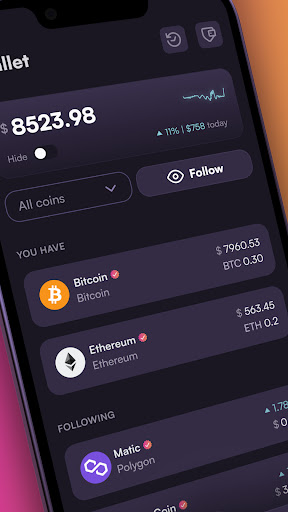
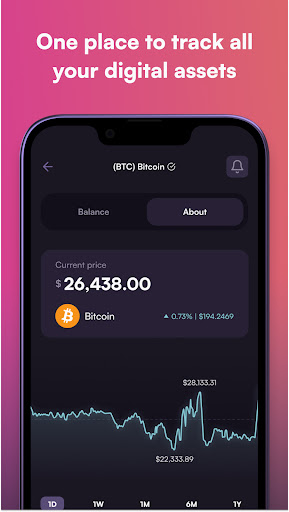
Meet Zelus – the user-friendly multichain NFT & cryptocurrency wallet. Zelus offers the most convenient and secure digital asset management in the world. Whether you're a seasoned web3 collector or just getting started with crypto, Zelus has everything you need to manage your digital assets with ease.
Top Features
- Make an account in under 60 seconds, with just an email and password
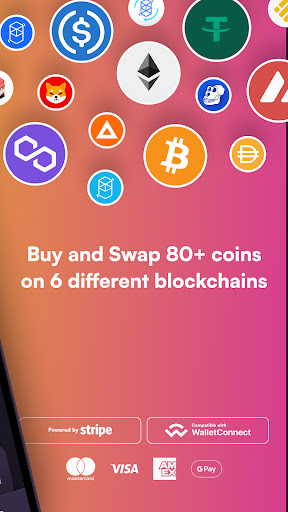
- Supports 6 blockchains: Bitcoin, Ethereum, Polygon, Avalanche, Binance Smart Chain, and Fantom
- Swap coins on and across all 6 supported blockchains without ever leaving the app
- Buy crypto in seconds with your credit/debit card, Google Pay, or bank account (if available in your country)
- Import existing wallets created on MetaMask, Rainbow, Coinbase Wallet, and others
- Transact confidently with threat detection notifications, alerting you of potentially malicious contracts before you approve
- Share your NFT gallery easily via text, viewable on mobile & desktop
- Connect to DApps like OpenSea and ENS with WalletConnect 2.0
SECURE/SELF CUSTODY: Zelus is a non-custodial wallet, meaning we never have access to your digital assets or password. Unlike exchange platforms and custodial wallets, Zelus does not control your crypto.
EASY TO USE: All Easy signup and an intuitive UI/UX, view/store/send/manage all your digital assets in one place.
BUY CRYPTO: Use your credit/debit card, Apple Pay, or bank account to purchase crypto easily in the app with Stripe.
MULTICHAIN: Securely manage all of your Ethereum, Polygon, Avalanche, Binance Smart Chain, and Fantom-based tokens in one convenient place.
TRANSACT ON OPENSEA & OTHER DAPPS: Use your Zelus Wallet to buy, sell and send NFTs on any marketplace that supports WalletConnect.
Mostra altro

1. Scarica il programma di installazione di MEmu e completa l'installazione

2. Avvia il Memu e apri il Google Play sulla homepage

3. Cerca Zelus Wallet: Crypto & NFTs in Google Play
Install
4. Scarica e installa Zelus Wallet: Crypto & NFTs
5. Al termine dell'installazione, fai clic sull'icona per avviar

6. Divertiti giocando a Zelus Wallet: Crypto & NFTs su PC con MEmu
MEmu App Player è il miglior emulatore Android gratuito, utilizzato da 50 milioni di persone per ottenere un'esperienza di gioco Android superba. La tecnilogia di virtualizzazione MEmu ti permette di giocare a migliaia di giochi Android con semplicità sul tuo computer, anche i giochi con la grafica più esigente.
Schermo più grande con una grafica migliore; Lunga durata, senza limitazione di batteria o dati mobili.
Supporto completo per mappa di tastiera per un controllo preciso di tastiera e mouse o gamepad.
Multipli account di gioco o attività su un singolo PC contemporaneamente con il gestore di multi istanza.
Use Zelus Wallet: Crypto & NFTs on PC by following steps: