Baby Panda's Sweet Shop
Dikemas kini
Versi Semasa
8.70.00.02
Ditawarkan Oleh

Dengan semangat anda untuk bermain Baby Panda's Sweet Shop, tangan anda tidak seharusnya terhad pada skrin kecil telefon anda. Main seperti profesional dan kendalikan sepenuhnya permainan anda dengan papan kekunci dan tetikus. MEmu menawarkan semua perkara yang anda harapkan. Muat turun dan mainkan Baby Panda's Sweet Shop di PC. Main selagi anda mahu, tidak ada batasan bateri, data mudah alih dan panggilan yang mengganggu. MEmu 9 yang baru adalah pilihan terbaik untuk bermain Baby Panda's Sweet Shop di PC. Disiapkan dengan kepakaran kami, sistem pemetaan kunci pratetap yang indah menjadikan Baby Panda's Sweet Shop permainan PC sebenar. Dikodkan dengan penyerapan kami, pengurus multi-instance menjadikan bermain 2 atau lebih akaun pada peranti yang sama mungkin. Dan yang paling penting, enjin emulasi eksklusif kami dapat melepaskan potensi penuh PC anda, menjadikan semuanya lancar.Kami tidak hanya peduli bagaimana anda bermain, tetapi juga keseluruhan proses menikmati kebahagiaan permainan.
Tunjukkan Lagi
Download Baby Panda's Sweet Shop on PC with MEmu Android Emulator. Enjoy playing on big screen. Baby Panda's Sweet Shop is open in this hot summer!
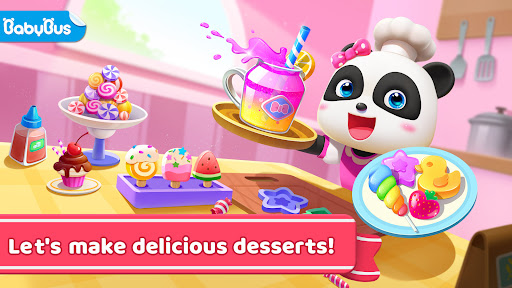
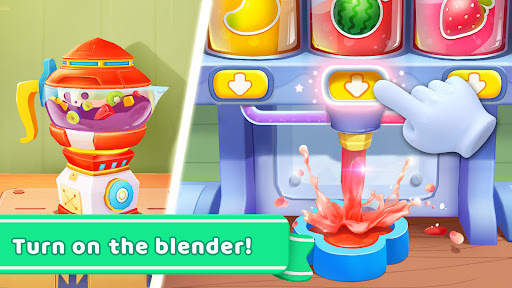


Baby Panda's Sweet Shop is open in this hot summer! What kind of refreshing desserts are available here? How are these desserts made? Let's check it out!
FRUIT JUICE
What would you like, blueberry juice, mango juice or strawberry juice? You can also mix and match them. Just pick your favorite bottle, fill it with juice, and your juice is done!
POPSICLE
Combine your favorite ingredients in a blender, select a mold and a popsicle stick you like, and place the popsicle in the freezer until it is solid. Don't forget to decorate your popsicle with nice wrapping paper!
CANDY
Melt sugar cubes to make syrup. Add ingredients into the syrup to color it. Pour the syrup into a star-shaped or flower-shaped mold. There are so many molds for you to choose from. Just pick the one you like!
Customers are waiting! Sell desserts to earn Coins and unlock more ingredients and items!
Run [Baby Panda's Sweet Shop] now!
FEATURES
- Realistic simulation of the ice cream making process: material selection, processing, freezing, etc.
- A variety of products to make: ice cream, juice, candy.
- Mix fruits, vegetables, nuts and more.
- Choose from a variety of flavors such as banana, apple and blueberry.
- Tons of wrapping paper, candy boxes, juice bottles and other decorations for creative packaging.
About BabyBus
—————
At BabyBus, we dedicate ourselves to sparking kids' creativity, imagination and curiosity,and designing our products through the kids' perspective to help them explore the world on their own.
Now BabyBus offers a wide variety of products, videos and other educational content for over 400 million fans from ages 0-8 around the world! We have released over 200 children's educational apps, over 2500 episodes of nursery rhymes and animations of various themes spanning the Health, Language, Society, Science, Art and other fields.
—————
Contact us: ser@babybus.com
Visit us: http://www.babybus.com
Tunjukkan Lagi

1. Muat turun pemasang MEmu dan selesaikan persediaan

2. Mulakan MEnu kemudian buka Google Play di desktop

3. Cari Baby Panda's Sweet Shop di Google Play
Install
4. Muat turun dan Pasang Baby Panda's Sweet Shop
5. Apabila selesai pemasangan, menekan ikon itu untuk memulakan

6. Nikmati bermain Baby Panda's Sweet Shop di komputer dengan MEmu
MEmu Play adalah emulator Android terbaik dan 100 juta orang sudah menikmati pengalaman permainan Androidnya yang luar biasa. Teknologi virtualisasi MEmu memberi kuasa kepada anda untuk bermain beribu-ribu permainan Android dengan lancar di komputar anda, malah yang paling intensif grafik.
Skrin lebih besar dengan grafik yang lebih baik; Tempoh yang panjang, tanpa had bateri atau data mudah alih.
Sokongan Keymapping penuh untuk kawalan tepat papan kekunci dan tetikus atau gamepad.
Pelbagai akaun permainan atau tugas pada satu PC sekaligus dengan pengurus pelbagai contoh.
Play Baby Panda's Sweet Shop on PC by following steps: