Woody Cross: Word Connect
Dikemas kini
Versi Semasa
2.20.0
Ditawarkan Oleh

Dengan semangat anda untuk bermain Woody Cross: Word Connect, tangan anda tidak seharusnya terhad pada skrin kecil telefon anda. Main seperti profesional dan kendalikan sepenuhnya permainan anda dengan papan kekunci dan tetikus. MEmu menawarkan semua perkara yang anda harapkan. Muat turun dan mainkan Woody Cross: Word Connect di PC. Main selagi anda mahu, tidak ada batasan bateri, data mudah alih dan panggilan yang mengganggu. MEmu 9 yang baru adalah pilihan terbaik untuk bermain Woody Cross: Word Connect di PC. Disiapkan dengan kepakaran kami, sistem pemetaan kunci pratetap yang indah menjadikan Woody Cross: Word Connect permainan PC sebenar. Dikodkan dengan penyerapan kami, pengurus multi-instance menjadikan bermain 2 atau lebih akaun pada peranti yang sama mungkin. Dan yang paling penting, enjin emulasi eksklusif kami dapat melepaskan potensi penuh PC anda, menjadikan semuanya lancar.Kami tidak hanya peduli bagaimana anda bermain, tetapi juga keseluruhan proses menikmati kebahagiaan permainan.
Tunjukkan Lagi
Download Woody Cross: Word Connect on PC with MEmu Android Emulator. Enjoy playing on big screen. Playing this brand new WOODY CROSS is an excellent way to loosen up and relax your mind!
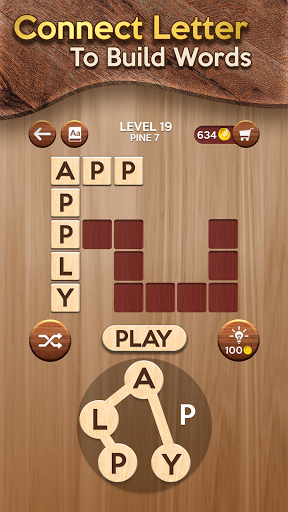
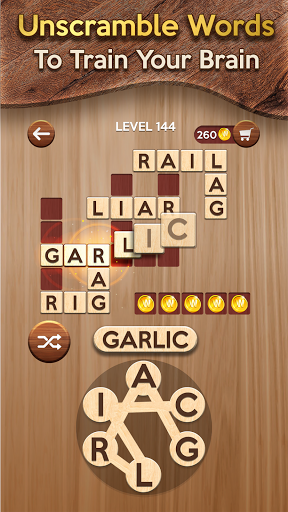

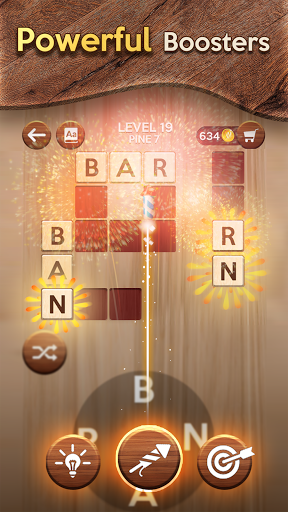
Playing this brand new WOODY CROSS is an excellent way to loosen up and relax your mind!
This one has the classic look and feel of old-school word puzzle games with the wooden theme and meditational music background. The goal of WOODY CROSS is to swipe and make letters into words that fill themselves into the grid above. With over 6,000 levels and no time limits, it’s a relaxing way to improve your vocabulary a little bit every day.
Like all other word game apps, WOODY CROSS starts out simple but quickly progresses to harder and harder puzzles to solve. However, there are so many great & unique features that await you to explore!
◉ HIGHLIGHT FEATURES
. 6000+ challenging levels
. Well-designed wooden theme;
. The meditational music background to cool your brain;
. Shuffle or Hint buttons are available to use;
. Bullseye booster lets you choose which letter to reveal;
. Rocket reveals 5 letters at once;
. Spelling Bees reveal letters and leave coins to collect;
. A dictionary feature to look up the meaning of words after each game;
. Complete daily crossword puzzles to build up your photo collection;
. Free & No time limit;
. Easy to play but hard to master.
WOODY CROSS is not only smooth and easy to play in small pockets of downtime to improve your vocabulary but also an ideal way to release stress and anxiety, as well as boost your focus, memory, and intuition. Don’t hesitate to give it a try!
CONTACT US:
Website: https://athena.studio/
Fanpage: https://www.facebook.com/athenamobilegames/
Customer Support: support+woodycross@athena.studio
Tunjukkan Lagi

1. Muat turun pemasang MEmu dan selesaikan persediaan

2. Mulakan MEnu kemudian buka Google Play di desktop

3. Cari Woody Cross: Word Connect di Google Play
Install
4. Muat turun dan Pasang Woody Cross: Word Connect
5. Apabila selesai pemasangan, menekan ikon itu untuk memulakan

6. Nikmati bermain Woody Cross: Word Connect di komputer dengan MEmu
MEmu Play adalah emulator Android terbaik dan 100 juta orang sudah menikmati pengalaman permainan Androidnya yang luar biasa. Teknologi virtualisasi MEmu memberi kuasa kepada anda untuk bermain beribu-ribu permainan Android dengan lancar di komputar anda, malah yang paling intensif grafik.
Skrin lebih besar dengan grafik yang lebih baik; Tempoh yang panjang, tanpa had bateri atau data mudah alih.
Sokongan Keymapping penuh untuk kawalan tepat papan kekunci dan tetikus atau gamepad.
Pelbagai akaun permainan atau tugas pada satu PC sekaligus dengan pengurus pelbagai contoh.
Play Woody Cross: Word Connect on PC by following steps: