Box Movie Cinema Series
Dikemas kini
Versi Semasa
1.0.2
Ditawarkan Oleh

Berhentilah bimbang dengan bayaran berlebihan semasa menggunakan Box Movie Cinema Series di telefon bimbit anda, bebaskan diri anda dari layar kecil dan nikmati penggunaan aplikasi pada paparan yang jauh lebih besar. Mulai sekarang, dapatkan pengalaman skrin penuh aplikasi anda dengan papan kekunci dan tetikus. MEmu Play semua ciri mengejutkan yang anda harapkan: pemasangan cepat dan penyediaan mudah, kawalan intuitif, tidak ada batasan bateri, data mudah alih, dan panggilan yang mengganggu. MEmu 9 yang baru adalah pilihan terbaik untuk menggunakan Box Movie Cinema Series di komputer anda. Dikodkan dengan penyerapan kami, pengurus multi-instance menjadikan pembukaan 2 atau lebih akaun pada masa yang sama mungkin. Dan yang paling penting, mesin emulasi eksklusif kami dapat melepaskan potensi penuh PC anda, menjadikan semuanya lancar dan menyeronokkan.
Tunjukkan Lagi
Nikmati pengalaman hebat menggunakan Box Movie Cinema Series di PC dengan MEmu Play. Ia merupakan emulator Android percuma yang hebat yang menyediakan beribu-ribu aplikasi Android untuk versi desktop mereka. Nikmati berhubung dengan rakan-rakan dan menggilap kerja anda dengan kecekapan yang lebih tinggi! Box Movie is an entertainment app for discovering fictional movies, series, and TV-show style stories created with artificial intelligence, with a focus on movie-style stories and episodic series.
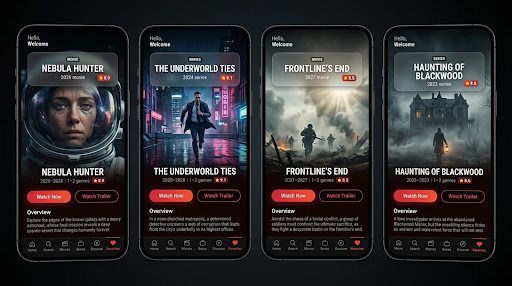
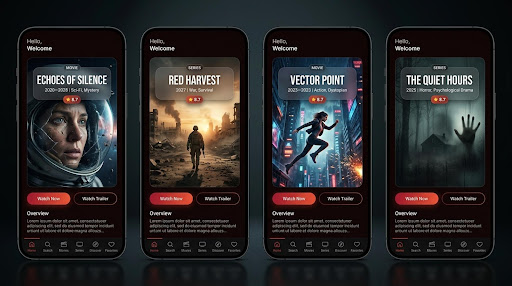
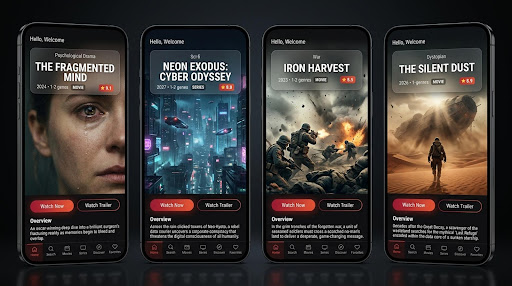
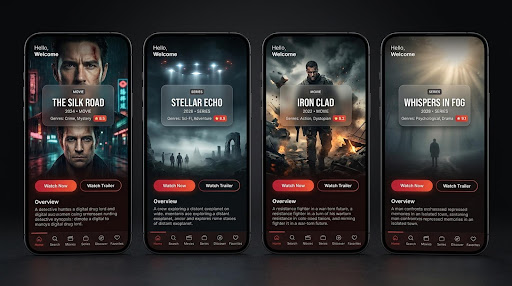
Box Movie is an entertainment app for discovering fictional movies, series, and TV-show style stories created with artificial intelligence, with a focus on movie-style stories and episodic series.
APP PURPOSE
The app provides a mobile catalog of AI-generated stories. Users can browse movie-style productions, series, and TV-show style titles, review information about each title, watch available trailers, and start playback from the title page.
CORE FEATURES
HOME
Browse featured AI-generated movies, series, and TV-style stories from the main screen.
MOVIES, SERIES AND TV SHOWS
Open separate sections to focus on the type of story you want to explore, including drama, action, mystery, science fiction, fantasy, thriller, and horror.
SEARCH
Use the Search section to find available titles by name.
DISCOVER
Explore the catalog by genre and story style, then open any title to learn more before watching.
TITLE DETAILS
Each title page clearly shows the poster, title, content type, release year, genres, rating, and a written story overview.
TRAILERS AND PLAYBACK
Select Watch Trailer to preview a title when a trailer is available. Select Watch Now to open the available movie, series, or TV-style content.
FAVORITES
Save titles to Favorites so they are easier to find again later.
NO ACCOUNT REQUIRED
The catalog can be browsed without creating a user account.
AI-GENERATED CONTENT
All movies, series, TV-style shows, artwork, characters, and story elements in Box Movie are fictional and generated for this app using artificial intelligence. They are not real theatrical releases, licensed television productions, or official broadcasts.
IMPORTANT NOTICE
Box Movie is an independent app and is not affiliated with similarly named websites, studios, broadcasters, cinemas, or streaming services. The app does not provide copyrighted movie downloads, licensed studio films, or official television broadcasts.
ADVERTISING AND DATA
The app may display advertisements and use third-party analytics, crash-reporting, and notification services. Review the Privacy Policy for details.
Tunjukkan Lagi

1. Muat turun pemasang MEmu dan selesaikan persediaan

2. Mulakan MEnu kemudian buka Google Play di desktop

3. Cari Box Movie Cinema Series di Google Play
Install
4. Muat turun dan Pasang Box Movie Cinema Series
5. Apabila selesai pemasangan, menekan ikon itu untuk memulakan

6. Gunakan MENu untuk mengalami Box Movie Cinema Series pada komputer anda
MEmu Play ialah emulator Android terbaik, dengan lebih 100 juta pengguna mengalami pengalaman aplikasi Android yang unggul. Teknologi virtualisasi MEmu membolehkan anda menjalankan beribu-ribu aplikasi Android dengan lancar pada komputer anda, walaupun yang paling mencabar.
Skrin lebih besar dengan grafik yang lebih baik; Tempoh yang panjang, tanpa had bateri atau data mudah alih.
Sokongan Keymapping penuh untuk kawalan tepat papan kekunci dan tetikus atau gamepad.
Pelbagai akaun permainan atau tugas pada satu PC sekaligus dengan pengurus pelbagai contoh.
Use Box Movie Cinema Series on PC by following steps: