CameraFy - Dual Camera Double
Dikemas kini
Versi Semasa
3.3.0
Ditawarkan Oleh

Berhentilah bimbang dengan bayaran berlebihan semasa menggunakan CameraFy - Dual Camera Double di telefon bimbit anda, bebaskan diri anda dari layar kecil dan nikmati penggunaan aplikasi pada paparan yang jauh lebih besar. Mulai sekarang, dapatkan pengalaman skrin penuh aplikasi anda dengan papan kekunci dan tetikus. MEmu Play semua ciri mengejutkan yang anda harapkan: pemasangan cepat dan penyediaan mudah, kawalan intuitif, tidak ada batasan bateri, data mudah alih, dan panggilan yang mengganggu. MEmu 9 yang baru adalah pilihan terbaik untuk menggunakan CameraFy - Dual Camera Double di komputer anda. Dikodkan dengan penyerapan kami, pengurus multi-instance menjadikan pembukaan 2 atau lebih akaun pada masa yang sama mungkin. Dan yang paling penting, mesin emulasi eksklusif kami dapat melepaskan potensi penuh PC anda, menjadikan semuanya lancar dan menyeronokkan.
Tunjukkan Lagi
Nikmati pengalaman hebat menggunakan CameraFy - Dual Camera Double di PC dengan MEmu Play. Ia merupakan emulator Android percuma yang hebat yang menyediakan beribu-ribu aplikasi Android untuk versi desktop mereka. Nikmati berhubung dengan rakan-rakan dan menggilap kerja anda dengan kecekapan yang lebih tinggi! CameraFy - Dual Camera Double Front and Back.
CameraFy - Dual Camera Double Front and Back
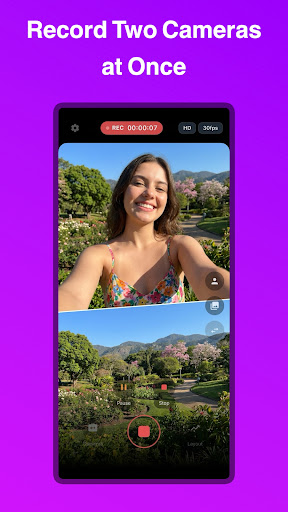
The professional multi-camera app that lets you record front and back cameras at the same time. Create reaction videos, vlogs, tutorials, and reviews using overlay or split screen layouts with full control over quality and composition.
KEY FEATURES:
• True Dual Camera Recording
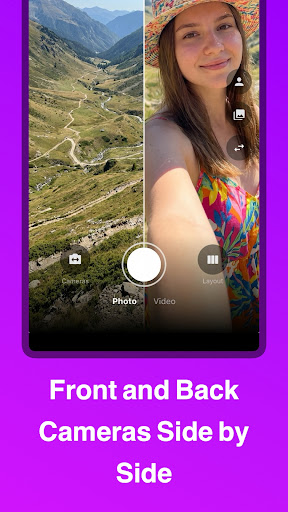
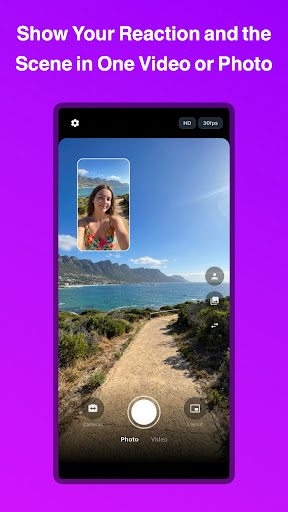
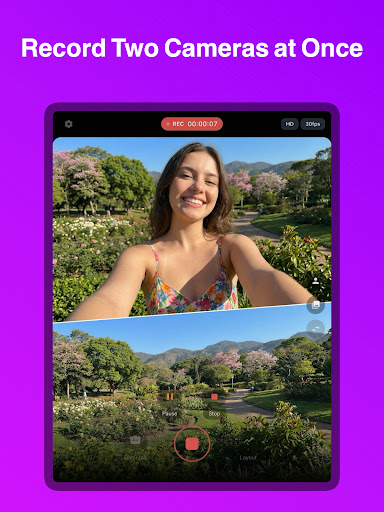
Capture video or photos using two cameras simultaneously on supported devices, combining front and back perspectives in a single file
• Overlay (Picture-in-Picture) Mode
Place one camera over another with a movable window, adjustable shapes (16:9, 9:16, square, circular) and precise positioning
• Split Screen Layouts
Choose horizontal or vertical 50/50 split to show both cameras equally on screen
• Full Quality Control
Select resolution (HD, Full HD, 2K, 4K when supported) and available FPS based on your device capabilities
• Pause & Resume in One File
Pause recording and continue without creating multiple clips, keeping everything in a single final video
• Fixed Image Source
Use a static image as one of the camera sources, displayed in cover mode without distortion
• Automatic Gallery Save
Photos and videos are saved directly to your Photos or Gallery with proper system integration
• Clean Professional Interface
On-screen timer and REC indicator for monitoring, never burned into the final video
• Smart Device Compatibility Check
If your device does not support simultaneous multi-camera capture, the app clearly informs you
• Pro Tips & Techniques
Monthly expert content on photography and filmmaking, curated by specialists to help you get the most out of every shot
Perfect for reaction videos, vlogging, interviews, tutorials, product reviews, commentary, and multi-angle content creation.
PRO SUBSCRIPTION:
- Unlimited dual camera photo and video capture
- Full access to all layout modes
- Resolution and FPS control
- Pause and resume recording
- Monthly pro tips on photography and filmmaking techniques
- Priority support
SUBSCRIPTION INFORMATION:
- Payment will be charged to your Google Account at confirmation of purchase.
- Subscription automatically renews unless auto-renew is turned off at least 24 hours before the end of the current period.
- Account will be charged for renewal within 24 hours prior to the end of the current period.
- You can manage or cancel your subscription in your Account Settings after purchase.
- Any unused portion of a free trial period will be forfeited when you purchase a subscription.
LINKS:
- Terms and Conditions: https://paulocoutinho.pages.dev/camerafy/terms/
- Privacy Policy: https://paulocoutinho.pages.dev/camerafy/privacy/
Tunjukkan Lagi

1. Muat turun pemasang MEmu dan selesaikan persediaan

2. Mulakan MEnu kemudian buka Google Play di desktop

3. Cari CameraFy - Dual Camera Double di Google Play
Install
4. Muat turun dan Pasang CameraFy - Dual Camera Double
5. Apabila selesai pemasangan, menekan ikon itu untuk memulakan

6. Gunakan MENu untuk mengalami CameraFy - Dual Camera Double pada komputer anda
MEmu Play ialah emulator Android terbaik, dengan lebih 100 juta pengguna mengalami pengalaman aplikasi Android yang unggul. Teknologi virtualisasi MEmu membolehkan anda menjalankan beribu-ribu aplikasi Android dengan lancar pada komputer anda, walaupun yang paling mencabar.
Skrin lebih besar dengan grafik yang lebih baik; Tempoh yang panjang, tanpa had bateri atau data mudah alih.
Sokongan Keymapping penuh untuk kawalan tepat papan kekunci dan tetikus atau gamepad.
Pelbagai akaun permainan atau tugas pada satu PC sekaligus dengan pengurus pelbagai contoh.
Use CameraFy - Dual Camera Double on PC by following steps: