SeatGeek – Tickets to Events
Dikemas kini
Versi Semasa
2024.12.121483
Ditawarkan Oleh

Berhentilah bimbang dengan bayaran berlebihan semasa menggunakan SeatGeek – Tickets to Events di telefon bimbit anda, bebaskan diri anda dari layar kecil dan nikmati penggunaan aplikasi pada paparan yang jauh lebih besar. Mulai sekarang, dapatkan pengalaman skrin penuh aplikasi anda dengan papan kekunci dan tetikus. MEmu Play semua ciri mengejutkan yang anda harapkan: pemasangan cepat dan penyediaan mudah, kawalan intuitif, tidak ada batasan bateri, data mudah alih, dan panggilan yang mengganggu. MEmu 9 yang baru adalah pilihan terbaik untuk menggunakan SeatGeek – Tickets to Events di komputer anda. Dikodkan dengan penyerapan kami, pengurus multi-instance menjadikan pembukaan 2 atau lebih akaun pada masa yang sama mungkin. Dan yang paling penting, mesin emulasi eksklusif kami dapat melepaskan potensi penuh PC anda, menjadikan semuanya lancar dan menyeronokkan.
Tunjukkan Lagi
Download SeatGeek – Tickets to Events on PC with MEmu Android Emulator. Enjoy playing on big screen. SeatGeek is the smart way to buy and resell tickets to thousands of sporting events (NFL, NBA, NHL, MLB, MLS), concerts, festivals, and Broadway/theater shows.

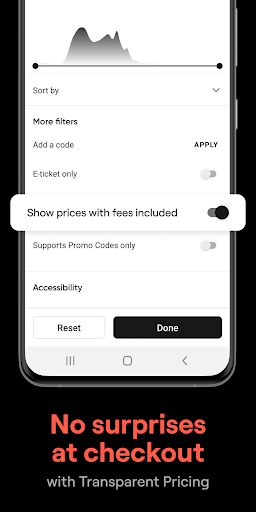
SeatGeek is the smart way to buy and resell tickets to thousands of sporting events (NFL, NBA, NHL, MLB, MLS), concerts, festivals, and Broadway/theater shows. Tickets are backed by SeatGeek's 100% buyer guarantee, and resellers may list tickets above or below face value.
FEATURES
◆ Interactive Seating Charts
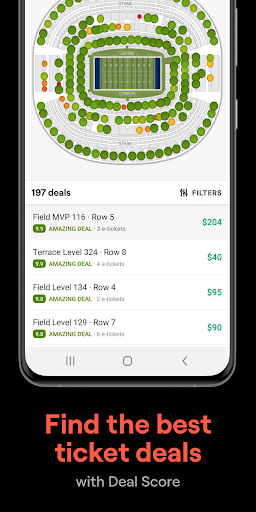
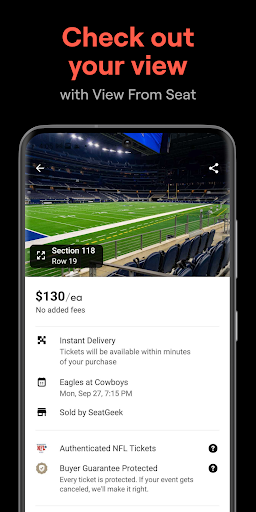
Explore the best deals mapped on interactive seating charts with panoramic photographs from every section. Know what the view from your seat looks like before you buy tickets.
◆ Deal Score
Never worry about getting ripped off again, every deal on SeatGeek is color-coded from best to worst based on value.
◆ Mobile Tickets
Show your e-ticket in the SeatGeek app to gain access to venues, no printer necessary.
◆ Send Tickets
No more waiting outside the stadium for friends in the rain. Send extra tickets to your friends’ phones in a tap for free or for $$$ (US only).
◆ Sell Your Tickets
Can’t attend tomorrow night’s concert? Sell your tickets on SeatGeek’s Marketplace in one tap. SeatGeek will even recommend the best price to help you quickly sell your tickets.
◆ Discover Nearby Events
Easily browse tickets for any live event. Search by team, artist, venue, genre, or sport (baseball, basketball, hockey, football, Nascar, etc.) to see upcoming events near you.
◆ Buy Your Way
Conveniently pay via Google Pay or Credit Card.
◆ The Daily Tap
Enter up to once a day to win free tickets to live events nearby.
Tunjukkan Lagi

1. Muat turun pemasang MEmu dan selesaikan persediaan

2. Mulakan MEnu kemudian buka Google Play di desktop

3. Cari SeatGeek – Tickets to Events di Google Play
Install
4. Muat turun dan Pasang SeatGeek – Tickets to Events
5. Apabila selesai pemasangan, menekan ikon itu untuk memulakan

6. Gunakan MENu untuk mengalami SeatGeek – Tickets to Events pada komputer anda
MEmu Play ialah emulator Android terbaik, dengan lebih 100 juta pengguna mengalami pengalaman aplikasi Android yang unggul. Teknologi virtualisasi MEmu membolehkan anda menjalankan beribu-ribu aplikasi Android dengan lancar pada komputer anda, walaupun yang paling mencabar.
Skrin lebih besar dengan grafik yang lebih baik; Tempoh yang panjang, tanpa had bateri atau data mudah alih.
Sokongan Keymapping penuh untuk kawalan tepat papan kekunci dan tetikus atau gamepad.
Pelbagai akaun permainan atau tugas pada satu PC sekaligus dengan pengurus pelbagai contoh.
Use SeatGeek – Tickets to Events on PC by following steps: