Cosyra: AI Coding Agents
Dikemas kini
Versi Semasa
2.8.5
Ditawarkan Oleh

Berhentilah bimbang dengan bayaran berlebihan semasa menggunakan Cosyra: AI Coding Agents di telefon bimbit anda, bebaskan diri anda dari layar kecil dan nikmati penggunaan aplikasi pada paparan yang jauh lebih besar. Mulai sekarang, dapatkan pengalaman skrin penuh aplikasi anda dengan papan kekunci dan tetikus. MEmu Play semua ciri mengejutkan yang anda harapkan: pemasangan cepat dan penyediaan mudah, kawalan intuitif, tidak ada batasan bateri, data mudah alih, dan panggilan yang mengganggu. MEmu 9 yang baru adalah pilihan terbaik untuk menggunakan Cosyra: AI Coding Agents di komputer anda. Dikodkan dengan penyerapan kami, pengurus multi-instance menjadikan pembukaan 2 atau lebih akaun pada masa yang sama mungkin. Dan yang paling penting, mesin emulasi eksklusif kami dapat melepaskan potensi penuh PC anda, menjadikan semuanya lancar dan menyeronokkan.
Tunjukkan Lagi
Nikmati pengalaman hebat menggunakan Cosyra: AI Coding Agents di PC dengan MEmu Play. Ia merupakan emulator Android percuma yang hebat yang menyediakan beribu-ribu aplikasi Android untuk versi desktop mereka. Nikmati berhubung dengan rakan-rakan dan menggilap kerja anda dengan kecekapan yang lebih tinggi! Cosyra gives you your own Linux computer in the cloud and an Android app built for running AI coding agents on it.
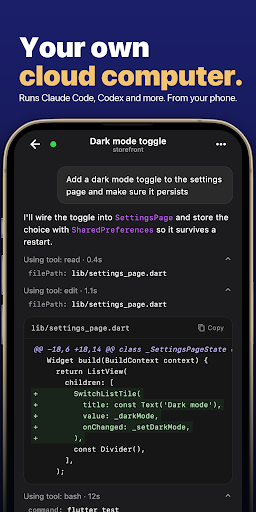
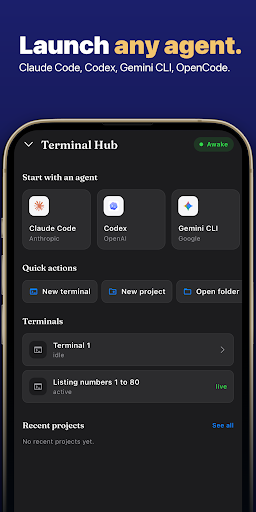
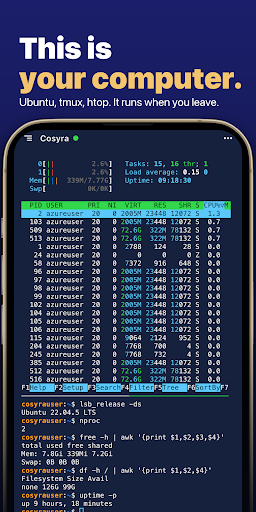
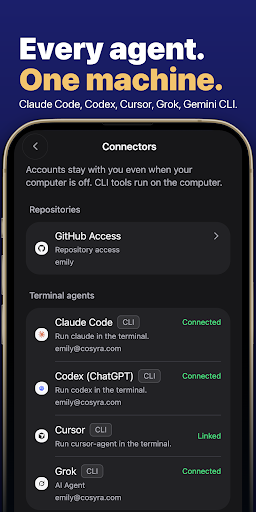
Cosyra gives you your own Linux computer in the cloud and an Android app built for running AI coding agents on it. Chat with Claude Code, Codex, Cursor or OpenCode while they work on your projects, browse the files they change, preview what they build, dictate by voice, and open a full Linux terminal whenever you want one.
YOUR OWN CLOUD LINUX MACHINE
• A persistent Ubuntu machine with 30 GB of storage. Repos, tools, dotfiles and agent sessions stay where you left them.
• Sleeps when idle and wakes in seconds.
• 4 GB of RAM on Core, 8 GB on Pro. Nothing depends on your phone's CPU or battery.
• git, node, python and a normal developer toolchain, plus whatever you install.
The machine, the storage and the tools are included, so there is nothing to host on your own server and nothing to emulate on your phone.
AI CODING AGENTS ON YOUR MACHINE
• Run Claude Code, Codex, Cursor or OpenCode on the cloud machine and talk to them from your phone.
• The agent edits files and runs commands with the permission level you choose.
• Queue follow-ups, steer work in progress, and switch agents on the same project.
• A running turn survives a dropped mobile connection, and you get a notification when unattended work finishes.
PROJECTS, FILES AND PREVIEWS
• Link GitHub, clone repositories, open projects, switch branches and inspect diffs.
• Browse and read files without typing paths.
• Preview the web apps your agents build through a secure, authenticated tunnel.
VOICE
• Dictate prompts to Claude Code or Codex. Speech is recognized on your device and tidied up before it reaches the agent.
A FULL LINUX TERMINAL WHEN YOU WANT ONE
• xterm-compatible terminal with a smart key row (ESC, TAB, CTRL, ALT, arrows, pipe), scrollback restoration and truecolor.
• Sessions keep running while the app is in the background and reconnect where they stopped.
BRING YOUR OWN MODELS
Connect Anthropic, OpenAI or another supported provider with your own API key or eligible subscription. Your subscription pays for the cloud machine, not the model.
PLANS
Core (4 GB RAM) and Pro (8 GB RAM), both with 30 GB of storage and a 7-day free trial. A subscription is required for machine access. Pricing is shown in the app before you start a trial.
PRIVACY AND SECURITY
• Provider API keys travel over TLS to encrypted server-side storage and are never saved on your phone.
• Every cloud machine runs in its own isolated sandbox.
• Voice recognition runs on the device.
• Sign in with Google, Apple or GitHub.
• No ads.
Claude Code is a product of Anthropic, Codex of OpenAI and Cursor of Anysphere; OpenCode is an open-source project. Cosyra is not affiliated with or endorsed by any of them.
Community: https://discord.gg/Uh4xm82U8x
Contact: hello@portablesoftware.co
Tunjukkan Lagi

1. Muat turun pemasang MEmu dan selesaikan persediaan

2. Mulakan MEnu kemudian buka Google Play di desktop

3. Cari Cosyra: AI Coding Agents di Google Play
Install
4. Muat turun dan Pasang Cosyra: AI Coding Agents
5. Apabila selesai pemasangan, menekan ikon itu untuk memulakan

6. Gunakan MENu untuk mengalami Cosyra: AI Coding Agents pada komputer anda
MEmu Play ialah emulator Android terbaik, dengan lebih 100 juta pengguna mengalami pengalaman aplikasi Android yang unggul. Teknologi virtualisasi MEmu membolehkan anda menjalankan beribu-ribu aplikasi Android dengan lancar pada komputer anda, walaupun yang paling mencabar.
Skrin lebih besar dengan grafik yang lebih baik; Tempoh yang panjang, tanpa had bateri atau data mudah alih.
Sokongan Keymapping penuh untuk kawalan tepat papan kekunci dan tetikus atau gamepad.
Pelbagai akaun permainan atau tugas pada satu PC sekaligus dengan pengurus pelbagai contoh.
Use Cosyra: AI Coding Agents on PC by following steps: