DNS Changer - Fast and Secure
Dikemas kini
Versi Semasa
1.0.45
Ditawarkan Oleh

Berhentilah bimbang dengan bayaran berlebihan semasa menggunakan DNS Changer - Fast and Secure di telefon bimbit anda, bebaskan diri anda dari layar kecil dan nikmati penggunaan aplikasi pada paparan yang jauh lebih besar. Mulai sekarang, dapatkan pengalaman skrin penuh aplikasi anda dengan papan kekunci dan tetikus. MEmu Play semua ciri mengejutkan yang anda harapkan: pemasangan cepat dan penyediaan mudah, kawalan intuitif, tidak ada batasan bateri, data mudah alih, dan panggilan yang mengganggu. MEmu 9 yang baru adalah pilihan terbaik untuk menggunakan DNS Changer - Fast and Secure di komputer anda. Dikodkan dengan penyerapan kami, pengurus multi-instance menjadikan pembukaan 2 atau lebih akaun pada masa yang sama mungkin. Dan yang paling penting, mesin emulasi eksklusif kami dapat melepaskan potensi penuh PC anda, menjadikan semuanya lancar dan menyeronokkan.
Tunjukkan Lagi
Nikmati pengalaman hebat menggunakan DNS Changer - Fast and Secure di PC dengan MEmu Play. Ia merupakan emulator Android percuma yang hebat yang menyediakan beribu-ribu aplikasi Android untuk versi desktop mereka. Nikmati berhubung dengan rakan-rakan dan menggilap kerja anda dengan kecekapan yang lebih tinggi! DNS Changer (no root Mobile Data/WIFI) IPV6 | IPV4 app comes with great features that are fast and efficient to use.
DNS Changer (no root Mobile Data/WIFI) IPV6 | IPV4 app comes with great features that are fast and efficient to use.
Benefits of using DNS changer
• Unblock the restricted websites and apps
• Surf securely on public Wi-Fi
• Greater online gaming experience
• Secure surfing
• Private no-logs policy - we don’t log your activities or store your online data
• Included servers: Malware Protection, Porn free, Ad Blocking and Parental Control Servers
Key Features
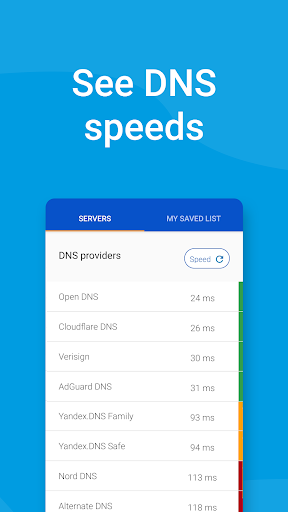
• See server speeds before connecting
• Most up-to-date and fast providers
• Choose from many free public servers
• Save your own custom server details
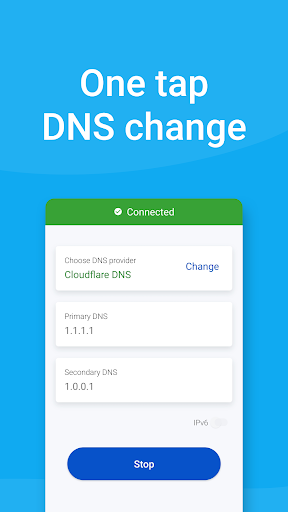
• Easy to use for all ages - just one tap to change. No registration required.
• Support for WIFI / Mobile Data Network (3G/4G/5G)
• Smartphone and tablet devices
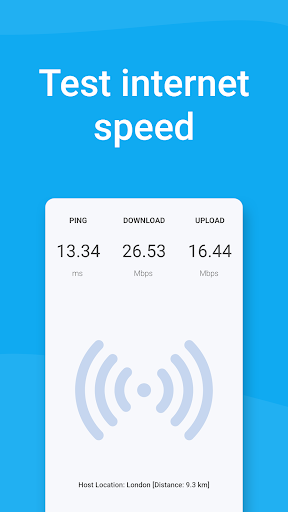
• Test your download and upload speed
• Small size and frequently updated
WHY SHOULD I USE A DNS CHANGER?
In most cases, it can provide better privacy, security and reliability. You can also view unblocked sites that’s blocked by your Internet service provider (e.g. government), or at the domain name level.
MAIN FEATURES
Unblock restricted websites:
If you want to look at a blocked website, video or other content, you can use this server changer and see how it improves web browsing time.
See DNS speed before connecting:
You can see provider speeds before connecting, it allows you to choose a provider based on speed.
Custom DNS:
Add your custom DNS server and save it for later use.
Internet Speed Test Feature
You can check your download and upload speed.
Tablet and phone devices supported:
You can use this app on any Android device, including tablet or smart phone.
Small size:
It’ll only take up a small space on your device.
Play PUBG and other games without a connection problem:
Changing DNS is a smart move when playing your favorite online games.
Tunjukkan Lagi

1. Muat turun pemasang MEmu dan selesaikan persediaan

2. Mulakan MEnu kemudian buka Google Play di desktop

3. Cari DNS Changer - Fast and Secure di Google Play
Install
4. Muat turun dan Pasang DNS Changer - Fast and Secure
5. Apabila selesai pemasangan, menekan ikon itu untuk memulakan

6. Gunakan MENu untuk mengalami DNS Changer - Fast and Secure pada komputer anda
MEmu Play ialah emulator Android terbaik, dengan lebih 100 juta pengguna mengalami pengalaman aplikasi Android yang unggul. Teknologi virtualisasi MEmu membolehkan anda menjalankan beribu-ribu aplikasi Android dengan lancar pada komputer anda, walaupun yang paling mencabar.
Skrin lebih besar dengan grafik yang lebih baik; Tempoh yang panjang, tanpa had bateri atau data mudah alih.
Sokongan Keymapping penuh untuk kawalan tepat papan kekunci dan tetikus atau gamepad.
Pelbagai akaun permainan atau tugas pada satu PC sekaligus dengan pengurus pelbagai contoh.
Use DNS Changer - Fast and Secure on PC by following steps: