Dream Live
Dikemas kini
Versi Semasa
1.5.3.5
Ditawarkan Oleh

Berhentilah bimbang dengan bayaran berlebihan semasa menggunakan Dream Live di telefon bimbit anda, bebaskan diri anda dari layar kecil dan nikmati penggunaan aplikasi pada paparan yang jauh lebih besar. Mulai sekarang, dapatkan pengalaman skrin penuh aplikasi anda dengan papan kekunci dan tetikus. MEmu Play semua ciri mengejutkan yang anda harapkan: pemasangan cepat dan penyediaan mudah, kawalan intuitif, tidak ada batasan bateri, data mudah alih, dan panggilan yang mengganggu. MEmu 9 yang baru adalah pilihan terbaik untuk menggunakan Dream Live di komputer anda. Dikodkan dengan penyerapan kami, pengurus multi-instance menjadikan pembukaan 2 atau lebih akaun pada masa yang sama mungkin. Dan yang paling penting, mesin emulasi eksklusif kami dapat melepaskan potensi penuh PC anda, menjadikan semuanya lancar dan menyeronokkan.
Tunjukkan Lagi
Nikmati pengalaman hebat menggunakan Dream Live di PC dengan MEmu Play. Ia merupakan emulator Android percuma yang hebat yang menyediakan beribu-ribu aplikasi Android untuk versi desktop mereka. Nikmati berhubung dengan rakan-rakan dan menggilap kerja anda dengan kecekapan yang lebih tinggi! Right from understanding the topics to clearing the exam, we offer you a one-stop solution for all your learning needs.
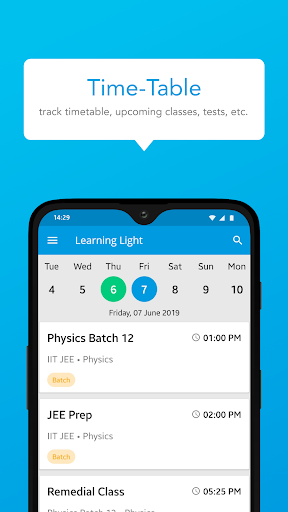
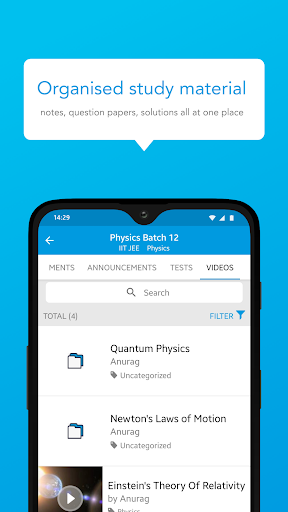
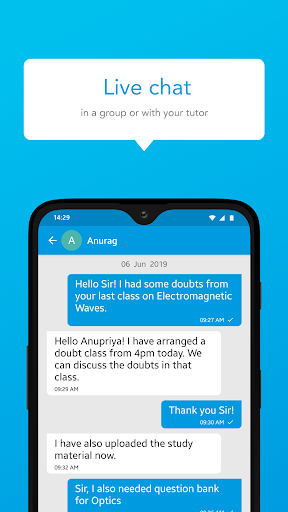
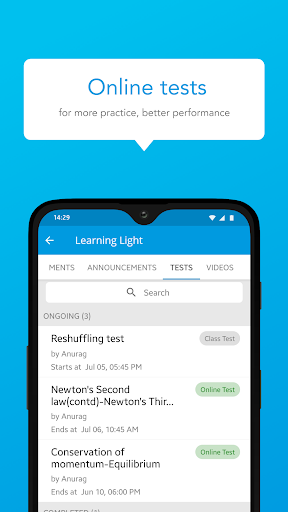
Right from understanding the topics to clearing the exam, we offer you a one-stop solution for all your learning needs. Now learn with us, uninterrupted from the safety of your home.
With a simple user interface, design and exciting features, our app is the go-to solution for students across the country.
Why study with us? Want to know what all you will get?
Interactive live classes
Let’s recreate our physical experiences now through our state-of-the-art live classes interface where multiple students can study, together.
- Periodical live classes to ensure you clear your exams
- Raise your hand feature to solve individual queries
Course material
- Get access to course, notes, and other study material on-the-go
- Regularly updated content
Tests and performance reports
- Get online tests and exams
- Track your performance, test scores & rank from time to time.
Ask every doubt
- Clearing doubts has never been easier. Ask your doubts by just clicking a screenshot/photo of the question and upload it. We’ll ensure that all your doubts are clarified.
- Clear your doubts on the go through our mobile app
Proven record of excellence:
- We have been part of the market for a long time now and we have helped multiple candidates clear their exams.
- Excellence has always been our motto, and the only thing that will never change is our motto.
⏰ Reminders and notifications for batches and sessions
- Get notifications about new courses, sessions and updates. No more worrying about missed classes, sessions, etc. because we only want you to focus on your studies.
- Get announcements around exam dates/special classes/ special events etc.
Assignment submission
- Practice makes a student perfect. Get regular online assignments so that you can become perfect.
- Submit your assignments online and we will help you in evaluating your performance
Anytime access
- Watch our classes, live or recorded, anytime from any of your devices.
Parent-Teacher discussion
- Parents can download the app and connect with teachers & track their ward’s performance
- Parents can easily chat with the teacher in case of any query
Payments and fees
- Easy fees submission with 100% safe and secure payment options
Online fee payment option for ease
Compete within groups
- Compete within groups and peers who are studying
- Get to see your comparative score as compared to peer students
Ads Free
- No ads for seamless studying experience
Safe and secure
- Safety of your data i.e. phone number, email address, etc. is of utmost importance
- We never use student data for any kind of advertisement
An online platform for studying in the most efficient and transparent manner. Download now !!
Tunjukkan Lagi

1. Muat turun pemasang MEmu dan selesaikan persediaan

2. Mulakan MEnu kemudian buka Google Play di desktop

3. Cari Dream Live di Google Play
Install
4. Muat turun dan Pasang Dream Live
5. Apabila selesai pemasangan, menekan ikon itu untuk memulakan

6. Gunakan MENu untuk mengalami Dream Live pada komputer anda
MEmu Play ialah emulator Android terbaik, dengan lebih 100 juta pengguna mengalami pengalaman aplikasi Android yang unggul. Teknologi virtualisasi MEmu membolehkan anda menjalankan beribu-ribu aplikasi Android dengan lancar pada komputer anda, walaupun yang paling mencabar.
Skrin lebih besar dengan grafik yang lebih baik; Tempoh yang panjang, tanpa had bateri atau data mudah alih.
Sokongan Keymapping penuh untuk kawalan tepat papan kekunci dan tetikus atau gamepad.
Pelbagai akaun permainan atau tugas pada satu PC sekaligus dengan pengurus pelbagai contoh.
Use Dream Live on PC by following steps: