Hausa Text-To-Speech
Dikemas kini
Versi Semasa
1.0
Ditawarkan Oleh

Berhentilah bimbang dengan bayaran berlebihan semasa menggunakan Hausa Text-To-Speech di telefon bimbit anda, bebaskan diri anda dari layar kecil dan nikmati penggunaan aplikasi pada paparan yang jauh lebih besar. Mulai sekarang, dapatkan pengalaman skrin penuh aplikasi anda dengan papan kekunci dan tetikus. MEmu Play semua ciri mengejutkan yang anda harapkan: pemasangan cepat dan penyediaan mudah, kawalan intuitif, tidak ada batasan bateri, data mudah alih, dan panggilan yang mengganggu. MEmu 9 yang baru adalah pilihan terbaik untuk menggunakan Hausa Text-To-Speech di komputer anda. Dikodkan dengan penyerapan kami, pengurus multi-instance menjadikan pembukaan 2 atau lebih akaun pada masa yang sama mungkin. Dan yang paling penting, mesin emulasi eksklusif kami dapat melepaskan potensi penuh PC anda, menjadikan semuanya lancar dan menyeronokkan.
Tunjukkan Lagi
Nikmati pengalaman hebat menggunakan Hausa Text-To-Speech di PC dengan MEmu Play. Ia merupakan emulator Android percuma yang hebat yang menyediakan beribu-ribu aplikasi Android untuk versi desktop mereka. Nikmati berhubung dengan rakan-rakan dan menggilap kerja anda dengan kecekapan yang lebih tinggi! Introduction In an era where digital inclusion is a fundamental right, the Hausa language—one of the most widely spoken languages in Africa—deserves a digital voice.
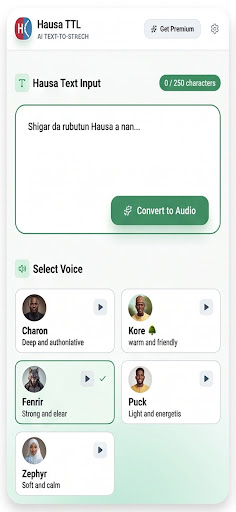
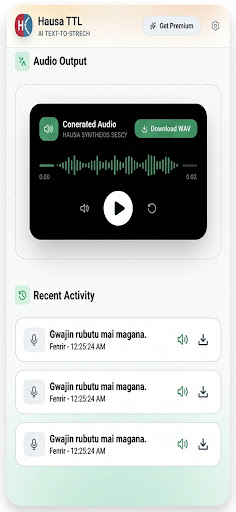
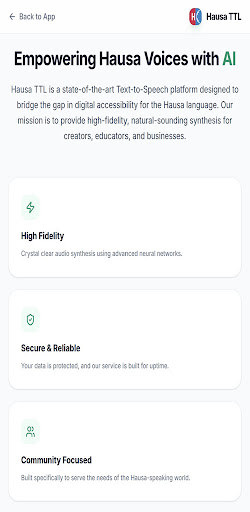
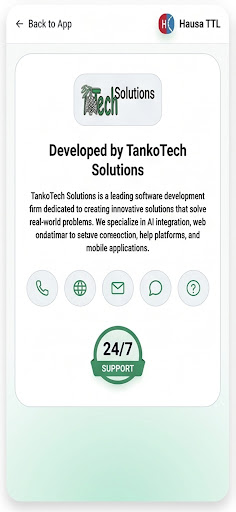
Introduction In an era where digital inclusion is a fundamental right, the Hausa language—one of the most widely spoken languages in Africa—deserves a digital voice. Hausa Text-To-Speech (HausaTTL), developed by TankoTech, is a revolutionary mobile application designed to transform the way Hausa speakers interact with digital content. By converting written Hausa text into high-quality, natural-sounding speech, HausaTTL serves as a bridge between technology and culture, ensuring that information is accessible to everyone, regardless of their reading ability or visual status.
The Vision Behind HausaTTL The Hausa language is spoken by millions across Nigeria, Niger, Ghana, Cameroon, and the diaspora. Despite its vast reach, many digital tools overlook the unique phonetic and tonal nuances of the language. TankoTech recognized this gap and created HausaTTL with a singular vision: to empower the Hausa-speaking community through accessibility. Whether it is for educational purposes, personal productivity, or assisting those with visual impairments, HausaTTL is more than just a utility; it is a movement toward linguistic equality in the digital space.
Comprehensive Key Features
1. High-Fidelity Text-To-Speech Conversion: At the core of HausaTTL is a sophisticated synthesis engine optimized specifically for the Hausa language. Unlike generic TTS tools, HausaTTL respects the specific dialects and rhythms of Hausa, providing a listening experience that feels natural and intuitive.
2. Integrated Web Portal Access: The app is seamlessly integrated with the TankoTech web platform (https://tankotech.com.ng/hausattl). This allows users to browse curated Hausa news, educational articles, and cultural stories directly within the app and have them read aloud with a single tap.
3. Enhanced Accessibility for All: HausaTTL is a game-changer for individuals with visual impairments or reading difficulties like dyslexia. By providing a voice to the written word, the app allows users to consume news, religious texts, and educational materials hands-free, fostering independence and confidence.
4. Optimized Performance & Lightweight Design: Understanding that many users in Northern Nigeria and beyond may use budget-friendly Android devices, TankoTech has optimized HausaTTL to be incredibly lightweight. It features a fast-loading splash screen, smooth transitions, and a clean user interface that won’t slow down your device.
5. Offline-First Mentality: While the app integrates with web content, its core conversion capabilities are designed to work efficiently across various network conditions, ensuring that your "voice" is always available even in areas with limited internet connectivity.
The Educational Impact Education is the foundation of progress. HausaTTL serves as a vital tool for literacy. Students can use the app to hear the correct pronunciation of Hausa words, while teachers can use it to create audio-based lessons for their students. By turning any Hausa text into an audiobook-style experience, the app makes learning more engaging and accessible for the youth and adult learners alike.
A Professional Tool for the Modern User For professionals who are constantly on the move, HausaTTL offers a "hands-free" productivity boost. Instead of reading through long reports or articles, you can simply use the app to narrate the content while you drive, exercise, or perform other tasks. It is the ultimate tool for multi-tasking without losing touch with important information.
Tunjukkan Lagi

1. Muat turun pemasang MEmu dan selesaikan persediaan

2. Mulakan MEnu kemudian buka Google Play di desktop

3. Cari Hausa Text-To-Speech di Google Play
Install
4. Muat turun dan Pasang Hausa Text-To-Speech
5. Apabila selesai pemasangan, menekan ikon itu untuk memulakan

6. Gunakan MENu untuk mengalami Hausa Text-To-Speech pada komputer anda
MEmu Play ialah emulator Android terbaik, dengan lebih 100 juta pengguna mengalami pengalaman aplikasi Android yang unggul. Teknologi virtualisasi MEmu membolehkan anda menjalankan beribu-ribu aplikasi Android dengan lancar pada komputer anda, walaupun yang paling mencabar.
Skrin lebih besar dengan grafik yang lebih baik; Tempoh yang panjang, tanpa had bateri atau data mudah alih.
Sokongan Keymapping penuh untuk kawalan tepat papan kekunci dan tetikus atau gamepad.
Pelbagai akaun permainan atau tugas pada satu PC sekaligus dengan pengurus pelbagai contoh.
Use Hausa Text-To-Speech on PC by following steps: