HOUSE SKETCHER | 3D FLOOR PLAN
Dikemas kini
Versi Semasa
3.7
Ditawarkan Oleh

Berhentilah bimbang dengan bayaran berlebihan semasa menggunakan HOUSE SKETCHER | 3D FLOOR PLAN di telefon bimbit anda, bebaskan diri anda dari layar kecil dan nikmati penggunaan aplikasi pada paparan yang jauh lebih besar. Mulai sekarang, dapatkan pengalaman skrin penuh aplikasi anda dengan papan kekunci dan tetikus. MEmu Play semua ciri mengejutkan yang anda harapkan: pemasangan cepat dan penyediaan mudah, kawalan intuitif, tidak ada batasan bateri, data mudah alih, dan panggilan yang mengganggu. MEmu 9 yang baru adalah pilihan terbaik untuk menggunakan HOUSE SKETCHER | 3D FLOOR PLAN di komputer anda. Dikodkan dengan penyerapan kami, pengurus multi-instance menjadikan pembukaan 2 atau lebih akaun pada masa yang sama mungkin. Dan yang paling penting, mesin emulasi eksklusif kami dapat melepaskan potensi penuh PC anda, menjadikan semuanya lancar dan menyeronokkan.
Tunjukkan Lagi
Nikmati pengalaman hebat menggunakan HOUSE SKETCHER | 3D FLOOR PLAN di PC dengan MEmu Play. Ia merupakan emulator Android percuma yang hebat yang menyediakan beribu-ribu aplikasi Android untuk versi desktop mereka. Nikmati berhubung dengan rakan-rakan dan menggilap kerja anda dengan kecekapan yang lebih tinggi! Welcome to HOUSE SKETCHER 3D your new 3D floor plan app!
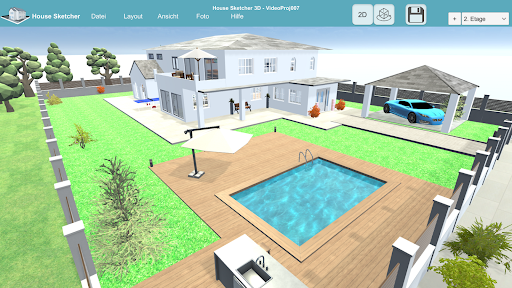
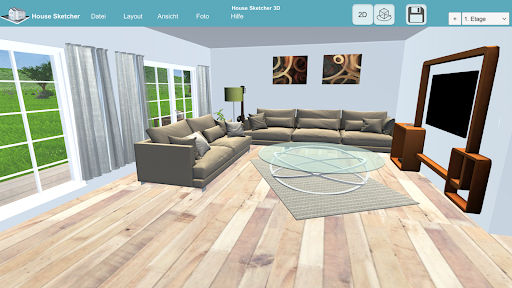
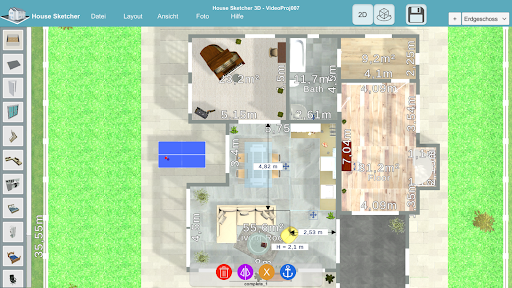
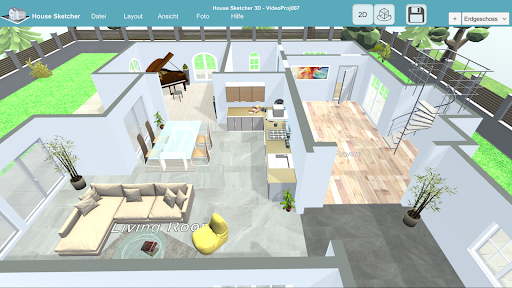
Welcome to HOUSE SKETCHER 3D your new 3D floor plan app!
HOUSE SKETCHER 3D
HOUSE SKETCHER 3D helps you to realize your house project quickly and easily. Be your architect and plan, design and draw your floor plan. Take your house planning into your own hands and use HOUSE SKETCHER 3D for your home design. Use the numerous pieces of furniture from the furniture library to set up and decorate your rooms.
IMPORT YOUR SKETCH
HOUSE SKETCHER 3D gives you the opportunity to import a sketch or a drawing as a template in order to create, draft and design rooms, doors, windows or entire buildings more quickly. Use your plans as a template and quickly and easily sketch your dream home.
FLOOR PLANNER
HOUSE SKETCHER 3D is your house planner and offers you everything for your building project. From the floor plan to the interior design to the entire visualization, as it is the state of the art in modern architecture today.
INTERIOR DESIGN
Use your finished building and develop new skills as an interior designer. HOUSE SKETCHER 3D is a leader in the field of interior design, design your rooms, whether it is your living room, your bathroom, your kitchen or your study. There are numerous library elements that can help you with your interior design. Realize your living ideas and renovate your home with the HOUSE SKETCHER 3D apartment planner.
SPECIAL FUNCTIONS
• Draw a 3D floor plan with several floors including a roof model
• Numerous room templates for quick assembly
• Extensive furniture libraries for interior decoration
• 3D viewer, fly cam mode and first person mode
• Photo function for creating high-resolution images including filter functions
• Light and shadow effects and several templates for the sky and surroundings
Who uses HOUSE SKETCHER 3D?
All those who are interested in drawing 3D floor plans themselves, who want to build themselves or want to move and design or plan their own home or rooms in advance. HOUSE SKETCHER 3D specializes in drawing floor plans quickly and professionally, designing room planning yourself and planning and creating interior fittings. That is why HOUSE SKETCHER 3D also offers huge added value for architects, brokers (exposé), craftsmen, building contractors, property managers, building planners and interior designers.
Can I use HOUSE SKETCHER 3D free of charge?
HOUSE SKETCHER 3D can be downloaded and used free of charge. There is the possibility of upgrading the app to the pro version in the app. A one-time fee is required for this and offers the following advantages:
• Advertisements are no longer displayed
• The customer has full access to all furniture and all library elements
• The photo function is activated
• The memory function is enabled
So press the download button and use your app!
Contact
You are always welcome to ask me questions or send me suggestions for improvement, I look forward to any feedback
Email: contact.kemper.apps@gmail.com
https://www.kemper-apps.com/Contact/
Tunjukkan Lagi

1. Muat turun pemasang MEmu dan selesaikan persediaan

2. Mulakan MEnu kemudian buka Google Play di desktop

3. Cari HOUSE SKETCHER | 3D FLOOR PLAN di Google Play
Install
4. Muat turun dan Pasang HOUSE SKETCHER | 3D FLOOR PLAN
5. Apabila selesai pemasangan, menekan ikon itu untuk memulakan

6. Gunakan MENu untuk mengalami HOUSE SKETCHER | 3D FLOOR PLAN pada komputer anda
MEmu Play ialah emulator Android terbaik, dengan lebih 100 juta pengguna mengalami pengalaman aplikasi Android yang unggul. Teknologi virtualisasi MEmu membolehkan anda menjalankan beribu-ribu aplikasi Android dengan lancar pada komputer anda, walaupun yang paling mencabar.
Skrin lebih besar dengan grafik yang lebih baik; Tempoh yang panjang, tanpa had bateri atau data mudah alih.
Sokongan Keymapping penuh untuk kawalan tepat papan kekunci dan tetikus atau gamepad.
Pelbagai akaun permainan atau tugas pada satu PC sekaligus dengan pengurus pelbagai contoh.
Use HOUSE SKETCHER | 3D FLOOR PLAN on PC by following steps: