HPRO Miner: Cloud Tool
Dikemas kini
Versi Semasa
1.0.0
Ditawarkan Oleh

Berhentilah bimbang dengan bayaran berlebihan semasa menggunakan HPRO Miner: Cloud Tool di telefon bimbit anda, bebaskan diri anda dari layar kecil dan nikmati penggunaan aplikasi pada paparan yang jauh lebih besar. Mulai sekarang, dapatkan pengalaman skrin penuh aplikasi anda dengan papan kekunci dan tetikus. MEmu Play semua ciri mengejutkan yang anda harapkan: pemasangan cepat dan penyediaan mudah, kawalan intuitif, tidak ada batasan bateri, data mudah alih, dan panggilan yang mengganggu. MEmu 9 yang baru adalah pilihan terbaik untuk menggunakan HPRO Miner: Cloud Tool di komputer anda. Dikodkan dengan penyerapan kami, pengurus multi-instance menjadikan pembukaan 2 atau lebih akaun pada masa yang sama mungkin. Dan yang paling penting, mesin emulasi eksklusif kami dapat melepaskan potensi penuh PC anda, menjadikan semuanya lancar dan menyeronokkan.
Tunjukkan Lagi
Nikmati pengalaman hebat menggunakan HPRO Miner: Cloud Tool di PC dengan MEmu Play. Ia merupakan emulator Android percuma yang hebat yang menyediakan beribu-ribu aplikasi Android untuk versi desktop mereka. Nikmati berhubung dengan rakan-rakan dan menggilap kerja anda dengan kecekapan yang lebih tinggi! HPRO Miner: Cloud Tool – Smart Access to Remote Hash Computing.
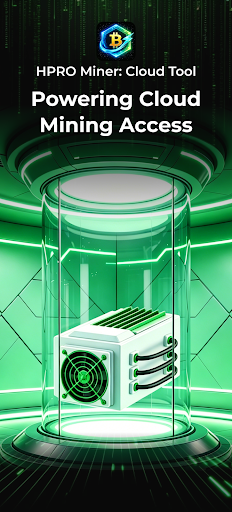
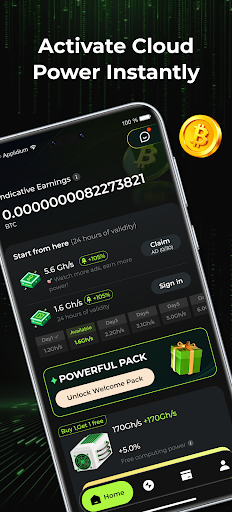
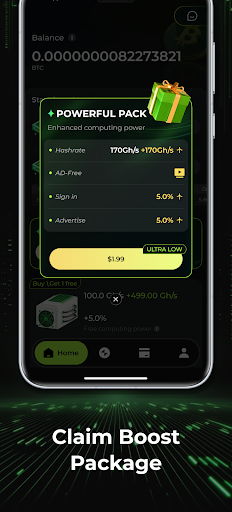
HPRO Miner: Cloud Tool – Smart Access to Remote Hash Computing
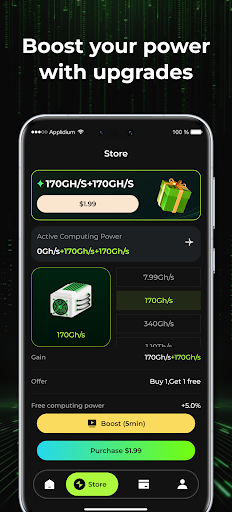
HPRO Miner: Cloud Tool is a modern cloud-based computing resource platform built to make high-performance hash power more accessible. Instead of investing in costly physical equipment, users can activate remote computing resources directly through the app and manage them easily from a mobile device. The platform provides a streamlined way to interact with cloud infrastructure designed for efficient and convenient access to distributed computing services.
Key Features
• Rapid Cloud Hash Power Activation
Choose from a variety of cloud computing plans designed for different levels of usage, from beginners exploring cloud resources to users requiring more advanced computing capacity.
• Reliable 24/7 Infrastructure
All computing workloads operate on professionally maintained remote data centers, providing stable service and continuous availability of cloud resources.
• Simple and User-Friendly Dashboard
The interface is designed to minimize complexity. Users can quickly view service status, usage information, and operational data through an easy-to-navigate control panel.
Security & Compliance
HPRO Miner: Cloud Tool follows mobile platform guidelines and security practices to ensure safe usage on user devices.
- No Local Device Mining
The application does not use the CPU, GPU, or other hardware of the mobile device for mining activities. All computational processes are executed on external servers.
- No Cryptocurrency Trading Functions
The app does not support cryptocurrency exchanges, trading, speculation, or investment advisory services. It functions strictly as a management interface for cloud computing resources.
- No Additional Device Power Consumption
Because workloads run remotely, the application does not place extra processing load on the device and will not significantly affect battery life, performance, or device temperature.
Usage Terms & Risk Notice
- Service Availability
Connectivity to cloud infrastructure may occasionally fluctuate due to global network conditions, maintenance activities, or other technical factors.
- No Performance Guarantees
Any displayed operational data reflects system output only. External conditions and market environments may influence results, and specific outcomes cannot be guaranteed.
- Legal Compliance
Users are responsible for ensuring that their use of the platform complies with the laws and regulations applicable in their region.
- Liability Limitation
Users should independently evaluate potential risks. The platform is not responsible for service disruptions or losses resulting from force majeure, network issues, or third-party interference.
A Lightweight Way to Use Cloud Computing
HPRO Miner: Cloud Tool simplifies access to remote hash power through cloud infrastructure—without requiring specialized hardware.
By installing this application, you confirm that you have read and agreed to the HPRO Miner: Cloud Tool User Agreement and Privacy Policy.
Tunjukkan Lagi

1. Muat turun pemasang MEmu dan selesaikan persediaan

2. Mulakan MEnu kemudian buka Google Play di desktop

3. Cari HPRO Miner: Cloud Tool di Google Play
Install
4. Muat turun dan Pasang HPRO Miner: Cloud Tool
5. Apabila selesai pemasangan, menekan ikon itu untuk memulakan

6. Gunakan MENu untuk mengalami HPRO Miner: Cloud Tool pada komputer anda
MEmu Play ialah emulator Android terbaik, dengan lebih 100 juta pengguna mengalami pengalaman aplikasi Android yang unggul. Teknologi virtualisasi MEmu membolehkan anda menjalankan beribu-ribu aplikasi Android dengan lancar pada komputer anda, walaupun yang paling mencabar.
Skrin lebih besar dengan grafik yang lebih baik; Tempoh yang panjang, tanpa had bateri atau data mudah alih.
Sokongan Keymapping penuh untuk kawalan tepat papan kekunci dan tetikus atau gamepad.
Pelbagai akaun permainan atau tugas pada satu PC sekaligus dengan pengurus pelbagai contoh.
Use HPRO Miner: Cloud Tool on PC by following steps: