Hue Light App Remote Control
Dikemas kini
Versi Semasa
6.5.4
Ditawarkan Oleh

Berhentilah bimbang dengan bayaran berlebihan semasa menggunakan Hue Light App Remote Control di telefon bimbit anda, bebaskan diri anda dari layar kecil dan nikmati penggunaan aplikasi pada paparan yang jauh lebih besar. Mulai sekarang, dapatkan pengalaman skrin penuh aplikasi anda dengan papan kekunci dan tetikus. MEmu Play semua ciri mengejutkan yang anda harapkan: pemasangan cepat dan penyediaan mudah, kawalan intuitif, tidak ada batasan bateri, data mudah alih, dan panggilan yang mengganggu. MEmu 9 yang baru adalah pilihan terbaik untuk menggunakan Hue Light App Remote Control di komputer anda. Dikodkan dengan penyerapan kami, pengurus multi-instance menjadikan pembukaan 2 atau lebih akaun pada masa yang sama mungkin. Dan yang paling penting, mesin emulasi eksklusif kami dapat melepaskan potensi penuh PC anda, menjadikan semuanya lancar dan menyeronokkan.
Tunjukkan Lagi
Download Hue Light App Remote Control on PC with MEmu Android Emulator. Enjoy playing on big screen. Remote Control for PhilipsHue Lights & Bridge for home assistant.
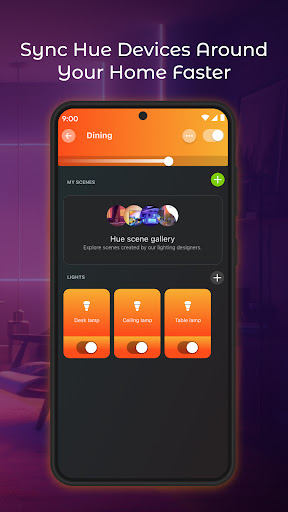
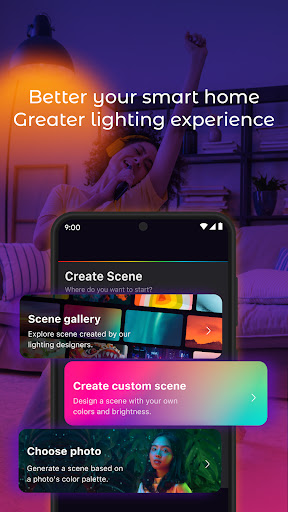
Remote Control for PhilipsHue Lights & Bridge for home assistant.
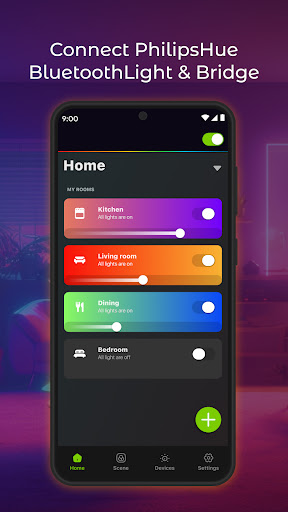
Hue Light App Remote is a must have app to CONNECT, CONTROL & MANAGE Hue light bluetooth & bridge.
Looking for an Hue Light Control App? Let Hue Light App Remote enhance the best lighting experience you'll ever get~ NEW WIDGET Bulit-in Control for your home
Easy to set up & faster to manage - from anywhere
Connect your lights easily simply adding your Hue Light & Bridge devices and ready it will be ready to use in quick seconds. After sucessfully adding your device, you can organise by selecting rooms & zones the way you want, and start using - add up to 50+ lights.
Organise your smart lights your way
200+ Scenes for the BEST LIGHTING EXPERIENCE
Hundreds of miraculous scenes available in our collections, designed by professional lighting expert - You can also create your own unique scene with Paris Light Show or Midnight matches your mood, time, locations, etc.
Personalize your experience
Build a customisable works for you. Command your light to dance, dim, brighten, change color in quick - access. Live in style, Light with PhlipsHue Life
Let's immerse yourself in colorful entertainment space.
Ready to turn your house-party into vivid light show? Impress your friends with magically colorful space? Download today and bring the show to your own home~
Terms of Use: http://smartwidgetlabs.com/terms-of-use/
Privacy Policy: http://smartwidgetlabs.com/privacy-policy/
You are welcome to contact us at support@smartwidgetlabs.com
Tunjukkan Lagi

1. Muat turun pemasang MEmu dan selesaikan persediaan

2. Mulakan MEnu kemudian buka Google Play di desktop

3. Cari Hue Light App Remote Control di Google Play
Install
4. Muat turun dan Pasang Hue Light App Remote Control
5. Apabila selesai pemasangan, menekan ikon itu untuk memulakan

6. Gunakan MENu untuk mengalami Hue Light App Remote Control pada komputer anda
MEmu Play ialah emulator Android terbaik, dengan lebih 100 juta pengguna mengalami pengalaman aplikasi Android yang unggul. Teknologi virtualisasi MEmu membolehkan anda menjalankan beribu-ribu aplikasi Android dengan lancar pada komputer anda, walaupun yang paling mencabar.
Skrin lebih besar dengan grafik yang lebih baik; Tempoh yang panjang, tanpa had bateri atau data mudah alih.
Sokongan Keymapping penuh untuk kawalan tepat papan kekunci dan tetikus atau gamepad.
Pelbagai akaun permainan atau tugas pada satu PC sekaligus dengan pengurus pelbagai contoh.
Use Hue Light App Remote Control on PC by following steps: