IGNIS | Wildfire Operations
Dikemas kini
Versi Semasa
2026.9
Ditawarkan Oleh

Berhentilah bimbang dengan bayaran berlebihan semasa menggunakan IGNIS | Wildfire Operations di telefon bimbit anda, bebaskan diri anda dari layar kecil dan nikmati penggunaan aplikasi pada paparan yang jauh lebih besar. Mulai sekarang, dapatkan pengalaman skrin penuh aplikasi anda dengan papan kekunci dan tetikus. MEmu Play semua ciri mengejutkan yang anda harapkan: pemasangan cepat dan penyediaan mudah, kawalan intuitif, tidak ada batasan bateri, data mudah alih, dan panggilan yang mengganggu. MEmu 9 yang baru adalah pilihan terbaik untuk menggunakan IGNIS | Wildfire Operations di komputer anda. Dikodkan dengan penyerapan kami, pengurus multi-instance menjadikan pembukaan 2 atau lebih akaun pada masa yang sama mungkin. Dan yang paling penting, mesin emulasi eksklusif kami dapat melepaskan potensi penuh PC anda, menjadikan semuanya lancar dan menyeronokkan.
Tunjukkan Lagi
Nikmati pengalaman hebat menggunakan IGNIS | Wildfire Operations di PC dengan MEmu Play. Ia merupakan emulator Android percuma yang hebat yang menyediakan beribu-ribu aplikasi Android untuk versi desktop mereka. Nikmati berhubung dengan rakan-rakan dan menggilap kerja anda dengan kecekapan yang lebih tinggi! **Fireline Mapping Transformed with IGNIS**.
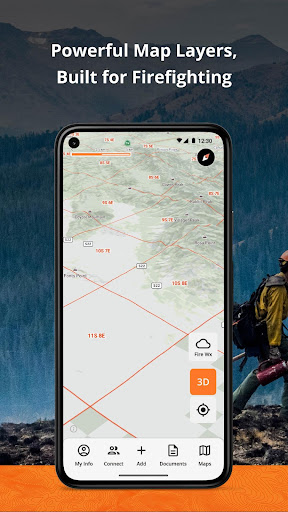
**Fireline Mapping Transformed with IGNIS**
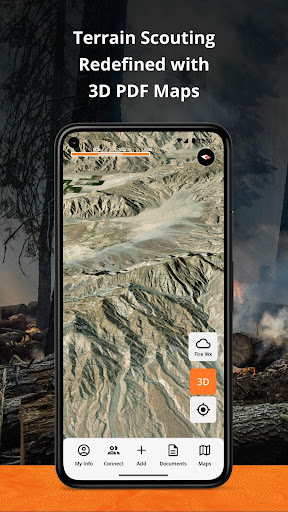
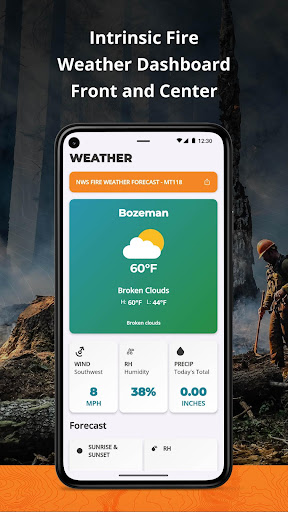
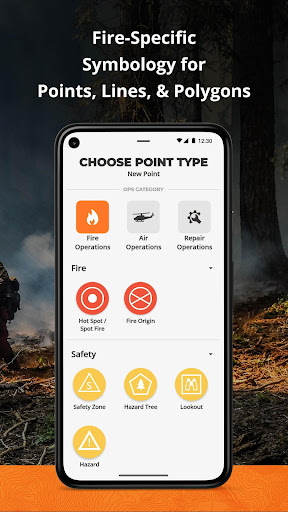
IGNIS redefines situational awareness, by centralizing essential fireline intelligence, offering unmatched capabilities: overlay GeoPDF maps on dynamic base maps, access curated wildland fire layers, utilize the Fire Weather Dashboard for detailed forecasts, and tap into fire-specific symbology and reference documents. Say goodbye to endless tabs and apps—IGNIS streamlines workflows, saving time and effort in the field.
**Step into the future of firefighting safety today.**
**IGNIS Core: FREE for Firefighters—Because the Right Tools Make a Difference**
Access powerful fire intelligence tools right at your fingertips, so you can focus on what matters most: the task at hand.
**Key Features:**
- Store unlimited GeoPDF maps and layer them on dynamic base maps with 3D views.
- Download sections of the base map for offline access.
- Access fire-specific weather, including zone forecasts and location-based weather reports.
- Build custom incident maps with fire-specific symbology.
- Record tracks, draw lines, drop points, and calculate areas in acres.
- Access essential reference documents directly in the app.
- Curated map layers designed for wildland fire, including:
- Severe Fire Danger Index
- Fire Weather Advisories
- Ground Medevac Transport Times
- Current Incidents
- Current & Historical Fire Perimeters
- NOAA Weather Radar
- ALERTCalifornia Cameras
- Satellite Heat Detection
- Wind Speed & Direction
- And more!
**IGNIS CONNECT: OFFLINE TEAM COLLABORATION**
Take fireline coordination to the next level with IGNIS Connect.
Everything in IGNIS Core, plus:
- Team coordination through offline Bluetooth mesh networking. Share points, lines, and polygons—even without cell service.
- A web app for centralized organization management, document and map sharing, and interactive mapping.
- Unified coordination for field crews and office teams, keeping everyone aligned.
Terms of Use:
https://www.ignistech.io/terms-of-use
[](https://www.ignistech.io/terms-of-use)Privacy Policy:
https://www.ignistech.io/privacy-policy
Get Help or Leave Feedback:
https://help.ignistech.io/
Or email contact@ignistech.io
Tunjukkan Lagi

1. Muat turun pemasang MEmu dan selesaikan persediaan

2. Mulakan MEnu kemudian buka Google Play di desktop

3. Cari IGNIS | Wildfire Operations di Google Play
Install
4. Muat turun dan Pasang IGNIS | Wildfire Operations
5. Apabila selesai pemasangan, menekan ikon itu untuk memulakan

6. Gunakan MENu untuk mengalami IGNIS | Wildfire Operations pada komputer anda
MEmu Play ialah emulator Android terbaik, dengan lebih 100 juta pengguna mengalami pengalaman aplikasi Android yang unggul. Teknologi virtualisasi MEmu membolehkan anda menjalankan beribu-ribu aplikasi Android dengan lancar pada komputer anda, walaupun yang paling mencabar.
Skrin lebih besar dengan grafik yang lebih baik; Tempoh yang panjang, tanpa had bateri atau data mudah alih.
Sokongan Keymapping penuh untuk kawalan tepat papan kekunci dan tetikus atau gamepad.
Pelbagai akaun permainan atau tugas pada satu PC sekaligus dengan pengurus pelbagai contoh.
Use IGNIS | Wildfire Operations on PC by following steps: