Launcher iOS16 - iLauncher
Dikemas kini
Versi Semasa
1.0.14
Ditawarkan Oleh

Berhentilah bimbang dengan bayaran berlebihan semasa menggunakan Launcher iOS16 - iLauncher di telefon bimbit anda, bebaskan diri anda dari layar kecil dan nikmati penggunaan aplikasi pada paparan yang jauh lebih besar. Mulai sekarang, dapatkan pengalaman skrin penuh aplikasi anda dengan papan kekunci dan tetikus. MEmu Play semua ciri mengejutkan yang anda harapkan: pemasangan cepat dan penyediaan mudah, kawalan intuitif, tidak ada batasan bateri, data mudah alih, dan panggilan yang mengganggu. MEmu 9 yang baru adalah pilihan terbaik untuk menggunakan Launcher iOS16 - iLauncher di komputer anda. Dikodkan dengan penyerapan kami, pengurus multi-instance menjadikan pembukaan 2 atau lebih akaun pada masa yang sama mungkin. Dan yang paling penting, mesin emulasi eksklusif kami dapat melepaskan potensi penuh PC anda, menjadikan semuanya lancar dan menyeronokkan.
Tunjukkan Lagi
Download Launcher iOS16 - iLauncher on PC with MEmu Android Emulator. Enjoy playing on big screen. How to change os from Android to iOS?
How to change os from Android to iOS?
Can we use IOS in Android iPhone?
How to make Android iPhone?
Which launcher can hide apps?
Which is the fastest launcher for Android?
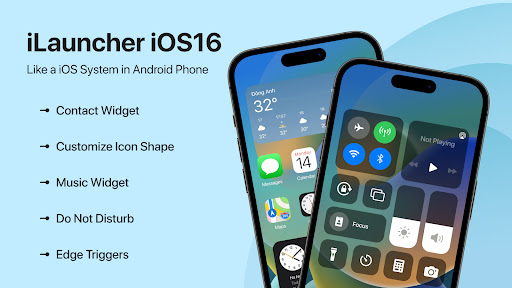
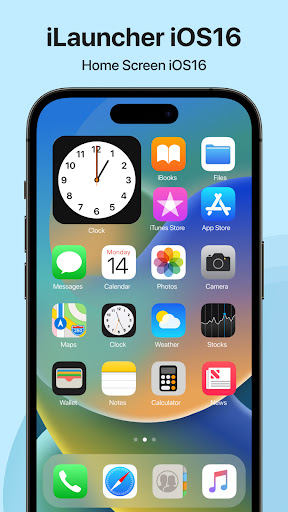
Then we have the perfect “Launcher iOS16 - iLauncher” app for you! “Launcher iOS16 - iLauncher” is the best app to move from Android OS to iOS OS. You can have an experience of using a newest and modern apple phone with your current android phone.
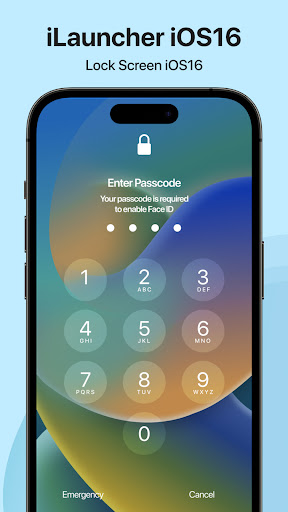
Lock Screen
Lock Screen is a great replacement for system lock-screen of Android. You can now create different lock-screens, each with a unique style, and easily switch between them.
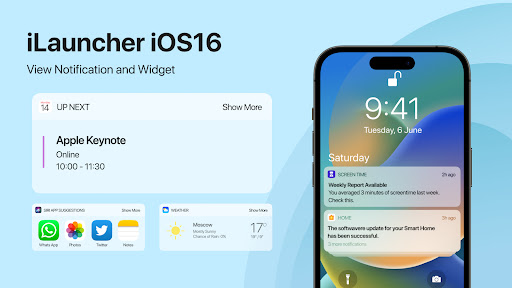
Notification
You can have an experience of iOS notification panel just making some essential settings.
Control Center
The best control panel just a swipe and quick access to your device settings or control your device settings directly. You can have an experience of iOS control panel just making some essential settings.
Assistive Touch
Assistive Touch is an feature which creates a virtual home button right on the Android screen with display and usage as same as the Assistive Touch on iPhone, iPad. More conveniently, you can quickly access to all your favorite apps, games, settings and quick toggle. Assistive Touch is also an ideal app to protect the physical buttons (home button and volume button). It is very useful for big screen smart phone.
Dynamic Island
With Dynamic Island you can easily get the latest iPhone's Dynamic Island notification feature from iOS on your android device!
Overview of the Key “Launcher iOS16 - iLauncher” app Features
✪ Smart Search: Smart Swipe down search screen
✪ Beautiful Wallpaper to decorate your screen
✪ Support Lock screen display with Passcode
✪ Easily search by swiping down anywhere on the home screen
✪ Smart Toggle for Silent mode, Airplane Mode, Bluetooth. With Control Center, you can customise more style, such as size, color, position, vibration.
✪ Easily customise homescreen with change icon, icon size, label colour, label size
✪ Add or remove widgets on widgets screen with different style of widgets
✪ Quick and fast to apply on your boring android OS
Note:
- This app requires Accessibility Services to perform the opening of the recently running apps dialog, the Back function in the X Home Bar, and the Assistive Touch
- This app require Query All Packages
So, what are you waiting for? Download "Launcher iOS16 - iLauncher" to always UpDated with latest iOS OS on your android phone.
Tunjukkan Lagi

1. Muat turun pemasang MEmu dan selesaikan persediaan

2. Mulakan MEnu kemudian buka Google Play di desktop

3. Cari Launcher iOS16 - iLauncher di Google Play
Install
4. Muat turun dan Pasang Launcher iOS16 - iLauncher
5. Apabila selesai pemasangan, menekan ikon itu untuk memulakan

6. Gunakan MENu untuk mengalami Launcher iOS16 - iLauncher pada komputer anda
MEmu Play ialah emulator Android terbaik, dengan lebih 100 juta pengguna mengalami pengalaman aplikasi Android yang unggul. Teknologi virtualisasi MEmu membolehkan anda menjalankan beribu-ribu aplikasi Android dengan lancar pada komputer anda, walaupun yang paling mencabar.
Skrin lebih besar dengan grafik yang lebih baik; Tempoh yang panjang, tanpa had bateri atau data mudah alih.
Sokongan Keymapping penuh untuk kawalan tepat papan kekunci dan tetikus atau gamepad.
Pelbagai akaun permainan atau tugas pada satu PC sekaligus dengan pengurus pelbagai contoh.
Use Launcher iOS16 - iLauncher on PC by following steps: