LearnMagica
Dikemas kini
Versi Semasa
3.2.6
Ditawarkan Oleh

Berhentilah bimbang dengan bayaran berlebihan semasa menggunakan LearnMagica di telefon bimbit anda, bebaskan diri anda dari layar kecil dan nikmati penggunaan aplikasi pada paparan yang jauh lebih besar. Mulai sekarang, dapatkan pengalaman skrin penuh aplikasi anda dengan papan kekunci dan tetikus. MEmu Play semua ciri mengejutkan yang anda harapkan: pemasangan cepat dan penyediaan mudah, kawalan intuitif, tidak ada batasan bateri, data mudah alih, dan panggilan yang mengganggu. MEmu 9 yang baru adalah pilihan terbaik untuk menggunakan LearnMagica di komputer anda. Dikodkan dengan penyerapan kami, pengurus multi-instance menjadikan pembukaan 2 atau lebih akaun pada masa yang sama mungkin. Dan yang paling penting, mesin emulasi eksklusif kami dapat melepaskan potensi penuh PC anda, menjadikan semuanya lancar dan menyeronokkan.
Tunjukkan Lagi
Nikmati pengalaman hebat menggunakan LearnMagica di PC dengan MEmu Play. Ia merupakan emulator Android percuma yang hebat yang menyediakan beribu-ribu aplikasi Android untuk versi desktop mereka. Nikmati berhubung dengan rakan-rakan dan menggilap kerja anda dengan kecekapan yang lebih tinggi! LearnMagica - Best Learning App for Students by Techior Solutions Pvt Ltd.
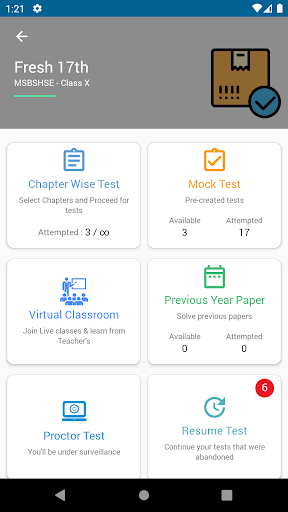
LearnMagica - Best Learning App for Students by Techior Solutions Pvt Ltd
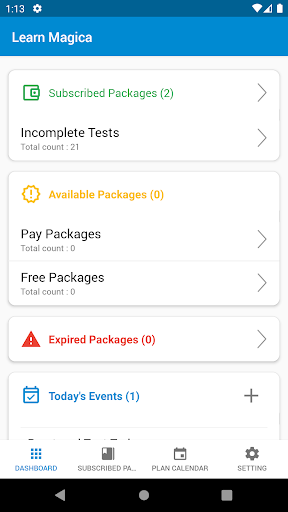
Study Planning, Audio/Visual Study Material, Live Classes, Online Tests, Result Analysis.
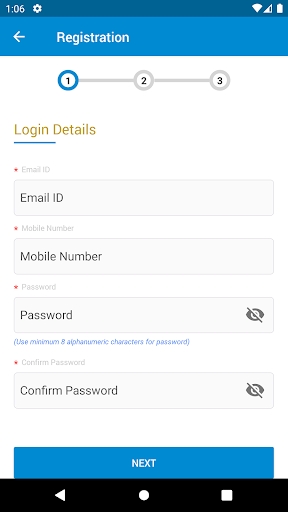
LearnMagica is an online learning app for students. Students can register themselves online and subscribe to the packages that are useful for them. They can plan their studies, go through the audio/visual study material put up by teaches, take online tests – practice using chapter wise tests and take mock tests which are put up by teachers. Students can monitor their own progress by seeing the test analysis reports – this gives them an idea about their weak areas so that they can build on those topics and practice more. The online study experience is very easy and smooth for students. We cover a very wide range of syllabus including CBSE Board (VI-XII), MH State Board (VIII-XII), JEE Main, JEE Advance, NEET, MHTCET, BITSAT, Aptitude, IBPS, UPSC, MPSC, SSC-CHSL, SSC-CGL.
Practice makes a man perfect. We, at Techior, believe that students need to practice online tests in order to get comfortable with the test environment. Most of the competitive tests are held online these days and practicing on an online test platform gives the student an edge over their peers.
The Institutes or Schools which use LearnMagica platform can upload study material and audio/video clips explaining various concepts. They can also create mock tests and mark some of the tests as Free. These institutes can also subscribe to one or more of our pre-created question bank containing about 2L questions. Students who register for any package can take the free mock tests without making any payment, and then go on to pay and use the complete package.
LearnMagica - Best Learning App for CBSE, MH State Board Students
For students from CBSE Class 6 to Class 12, LearnMagica is the best learning app. The Flachcards cover the complete NCERT syllabus in a presentation format and it also has audio explaining the chapters point by point. Some of the important experiments in Science are explained using animated videos – which help students to grasp the concepts quickly. The CBSE question bank provides answers to all the NCERT questions, several Previous Year Question Papers, CBSE Notes, Important Questions, and much more. Chapter wise tests in Test Center allow students to take unlimited number of tests on the fly – hence helping them to achieve perfection.
LearnMagica - Best Entrance Exams Preparation App - JEE Main, JEE Advance, BITSAT, NEET, MHTCET
If you are preparing for any of these Engineering or Medical Entrance Exam, then LearnMagica lets you practice until you can’t get it wrong. You can take mock tests for all the entrance exams. It is a known fact that when it comes to entrance exams, speed is the key as students have to answer a lot of questions in limited time. The mock tests created by teachers are as per the actual paper pattern for the respective exams – so students can get trained on the pattern and the time available for each question in each of thecompetitive exams.
Tunjukkan Lagi

1. Muat turun pemasang MEmu dan selesaikan persediaan

2. Mulakan MEnu kemudian buka Google Play di desktop

3. Cari LearnMagica di Google Play
Install
4. Muat turun dan Pasang LearnMagica
5. Apabila selesai pemasangan, menekan ikon itu untuk memulakan

6. Gunakan MENu untuk mengalami LearnMagica pada komputer anda
MEmu Play ialah emulator Android terbaik, dengan lebih 100 juta pengguna mengalami pengalaman aplikasi Android yang unggul. Teknologi virtualisasi MEmu membolehkan anda menjalankan beribu-ribu aplikasi Android dengan lancar pada komputer anda, walaupun yang paling mencabar.
Skrin lebih besar dengan grafik yang lebih baik; Tempoh yang panjang, tanpa had bateri atau data mudah alih.
Sokongan Keymapping penuh untuk kawalan tepat papan kekunci dan tetikus atau gamepad.
Pelbagai akaun permainan atau tugas pada satu PC sekaligus dengan pengurus pelbagai contoh.
Use LearnMagica on PC by following steps: