Max2D: Game Maker, Game Engine
Dikemas kini
Versi Semasa
2024.08.37
Ditawarkan Oleh

Berhentilah bimbang dengan bayaran berlebihan semasa menggunakan Max2D: Game Maker, Game Engine di telefon bimbit anda, bebaskan diri anda dari layar kecil dan nikmati penggunaan aplikasi pada paparan yang jauh lebih besar. Mulai sekarang, dapatkan pengalaman skrin penuh aplikasi anda dengan papan kekunci dan tetikus. MEmu Play semua ciri mengejutkan yang anda harapkan: pemasangan cepat dan penyediaan mudah, kawalan intuitif, tidak ada batasan bateri, data mudah alih, dan panggilan yang mengganggu. MEmu 9 yang baru adalah pilihan terbaik untuk menggunakan Max2D: Game Maker, Game Engine di komputer anda. Dikodkan dengan penyerapan kami, pengurus multi-instance menjadikan pembukaan 2 atau lebih akaun pada masa yang sama mungkin. Dan yang paling penting, mesin emulasi eksklusif kami dapat melepaskan potensi penuh PC anda, menjadikan semuanya lancar dan menyeronokkan.
Tunjukkan Lagi
Download Max2D: Game Maker, Game Engine on PC with MEmu Android Emulator. Enjoy playing on big screen. Turn your phone into a game development studio with Max2D!
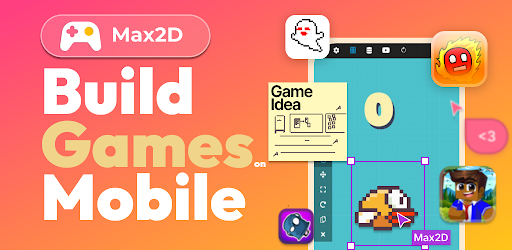
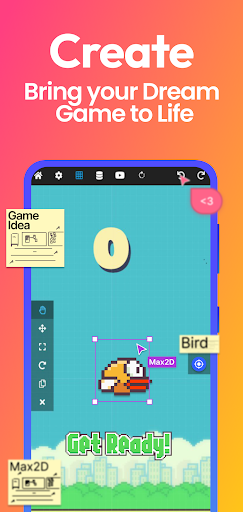
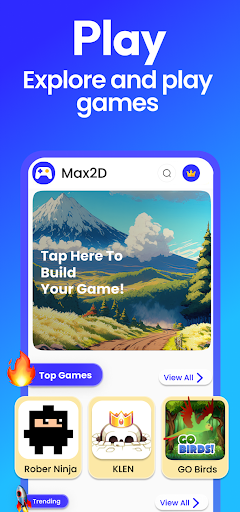
Turn your phone into a game development studio with Max2D! Create your own games, or play a bunch of games made by people just like you. Get ready to jump into the exciting world of mobile game development today!
Max2D is a mobile game development app used by millions of people all around the world to build and share games completely on mobile, whether it's racing games, puzzles games, clicker games, sandbox games or battles against various enemies. Whatever game you can imagine, you can build it using Max2D game maker.
The best part? You don't need any coding skills to get started!
FEATURES
- Mobile-only: Create games right from your smartphone or tablet.
- No coding: Build games easily without programming/coding skills.
- Professional game editor: Tackle game design tasks with our powerful tool.
- Works offline: Design games without needing an internet connection.
- Quick sharing: Share your games globally with just a click.
- Tutorials available: Learn fast with our plentiful guides and tutorials.
- Growing community: Join our expanding network of game enthusiasts.
- Variety of games: Play from a wide range of community-created games.
- Play Store publishing: Reach wider audiences by publishing on Play Store.
Create Games
Unleash your creativity with Max2D Game Maker as you create captivating games from start to finish. Design engaging start screens, craft immersive levels, cool characters, and tough enemies. Add logic and gameplay to make your game exciting. Max2D gives you the tools to turn your game ideas into real games offline.
Play Games
Play lots of games made by other Max2D users. Share your thoughts and feedback on games. Max2D is a platform where you can discover a world of user-made games.
Learn Game Development
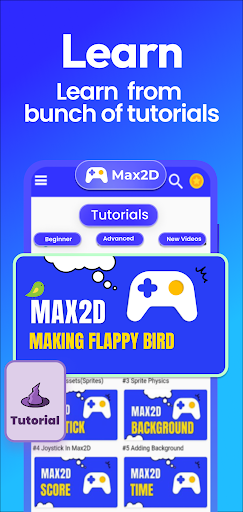
Max2D has a "Learn" section with how-to videos for game development. Our tutorials are regularly updated, and our community also creates educational videos.
Professional Game Editor
Max2D offers a professional development game engine with tools like visual scripting and camera controls. Comparable to Unity or Unreal Engine, you can use these tools offline. Master game making with Max2D quickly.
Share Your Games
After making your game, you can share it on Max2D for others to play and review. Showcase your game to our global audience.
Publish on Play Store
Max2D lets you create APK and AAB files to publish your game on the Google Play Store. Reach a wider audience with your game.
Join Our Community
Max2D has an incredible community of passionate users who are ready to support you throughout your journey. This vibrant community provides a wealth of resources, including tutorials, shared learnings, and support. Whether you have questions, need guidance, or want to share your own experiences, the Max2D community is there to lend a helping hand. Together, you can learn, grow, and create amazing games while being part of a supportive and inspiring community.
Unleash your creativity and start building your own games, right from your phone! Or dive into a sea of fun, exploring a wealth of games created by others. Your journey of endless fun and inspiration starts here!
---------------------------------------
FIND US ON
Official Website : https://max2dgame.com
Discord : https://discord.gg/dHzPjaHBbF
Max2D Forum : https://discord.gg/dHzPjaHBbF
Contact: support@max2d.app
Privacy Policy : https://www.max2d.app/privacypolicy.html
Tunjukkan Lagi

1. Muat turun pemasang MEmu dan selesaikan persediaan

2. Mulakan MEnu kemudian buka Google Play di desktop

3. Cari Max2D: Game Maker, Game Engine di Google Play
Install
4. Muat turun dan Pasang Max2D: Game Maker, Game Engine
5. Apabila selesai pemasangan, menekan ikon itu untuk memulakan

6. Gunakan MENu untuk mengalami Max2D: Game Maker, Game Engine pada komputer anda
MEmu Play ialah emulator Android terbaik, dengan lebih 100 juta pengguna mengalami pengalaman aplikasi Android yang unggul. Teknologi virtualisasi MEmu membolehkan anda menjalankan beribu-ribu aplikasi Android dengan lancar pada komputer anda, walaupun yang paling mencabar.
Skrin lebih besar dengan grafik yang lebih baik; Tempoh yang panjang, tanpa had bateri atau data mudah alih.
Sokongan Keymapping penuh untuk kawalan tepat papan kekunci dan tetikus atau gamepad.
Pelbagai akaun permainan atau tugas pada satu PC sekaligus dengan pengurus pelbagai contoh.
Use Max2D: Game Maker, Game Engine on PC by following steps: