Nuvra LogicLens
Dikemas kini
Versi Semasa
1.5.1
Ditawarkan Oleh

Berhentilah bimbang dengan bayaran berlebihan semasa menggunakan Nuvra LogicLens di telefon bimbit anda, bebaskan diri anda dari layar kecil dan nikmati penggunaan aplikasi pada paparan yang jauh lebih besar. Mulai sekarang, dapatkan pengalaman skrin penuh aplikasi anda dengan papan kekunci dan tetikus. MEmu Play semua ciri mengejutkan yang anda harapkan: pemasangan cepat dan penyediaan mudah, kawalan intuitif, tidak ada batasan bateri, data mudah alih, dan panggilan yang mengganggu. MEmu 9 yang baru adalah pilihan terbaik untuk menggunakan Nuvra LogicLens di komputer anda. Dikodkan dengan penyerapan kami, pengurus multi-instance menjadikan pembukaan 2 atau lebih akaun pada masa yang sama mungkin. Dan yang paling penting, mesin emulasi eksklusif kami dapat melepaskan potensi penuh PC anda, menjadikan semuanya lancar dan menyeronokkan.
Tunjukkan Lagi
Nikmati pengalaman hebat menggunakan Nuvra LogicLens di PC dengan MEmu Play. Ia merupakan emulator Android percuma yang hebat yang menyediakan beribu-ribu aplikasi Android untuk versi desktop mereka. Nikmati berhubung dengan rakan-rakan dan menggilap kerja anda dengan kecekapan yang lebih tinggi! Nuvra LogicLens — Private Media Cleaner & Secure Vault.
Nuvra LogicLens — Private Media Cleaner & Secure Vault
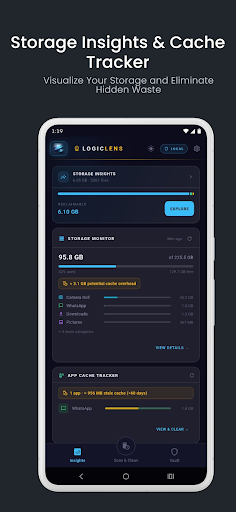
Your phone holds thousands of photos, videos, and documents. Most of them are duplicates, blurry shots, burst sequences, or files quietly leaking your GPS location to anyone you share them with. Nuvra LogicLens fixes all of that — entirely on your device, with zero cloud involvement.
Everything runs locally. Always.
There is no server. No account. No upload. Your files never leave your device — not for analysis, not for AI processing, not for anything. The Logic Engine is a native C++ module that runs directly on your phone's processor. What happens on your device stays on your device.
DEEP SCAN WITH LOGICLENS:
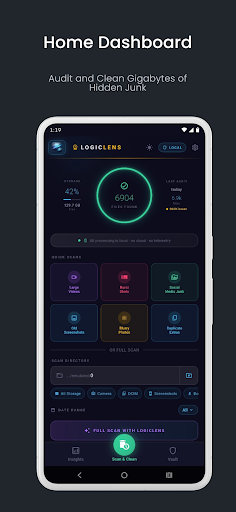
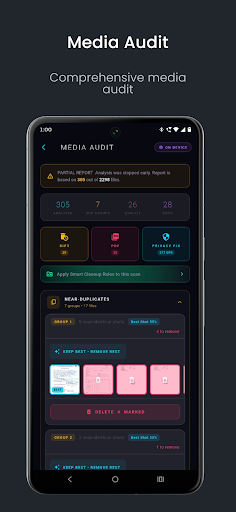
Run a full media audit in seconds. The C++ Logic Engine scans your chosen folder and detects:
Near-duplicate images
Blurry, dark, and low-resolution shots
Burst sequences — rapid-fire near-identical photos
Documents and screenshots ready for archiving
Files tagged with GPS coordinates before you share them
A live progress ring, file counter, and ETA keep you informed throughout. Stop at any time for a full partial report.
SIFT — GALLERY PURGE:
Review all flagged duplicates and quality issues in a fast, smooth thumbnail gallery. Select individual files or tap ALL, then purge them in one go. Simple, fast, permanent.
PRIVACY FIX PACK — METADATA SCRUBBER:
Every photo you take contains hidden metadata — your GPS coordinates, camera model, timestamp, and more. Before you share anything, run it through the Privacy Fix Pack. The scrubber strips all EXIF, GPS, and XMP data using native C++ processing. Clean copies are saved separately. Your originals are never touched. Enable Fix & Share mode and the cleaned files go straight to the share sheet the moment scrubbing completes.
SMART PDF COMPILER:
Turn your scanned documents and screenshots into a clean, shareable PDF in seconds. Review the page list, drag to reorder, remove unwanted pages, then compile. The entire process runs in a background thread so the UI stays completely smooth. Share the result instantly via the native share sheet.
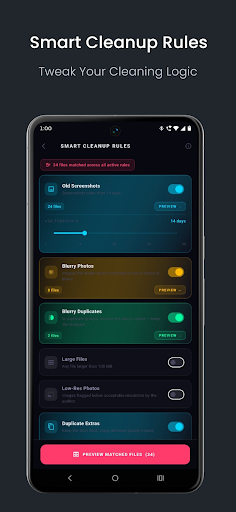
SMART CLEANUP RULES:
Set rules that automatically match files based on age, quality, size, and type. Run a scan directly from the rules page and see live match counts for every rule. Free users can analyse up to 100 files per scan. Upgrade to Pro for unlimited analysis.
ENCRYPTED VAULT :
Lock sensitive photos, videos, and documents behind biometric authentication or your device PIN. Files are encrypted on import — no plain copy is ever written to disk. Preview any file directly from the vault; decryption happens in memory only. Export or share selected items at any time.
Free tier includes up to 25 files. Pro unlocks unlimited storage plus:
Strict Mode — originals are always deleted on import, no prompt
Decoy Vault — a secondary PIN opens a separate vault with different contents, protecting you in coercion scenarios
Failed Unlock Alerts — warns you if repeated failed authentication attempts are detected
BACKGROUND OPTIMIZER (Pro):
Enable automatic background scans that run silently when your device is charging and idle. The dashboard card shows files indexed, issues found, and the last run time — so your gallery stays clean without any manual effort.
WHY NUVRA LOGICLENS?
100% on-device processing — no cloud, no tracking, no account required
Native C++ Logic Engine for fast, accurate analysis
Glassmorphism dark UI designed for clarity and speed
120 fps rendering on capable devices
Immediate visual feedback on every action — nothing ever freezes
FREE vs PRO
The free tier gives you full access to Deep Scan, Sift, the Privacy Fix Pack,
Smart PDF Compiler, Smart Cleanup Rules, and a 25-file Vault — with up to 50 file deletions per month. Pro removes every limit and unlocks Background Optimizer, Decoy Vault, Strict Mode, unlimited Vault storage, and unlimited deletions.
No internet permission required for core features. Your privacy is the product, not the price.
Tunjukkan Lagi

1. Muat turun pemasang MEmu dan selesaikan persediaan

2. Mulakan MEnu kemudian buka Google Play di desktop

3. Cari Nuvra LogicLens di Google Play
Install
4. Muat turun dan Pasang Nuvra LogicLens
5. Apabila selesai pemasangan, menekan ikon itu untuk memulakan

6. Gunakan MENu untuk mengalami Nuvra LogicLens pada komputer anda
MEmu Play ialah emulator Android terbaik, dengan lebih 100 juta pengguna mengalami pengalaman aplikasi Android yang unggul. Teknologi virtualisasi MEmu membolehkan anda menjalankan beribu-ribu aplikasi Android dengan lancar pada komputer anda, walaupun yang paling mencabar.
Skrin lebih besar dengan grafik yang lebih baik; Tempoh yang panjang, tanpa had bateri atau data mudah alih.
Sokongan Keymapping penuh untuk kawalan tepat papan kekunci dan tetikus atau gamepad.
Pelbagai akaun permainan atau tugas pada satu PC sekaligus dengan pengurus pelbagai contoh.
Use Nuvra LogicLens on PC by following steps: