PetPal: Desktop Pet Companion
Dikemas kini
Versi Semasa
3.6
Ditawarkan Oleh

Berhentilah bimbang dengan bayaran berlebihan semasa menggunakan PetPal: Desktop Pet Companion di telefon bimbit anda, bebaskan diri anda dari layar kecil dan nikmati penggunaan aplikasi pada paparan yang jauh lebih besar. Mulai sekarang, dapatkan pengalaman skrin penuh aplikasi anda dengan papan kekunci dan tetikus. MEmu Play semua ciri mengejutkan yang anda harapkan: pemasangan cepat dan penyediaan mudah, kawalan intuitif, tidak ada batasan bateri, data mudah alih, dan panggilan yang mengganggu. MEmu 9 yang baru adalah pilihan terbaik untuk menggunakan PetPal: Desktop Pet Companion di komputer anda. Dikodkan dengan penyerapan kami, pengurus multi-instance menjadikan pembukaan 2 atau lebih akaun pada masa yang sama mungkin. Dan yang paling penting, mesin emulasi eksklusif kami dapat melepaskan potensi penuh PC anda, menjadikan semuanya lancar dan menyeronokkan.
Tunjukkan Lagi
Nikmati pengalaman hebat menggunakan PetPal: Desktop Pet Companion di PC dengan MEmu Play. Ia merupakan emulator Android percuma yang hebat yang menyediakan beribu-ribu aplikasi Android untuk versi desktop mereka. Nikmati berhubung dengan rakan-rakan dan menggilap kerja anda dengan kecekapan yang lebih tinggi! Meet PetPal, an interactive screen pet app that brings lifelike cats, dogs, small pets and other companions onto your Android screen.
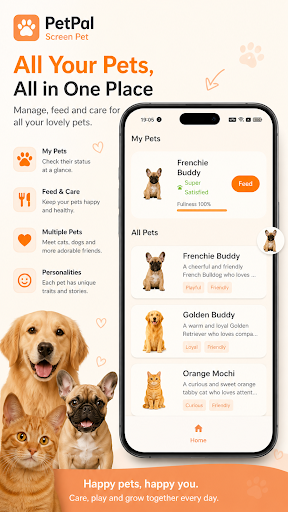
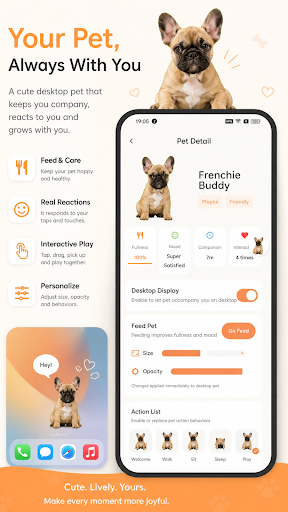
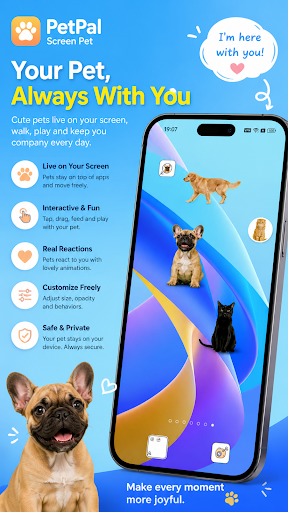
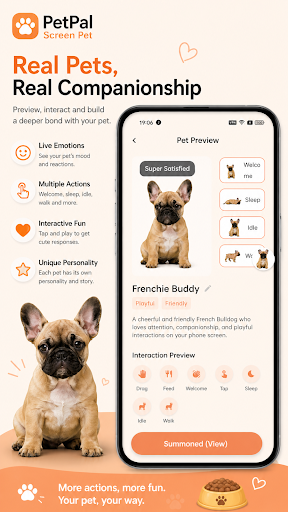
Meet PetPal, an interactive screen pet app that brings lifelike cats, dogs, small pets and other companions onto your Android screen.
Your pet does more than sit inside an app. It can float over other apps and stay with you while you browse, work, read or watch videos. Depending on the pet, it can walk, react to taps and dragging, eat, sleep, greet you, and respond when you charge or unlock your phone.
ADOPT READY-MADE PETS
Browse cats, dogs, cute small pets, exotic animals, wildlife and character-style companions. Preview each pet before adopting.
Eligible new users can choose their first pet for free. Purchased pets are one-time permanent unlocks, so you can keep and use the pets you adopt.
CREATE A CUSTOM PET OR CHARACTER
Want your own pet on your screen?
Upload a photo of your pet or a person and request a handmade custom desktop companion. Choose from natural, cartoon or sticker styles.
Custom orders are created by a human creator, usually within 1–12 hours, with the fastest orders completed in about 1 hour.
Once finished, your custom companion can be downloaded, adopted and used long term.
INTERACTIVE DESKTOP PET FEATURES
• Floating pets that can appear over other apps
• Tap, drag, feed, sleep and welcome interactions
• Charging and phone-unlock reactions on supported pets
• Adjustable pet size and transparency
• Sound and touch-through controls
• Custom pet names and interaction bubble text
• Import local GIFs for compatible action slots
• Pet care with food, bath coupons and treatment cards
• Remote movement and quick interactions for members
Different pets may support different actions and interactions.
PETPAL PLUS
PetPal Plus unlocks premium features including:
• Co-adopt a custom pet with friends
• Remote pet controls
• Notification sound features for supported messaging apps
• Bonus pet-care resources
Monthly and yearly plans renew automatically unless canceled through Google Play.
PETS ON YOUR PHONE AND COMPUTER
PetPal also provides Windows and macOS desktop clients.
Use your phone to scan the computer login QR code and continue your pet companion experience across devices.
Whether you're using your phone or working on your computer, your virtual companion can stay close to you.
MAKE YOUR PET YOUR OWN
Personalize your desktop pet by changing its:
• Name
• Size
• Transparency
• Sounds
• Interaction messages
• Action configuration
You can also use pet videos as live wallpapers and manage which downloaded pets appear on your screen.
MORE THAN A VIRTUAL PET
PetPal combines the fun of a virtual pet with the personal feeling of having your own companion on screen.
Adopt a cat or dog you love, discover unusual animals, or turn a photo of your own pet or someone important to you into a personalized screen companion.
Bring a little companion to your screen with PetPal.
Tunjukkan Lagi

1. Muat turun pemasang MEmu dan selesaikan persediaan

2. Mulakan MEnu kemudian buka Google Play di desktop

3. Cari PetPal: Desktop Pet Companion di Google Play
Install
4. Muat turun dan Pasang PetPal: Desktop Pet Companion
5. Apabila selesai pemasangan, menekan ikon itu untuk memulakan

6. Gunakan MENu untuk mengalami PetPal: Desktop Pet Companion pada komputer anda
MEmu Play ialah emulator Android terbaik, dengan lebih 100 juta pengguna mengalami pengalaman aplikasi Android yang unggul. Teknologi virtualisasi MEmu membolehkan anda menjalankan beribu-ribu aplikasi Android dengan lancar pada komputer anda, walaupun yang paling mencabar.
Skrin lebih besar dengan grafik yang lebih baik; Tempoh yang panjang, tanpa had bateri atau data mudah alih.
Sokongan Keymapping penuh untuk kawalan tepat papan kekunci dan tetikus atau gamepad.
Pelbagai akaun permainan atau tugas pada satu PC sekaligus dengan pengurus pelbagai contoh.
Use PetPal: Desktop Pet Companion on PC by following steps: