ReFollow - Who Unfollowed Me
Dikemas kini
Versi Semasa
2.0.3
Ditawarkan Oleh

Berhentilah bimbang dengan bayaran berlebihan semasa menggunakan ReFollow - Who Unfollowed Me di telefon bimbit anda, bebaskan diri anda dari layar kecil dan nikmati penggunaan aplikasi pada paparan yang jauh lebih besar. Mulai sekarang, dapatkan pengalaman skrin penuh aplikasi anda dengan papan kekunci dan tetikus. MEmu Play semua ciri mengejutkan yang anda harapkan: pemasangan cepat dan penyediaan mudah, kawalan intuitif, tidak ada batasan bateri, data mudah alih, dan panggilan yang mengganggu. MEmu 9 yang baru adalah pilihan terbaik untuk menggunakan ReFollow - Who Unfollowed Me di komputer anda. Dikodkan dengan penyerapan kami, pengurus multi-instance menjadikan pembukaan 2 atau lebih akaun pada masa yang sama mungkin. Dan yang paling penting, mesin emulasi eksklusif kami dapat melepaskan potensi penuh PC anda, menjadikan semuanya lancar dan menyeronokkan.
Tunjukkan Lagi
Nikmati pengalaman hebat menggunakan ReFollow - Who Unfollowed Me di PC dengan MEmu Play. Ia merupakan emulator Android percuma yang hebat yang menyediakan beribu-ribu aplikasi Android untuk versi desktop mereka. Nikmati berhubung dengan rakan-rakan dan menggilap kerja anda dengan kecekapan yang lebih tinggi! Curious who doesn’t follow you back — without handing over your Instagram password?
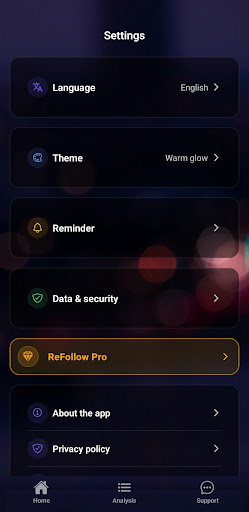
Curious who doesn’t follow you back — without handing over your Instagram password?
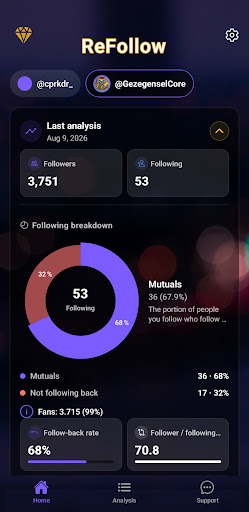
ReFollow is a privacy-first follower analyzer that runs entirely on your phone. No login. No OAuth. No connection to your Instagram account. You simply load Instagram’s official “Download Your Information” file (JSON inside a ZIP) and get a clear breakdown in seconds.
WHAT YOU’LL SEE
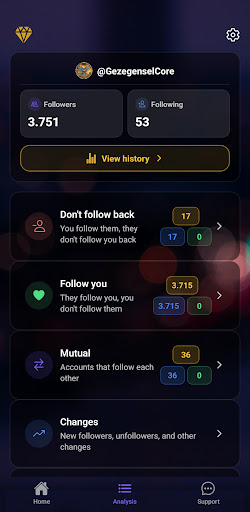
• Not following back — people you follow who don’t follow you
• Fans — people who follow you whom you don’t follow back
• Mutuals — your mutual follows at a glance
• Changes — new followers, unfollowers, and more when you compare two exports
• Follow requests — sent and received when they’re in your export
• Home insights — follow-back feel, ratios, and easy-to-read summaries
• History — track follower and following trends with charts over time
HOW IT WORKS
1. Instagram → Account Center → Download Your Information → choose JSON
2. Open ReFollow and load the ZIP (or share the file to ReFollow on Android)
3. Tap Analyze — your results appear on the Analysis tab
Tip: HTML exports aren’t supported. Pick JSON when you request your data.
WHY PEOPLE CHOOSE REFOLLOW
• Your lists stay on your device for analysis
• No Instagram password, ever
• Clean results you can actually use
• Built for real privacy — not another “connect your account” tool
FREE TO START
Full analysis from your export, useful previews of key lists, optional rewarded unlocks for some full lists and Changes, plus banner ads.
REFOLLOW PRO — MONTHLY OR YEARLY
Unlock the full not-following-back list and Changes without ad unlocks, manage multiple accounts separately, export lists as CSV, get a PDF snapshot from History, create an encrypted backup of your local data, and enjoy an ad-free experience. The yearly plan may include a 14-day free trial where offered.
PRIVACY, PLAINLY
ReFollow never asks you to sign in to Instagram. Analysis happens on your device. You can delete local data anytime in Settings. Uninstalling removes the app’s data from your phone.
LANGUAGES
Turkish, English, German, French, Spanish, Portuguese (Brazil), Arabic, Hindi.
SUPPORT
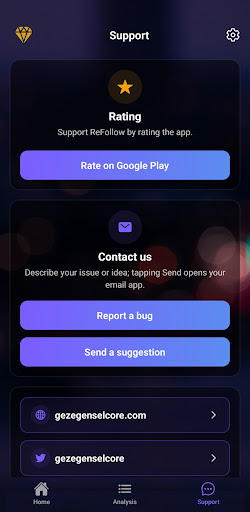
In-app Support tab for bugs and ideas (optional screenshot). Email: support@gezegenselcore.com
ReFollow is not affiliated with Instagram or Meta.
Not intended for users under 13.
Tunjukkan Lagi

1. Muat turun pemasang MEmu dan selesaikan persediaan

2. Mulakan MEnu kemudian buka Google Play di desktop

3. Cari ReFollow - Who Unfollowed Me di Google Play
Install
4. Muat turun dan Pasang ReFollow - Who Unfollowed Me
5. Apabila selesai pemasangan, menekan ikon itu untuk memulakan

6. Gunakan MENu untuk mengalami ReFollow - Who Unfollowed Me pada komputer anda
MEmu Play ialah emulator Android terbaik, dengan lebih 100 juta pengguna mengalami pengalaman aplikasi Android yang unggul. Teknologi virtualisasi MEmu membolehkan anda menjalankan beribu-ribu aplikasi Android dengan lancar pada komputer anda, walaupun yang paling mencabar.
Skrin lebih besar dengan grafik yang lebih baik; Tempoh yang panjang, tanpa had bateri atau data mudah alih.
Sokongan Keymapping penuh untuk kawalan tepat papan kekunci dan tetikus atau gamepad.
Pelbagai akaun permainan atau tugas pada satu PC sekaligus dengan pengurus pelbagai contoh.
Use ReFollow - Who Unfollowed Me on PC by following steps: