Roku TV Remote
Dikemas kini
Versi Semasa
1.0.9
Ditawarkan Oleh

Berhentilah bimbang dengan bayaran berlebihan semasa menggunakan Roku TV Remote di telefon bimbit anda, bebaskan diri anda dari layar kecil dan nikmati penggunaan aplikasi pada paparan yang jauh lebih besar. Mulai sekarang, dapatkan pengalaman skrin penuh aplikasi anda dengan papan kekunci dan tetikus. MEmu Play semua ciri mengejutkan yang anda harapkan: pemasangan cepat dan penyediaan mudah, kawalan intuitif, tidak ada batasan bateri, data mudah alih, dan panggilan yang mengganggu. MEmu 9 yang baru adalah pilihan terbaik untuk menggunakan Roku TV Remote di komputer anda. Dikodkan dengan penyerapan kami, pengurus multi-instance menjadikan pembukaan 2 atau lebih akaun pada masa yang sama mungkin. Dan yang paling penting, mesin emulasi eksklusif kami dapat melepaskan potensi penuh PC anda, menjadikan semuanya lancar dan menyeronokkan.
Tunjukkan Lagi
Nikmati pengalaman hebat menggunakan Roku TV Remote di PC dengan MEmu Play. Ia merupakan emulator Android percuma yang hebat yang menyediakan beribu-ribu aplikasi Android untuk versi desktop mereka. Nikmati berhubung dengan rakan-rakan dan menggilap kerja anda dengan kecekapan yang lebih tinggi! Looking for the best Roku Remote app for your Android phone?
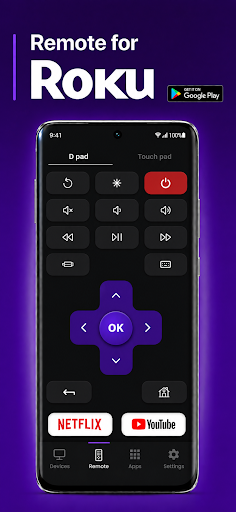
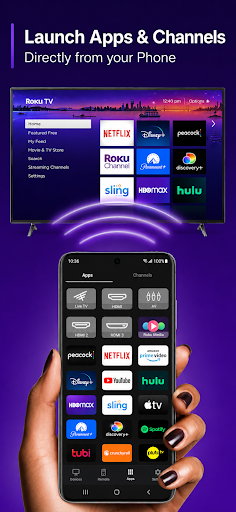
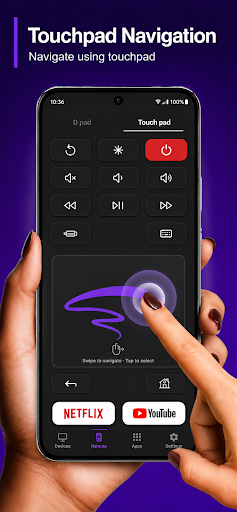
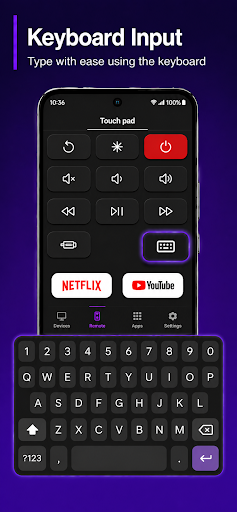
Looking for the best Roku Remote app for your Android phone? Meet the smartest Roku TV Remote — a free, easy-to-use Remote for Roku that turns your phone into a full Roku remote control for every Roku device in your home. Whether you have a Roku TV, a TCL Roku TV, a Roku streaming stick, a Roku Express, or a Roku Ultra, this Roku Remote app gives you instant, lag-free control from anywhere in the room.
THE ULTIMATE ROKU REMOTE FOR ROKU TV & TCL ROKU
Lost your physical Roku remote? Broken buttons? Dead batteries? No problem. Our Roku Remote app replaces your TCL Roku remote, Hisense Roku remote, Sharp Roku remote, Onn Roku remote, and every official Roku TV Remote — no more digging through couch cushions for a tiny plastic stick.
KEY FEATURES
- Full Roku Remote Control — power, volume, mute, home, back, OK, directional pad, replay, options, info, headphone mode.
- Works with every Roku TV and Roku streaming device — Roku Express, Roku Premiere, Roku Streaming Stick, Roku Streaming Stick 4K, Roku Ultra, Roku Smart Soundbar, and all TCL Roku TV models.
- One-tap channel shortcuts — launch Netflix, YouTube, Prime Video, Disney+, Hulu, Max, Paramount+, Apple TV+, Spotify, and Peacock instantly from your Roku Remote.
- Private listening mode — stream Roku TV audio straight to your phone headphones, perfect for late-night viewing.
- Smart keyboard for fast typing — search Roku channels and apps without the slow on-screen letter hunt.
- Voice search support — speak commands directly to your Roku TV through the app.
- Cast photos, videos, and music from your phone to any Roku streaming device.
- Dark mode, light mode, and a clean modern UI built for one-handed use.
- Works over Wi-Fi — no IR, no bluetooth pairing headaches, no extra hardware.
COMPATIBLE WITH ALL ROKU DEVICES
This Remote for Roku is compatible with every Roku device released, including:
Roku TV (all models and years)
TCL Roku TV
Hisense Roku TV
Sharp Roku TV
Onn Roku TV
Element Roku TV
Philips Roku TV
Roku Express & Express 4K
Roku Premiere
Roku Streaming Stick & Stick 4K
Roku Ultra & Ultra LT
Roku Smart Soundbar & Streambar
If it's a Roku streaming device, this Roku Remote controls it.
HOW TO SET UP YOUR ROKU REMOTE
1. Connect your phone and your Roku TV (or any Roku device) to the same Wi-Fi network.
2. Open the Roku Remote app.
3. Tap the auto-detected Roku device — pairing takes 3 seconds.
4. Start using your phone as a full Roku TV Remote.
No login. No sign-up. No ads
WHY CHOOSE THIS ROKU REMOTE APP
- Faster pairing — connects to your Roku TV in seconds, no setup hassle.
- Lag-free controls — instant response so volume, channel, and navigation feel as natural as the physical remote.
- Built for everyday use — clean layout, one-handed operation, no clutter.
- Save your couch from another remote search — your phone is always within reach.
- Private listening on headphones means late-night watching without waking the house.
COMMON SEARCHES THIS APP ANSWERS
- Roku remote app for Android
- Roku TV Remote replacement
- TCL Roku Remote not working
- Remote for Roku streaming stick
- Free Roku Remote
- Roku Remote control phone
- Universal Roku Remote
- Rookie remote / Roko remote / Ruku remote (yes, we know — and yes, this app works)
PRIVACY & PERMISSIONS
We only request the permissions needed to discover and control your Roku device on your local Wi-Fi network. No personal data is collected, sold, or shared. Your Roku Remote stays private.
DOWNLOAD NOW
Stop searching for your lost Roku remote. Download the smartest Roku TV Remote app for Android today and take full Roku remote control of every Roku streaming device in your home — Roku TV, TCL Roku, Hisense Roku, Roku stick, Roku Ultra, and more.
This app is not affiliated with, endorsed by, or sponsored by Roku, Inc. "Roku" is a trademark of Roku, Inc. This is a third-party Roku Remote app designed for fans of Roku streaming devices.
Tunjukkan Lagi

1. Muat turun pemasang MEmu dan selesaikan persediaan

2. Mulakan MEnu kemudian buka Google Play di desktop

3. Cari Roku TV Remote di Google Play
Install
4. Muat turun dan Pasang Roku TV Remote
5. Apabila selesai pemasangan, menekan ikon itu untuk memulakan

6. Gunakan MENu untuk mengalami Roku TV Remote pada komputer anda
MEmu Play ialah emulator Android terbaik, dengan lebih 100 juta pengguna mengalami pengalaman aplikasi Android yang unggul. Teknologi virtualisasi MEmu membolehkan anda menjalankan beribu-ribu aplikasi Android dengan lancar pada komputer anda, walaupun yang paling mencabar.
Skrin lebih besar dengan grafik yang lebih baik; Tempoh yang panjang, tanpa had bateri atau data mudah alih.
Sokongan Keymapping penuh untuk kawalan tepat papan kekunci dan tetikus atau gamepad.
Pelbagai akaun permainan atau tugas pada satu PC sekaligus dengan pengurus pelbagai contoh.
Use Roku TV Remote on PC by following steps: