SolimacAI Video Generator
Dikemas kini
Versi Semasa
1.0.3
Ditawarkan Oleh

Berhentilah bimbang dengan bayaran berlebihan semasa menggunakan SolimacAI Video Generator di telefon bimbit anda, bebaskan diri anda dari layar kecil dan nikmati penggunaan aplikasi pada paparan yang jauh lebih besar. Mulai sekarang, dapatkan pengalaman skrin penuh aplikasi anda dengan papan kekunci dan tetikus. MEmu Play semua ciri mengejutkan yang anda harapkan: pemasangan cepat dan penyediaan mudah, kawalan intuitif, tidak ada batasan bateri, data mudah alih, dan panggilan yang mengganggu. MEmu 9 yang baru adalah pilihan terbaik untuk menggunakan SolimacAI Video Generator di komputer anda. Dikodkan dengan penyerapan kami, pengurus multi-instance menjadikan pembukaan 2 atau lebih akaun pada masa yang sama mungkin. Dan yang paling penting, mesin emulasi eksklusif kami dapat melepaskan potensi penuh PC anda, menjadikan semuanya lancar dan menyeronokkan.
Tunjukkan Lagi
Nikmati pengalaman hebat menggunakan SolimacAI Video Generator di PC dengan MEmu Play. Ia merupakan emulator Android percuma yang hebat yang menyediakan beribu-ribu aplikasi Android untuk versi desktop mereka. Nikmati berhubung dengan rakan-rakan dan menggilap kerja anda dengan kecekapan yang lebih tinggi! Create AI videos with Arabic lip-synced dialogue.
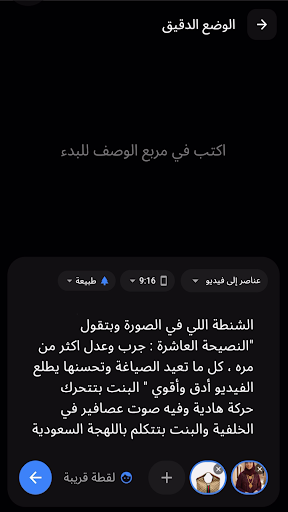
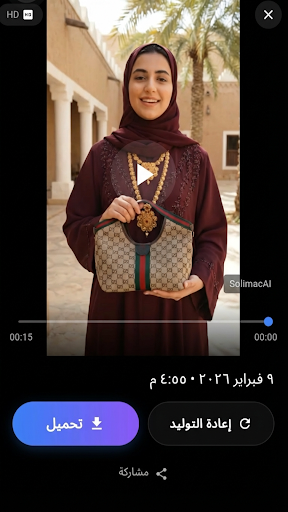
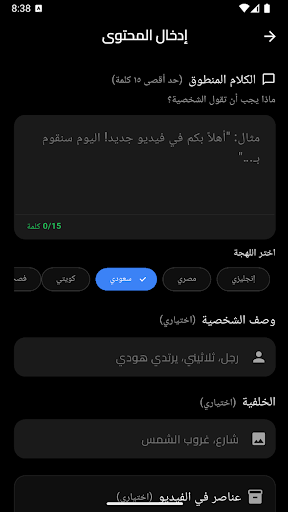
Create AI videos with Arabic lip-synced dialogue. Pick your dialect - Egyptian, Saudi, Kuwaiti, or Fosha - type what your character should say, and generate a video with realistic speech. Drop any person, product, or object into your scene from a photo and watch the AI bring it to life.
ARABIC DIALECTS & SPOKEN DIALOGUE
Type up to 15 words of dialogue, choose your dialect, and the AI renders lip-synced speech directly into the video. Perfect for TikTok ads, social reels, e-commerce demos, and storytelling in your audience's language.
PHOTO-BASED VIDEO CREATION
Upload portraits, product shots, or logos - the AI places them naturally into your video. Combine multiple photos in Ingredients mode to create dynamic product demos, outfit showcases, or brand content. Use your own face for personalized speaking videos.
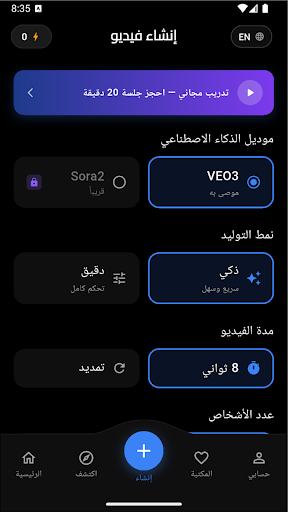
SMART MODE - Quick & Easy
Use guided selectors for video length, visual style, camera angle, and aspect ratio, then generate - no prompt engineering required.
PRECISION MODE - Full Creative Control
Write your own prompt, set start and end frames from photos, choose a scene mood (Cinematic, Film Noir, Action Figure, Vintage, Nature, Urban), dial in camera movement, and fine-tune every detail from a single interface.
CREATION WORKFLOWS
- Smart Mode: Guided setup for faster video creation
- Precision - Text-to-Video: Describe any scene and get a professional video
- Precision - Frames-to-Video: Set start and end frames, AI generates the motion
- Precision - Ingredients-to-Video: Combine multiple photos into one dynamic video
EXTEND YOUR VIDEOS
Continue any video by +7 seconds at a time with new prompts and dialogue. Build longer sequences up to 148 seconds.
QUALITY & STYLE
- HD 720p output
- 7 visual styles: Calm, Dark, Confident, Cinematic, Cyberpunk, Vibrant, Minimal
- 7 camera angle presets and 6 scene presets
- Vertical (9:16) and Horizontal (16:9) aspect ratios
EXPLORE & VIDEO LIBRARY
Discover curated AI videos for inspiration. Manage all your creations with search, favorites, full playback, download to camera roll, and share to Instagram, TikTok, WhatsApp, and more.
BILINGUAL INTERFACE
Switch between English and Arabic at any time. Full RTL layout support throughout the entire app.
ACCOUNT & SUPPORT
Edit your profile, view transaction history, send feedback, report problems, and request account deletion - all in-app.
FREE 1-ON-1 TRAINING
Book a free 20-minute session with the SolimacAI team for personalized prompt and workflow guidance - directly from the app.
This is a companion app for existing SolimacAI customers. Sign in with your existing account and use previously acquired credits to generate videos on the go. This Android app does not include in-app purchases or an in-app checkout flow.
Tunjukkan Lagi

1. Muat turun pemasang MEmu dan selesaikan persediaan

2. Mulakan MEnu kemudian buka Google Play di desktop

3. Cari SolimacAI Video Generator di Google Play
Install
4. Muat turun dan Pasang SolimacAI Video Generator
5. Apabila selesai pemasangan, menekan ikon itu untuk memulakan

6. Gunakan MENu untuk mengalami SolimacAI Video Generator pada komputer anda
MEmu Play ialah emulator Android terbaik, dengan lebih 100 juta pengguna mengalami pengalaman aplikasi Android yang unggul. Teknologi virtualisasi MEmu membolehkan anda menjalankan beribu-ribu aplikasi Android dengan lancar pada komputer anda, walaupun yang paling mencabar.
Skrin lebih besar dengan grafik yang lebih baik; Tempoh yang panjang, tanpa had bateri atau data mudah alih.
Sokongan Keymapping penuh untuk kawalan tepat papan kekunci dan tetikus atau gamepad.
Pelbagai akaun permainan atau tugas pada satu PC sekaligus dengan pengurus pelbagai contoh.
Use SolimacAI Video Generator on PC by following steps: