The Particle Box
Dikemas kini
Versi Semasa
1.6
Ditawarkan Oleh

Berhentilah bimbang dengan bayaran berlebihan semasa menggunakan The Particle Box di telefon bimbit anda, bebaskan diri anda dari layar kecil dan nikmati penggunaan aplikasi pada paparan yang jauh lebih besar. Mulai sekarang, dapatkan pengalaman skrin penuh aplikasi anda dengan papan kekunci dan tetikus. MEmu Play semua ciri mengejutkan yang anda harapkan: pemasangan cepat dan penyediaan mudah, kawalan intuitif, tidak ada batasan bateri, data mudah alih, dan panggilan yang mengganggu. MEmu 9 yang baru adalah pilihan terbaik untuk menggunakan The Particle Box di komputer anda. Dikodkan dengan penyerapan kami, pengurus multi-instance menjadikan pembukaan 2 atau lebih akaun pada masa yang sama mungkin. Dan yang paling penting, mesin emulasi eksklusif kami dapat melepaskan potensi penuh PC anda, menjadikan semuanya lancar dan menyeronokkan.
Tunjukkan Lagi
Nikmati pengalaman hebat menggunakan The Particle Box di PC dengan MEmu Play. Ia merupakan emulator Android percuma yang hebat yang menyediakan beribu-ribu aplikasi Android untuk versi desktop mereka. Nikmati berhubung dengan rakan-rakan dan menggilap kerja anda dengan kecekapan yang lebih tinggi! The Particle Box Mobile: Advanced ITC Research Tool.
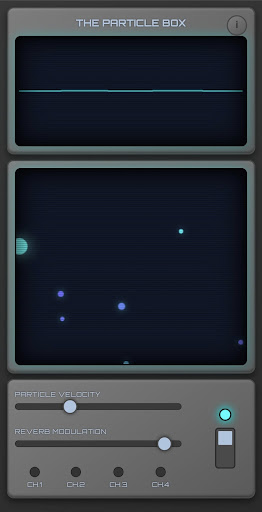
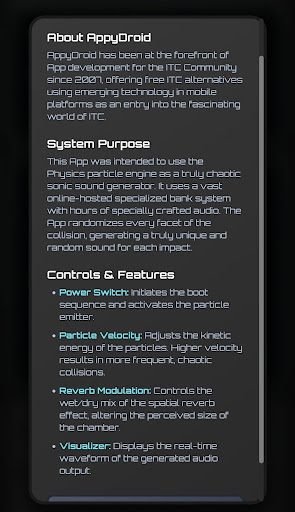
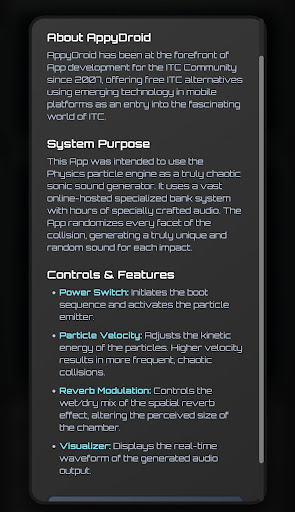
The Particle Box Mobile: Advanced ITC Research Tool
In the latest release the banks are stored locally on the device to prevent audio issues and works completely offline.
Experience the next generation of Instrumental Trans-Communication (ITC) research with The Particle Box Mobile. Developed by AppyDroid, a leader in paranormal software since 2007, this application brings the power of stochastic physics simulation to your Android device.
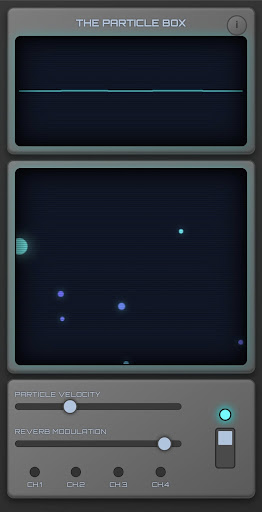
Concept & Technology Unlike standard ghost box apps that simply loop pre-recorded audio banks, The Particle Box uses a real-time physics particle engine to generate audio. The system simulates a vacuum chamber where autonomous particles collide at high velocities.
Every collision is a unique event. The physics engine tracks the impact force, velocity, and angle of every particle interaction to trigger and modulate specific audio fragments from our vast, online-hosted vocal banks.
Key Features:
Stochastic Collision Engine: Audio is triggered 100% dynamically by random particle interactions, ensuring no two sessions are ever the same.
Live Physics Simulation: Watch the particles react in real-time. You control the chaotic environment.
4 Specialized Audio Banks: specially crafted vocal audio designed for EVP (Electronic Voice Phenomena) capture.
Dynamic Modulation: The app randomizes the start position, pitch, and playback speed of every audio fragment based on the physics of the collision, creating a truly non-linear audio stream.
Adjustable Parameters:
Velocity Control: Increase particle energy for faster, more chaotic responses.
Reverb Density: Control the "Cathedral" reverb effect to create a massive, immersive sound stage ideal for capturing subtle EVPs.
Real-Time Visualizer: Monitor the audio waveform output directly on the virtual CRT display.
Why use The Particle Box? This tool is designed for serious paranormal investigators and ITC researchers looking for a "clean" but chaotic audio source. By removing the predictability of linear radio sweeps or simple loops, The Particle Box provides a bed of random vocal phonemes—the raw material believed to be used by spirits to form words and sentences.
Note: This application requires an internet connection to stream the audio banks effectively.
Disclaimer: This app is intended for experimental paranormal research and entertainment purposes. Results vary and cannot be guaranteed.
Tunjukkan Lagi

1. Muat turun pemasang MEmu dan selesaikan persediaan

2. Mulakan MEnu kemudian buka Google Play di desktop

3. Cari The Particle Box di Google Play
Install
4. Muat turun dan Pasang The Particle Box
5. Apabila selesai pemasangan, menekan ikon itu untuk memulakan

6. Gunakan MENu untuk mengalami The Particle Box pada komputer anda
MEmu Play ialah emulator Android terbaik, dengan lebih 100 juta pengguna mengalami pengalaman aplikasi Android yang unggul. Teknologi virtualisasi MEmu membolehkan anda menjalankan beribu-ribu aplikasi Android dengan lancar pada komputer anda, walaupun yang paling mencabar.
Skrin lebih besar dengan grafik yang lebih baik; Tempoh yang panjang, tanpa had bateri atau data mudah alih.
Sokongan Keymapping penuh untuk kawalan tepat papan kekunci dan tetikus atau gamepad.
Pelbagai akaun permainan atau tugas pada satu PC sekaligus dengan pengurus pelbagai contoh.
Use The Particle Box on PC by following steps: