
Vivino: Buy the Right Wine
Dikemas kini
Versi Semasa
2024.50.1
Ditawarkan Oleh

Berhentilah bimbang dengan bayaran berlebihan semasa menggunakan Vivino: Buy the Right Wine di telefon bimbit anda, bebaskan diri anda dari layar kecil dan nikmati penggunaan aplikasi pada paparan yang jauh lebih besar. Mulai sekarang, dapatkan pengalaman skrin penuh aplikasi anda dengan papan kekunci dan tetikus. MEmu Play semua ciri mengejutkan yang anda harapkan: pemasangan cepat dan penyediaan mudah, kawalan intuitif, tidak ada batasan bateri, data mudah alih, dan panggilan yang mengganggu. MEmu 9 yang baru adalah pilihan terbaik untuk menggunakan Vivino: Buy the Right Wine di komputer anda. Dikodkan dengan penyerapan kami, pengurus multi-instance menjadikan pembukaan 2 atau lebih akaun pada masa yang sama mungkin. Dan yang paling penting, mesin emulasi eksklusif kami dapat melepaskan potensi penuh PC anda, menjadikan semuanya lancar dan menyeronokkan.
Tunjukkan Lagi
Download Vivino: Buy the Right Wine on PC with MEmu Android Emulator. Enjoy playing on big screen. With 65 million users, Vivino is the world’s largest wine app and your one-stop shop for ratings, recommendations, food pairings, learning, and cellar management alongside the most exciting range of wines you'd ever want to drink.
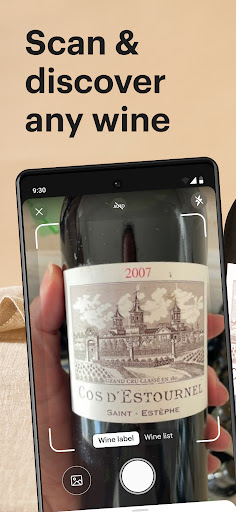

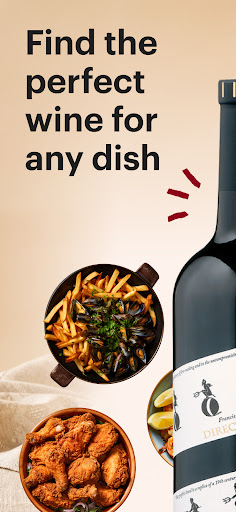

With 65 million users, Vivino is the world’s largest wine app and your one-stop shop for ratings, recommendations, food pairings, learning, and cellar management alongside the most exciting range of wines you'd ever want to drink.
Whether you’re an expert or a beginner, Vivino has everything you need to go from scanning to sipping, all in one place.
Get essential info fast
Scan labels and wine lists, or search names, to instantly get important details including unbiased ratings, tasting notes, and even food pairings.
Choose with confidence
Get a ‘Match for You’ score for every wine and insights into why we think you’ll like or dislike it.
Track your tastes
Rate and review wines to record what you love (or don’t). Keep your Taste Profile updated to discover what to drink next and how you rank against the Vivino community.
Buy the world’s most-loved wines
Using community data we source and sell the world's most-loved wines. We’ll even recommend bottles based on your ratings and preferences – all delivered directly to your door.
Manage your collection
Use our Cellar management feature to sort and organize your collection by grape, style, food pairing, and even drinking window.
Interactive wine courses
Use Vivino’s ‘Wine Adventure’ to get a deeper knowledge of regions, grapes, food pairing, and more. Or access Vivino’s library of wine regions and styles to learn more whenever you like
Connect with the community
Add friends, family, and expert community members to share your love of wine and get recommendations from trusted sources beyond the critics.
Vivino includes both a free version and a subscription version with premium features.
Privacy policy: https://www.vivino.com/privacy
Terms of use: https://www.vivino.com/terms
Please note that we are not able to reply to comments or questions left in App Store reviews. If you have any support-related inquiries or need assistance, please contact support@vivino.com
STATS AT A GLANCE
• 65 million app downloads and climbing
• 16 million wines and counting from 245,000+ wineries
• Millions of unbiased ratings and reviews
• Hundreds of thousands of wines available for purchase in 18 markets worldwide"
Tunjukkan Lagi

1. Muat turun pemasang MEmu dan selesaikan persediaan

2. Mulakan MEnu kemudian buka Google Play di desktop

3. Cari Vivino: Buy the Right Wine di Google Play
Install
4. Muat turun dan Pasang Vivino: Buy the Right Wine
5. Apabila selesai pemasangan, menekan ikon itu untuk memulakan

6. Gunakan MENu untuk mengalami Vivino: Buy the Right Wine pada komputer anda
MEmu Play ialah emulator Android terbaik, dengan lebih 100 juta pengguna mengalami pengalaman aplikasi Android yang unggul. Teknologi virtualisasi MEmu membolehkan anda menjalankan beribu-ribu aplikasi Android dengan lancar pada komputer anda, walaupun yang paling mencabar.
Skrin lebih besar dengan grafik yang lebih baik; Tempoh yang panjang, tanpa had bateri atau data mudah alih.
Sokongan Keymapping penuh untuk kawalan tepat papan kekunci dan tetikus atau gamepad.
Pelbagai akaun permainan atau tugas pada satu PC sekaligus dengan pengurus pelbagai contoh.
Use Vivino: Buy the Right Wine on PC by following steps: