VpnHood! Connect
Dikemas kini
Versi Semasa
5.0.627
Ditawarkan Oleh

Berhentilah bimbang dengan bayaran berlebihan semasa menggunakan VpnHood! Connect di telefon bimbit anda, bebaskan diri anda dari layar kecil dan nikmati penggunaan aplikasi pada paparan yang jauh lebih besar. Mulai sekarang, dapatkan pengalaman skrin penuh aplikasi anda dengan papan kekunci dan tetikus. MEmu Play semua ciri mengejutkan yang anda harapkan: pemasangan cepat dan penyediaan mudah, kawalan intuitif, tidak ada batasan bateri, data mudah alih, dan panggilan yang mengganggu. MEmu 9 yang baru adalah pilihan terbaik untuk menggunakan VpnHood! Connect di komputer anda. Dikodkan dengan penyerapan kami, pengurus multi-instance menjadikan pembukaan 2 atau lebih akaun pada masa yang sama mungkin. Dan yang paling penting, mesin emulasi eksklusif kami dapat melepaskan potensi penuh PC anda, menjadikan semuanya lancar dan menyeronokkan.
Tunjukkan Lagi
Download VpnHood! Connect on PC with MEmu Android Emulator. Enjoy playing on big screen. Our VPN app is a FREE, fast, and secure solution for all your internet needs.
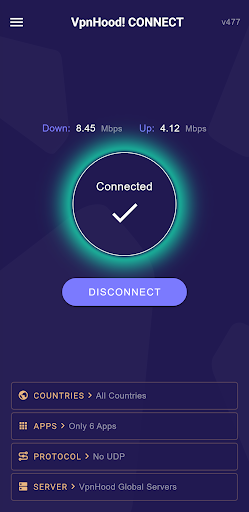

Our VPN app is a FREE, fast, and secure solution for all your internet needs. With unlimited bandwidth and speed, you can browse the web without any restrictions.
It’s powered by the open-source ★★VpnHood engine★★, ensuring a reliable and robust connection.
Key Features:
★ Free to Use
★ Easy to Use: You can connect to our VPN with a simple click of the connect button.
★ Fast and Secure
★ Unlimited Bandwidth, Speed and Time
★ Open Source: Built on the open-source VpnHood engine (on GitHub), our app is transparent and trustworthy.
★ Broad Compatibility: Our app supports Android 6 and above, including Android TV and Windows
★ IPv4 & IPv6 Support: We support IPv4 and IPv6, ensuring maximum compatibility and performance.
★ Dynamic Servers
Customizable Options:
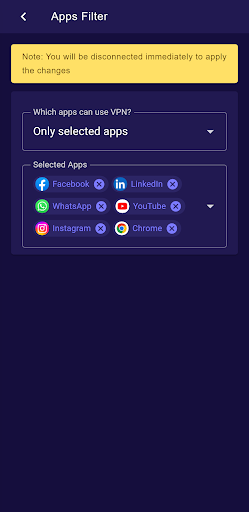
✔ App Filtering: Choose which apps use the VPN with our filter options. You can exclude, include, or select all apps.
✔ Country Exclusion: This allows you to exclude your own country, ensuring that traffic to servers within your country does not pass through the VPN tunnel. This eliminates the necessity of disconnecting your VPN when accessing services in your country that do not accept connections from foreign IPs and increase your connections to servers in your country.
✔ Local Network Exclusion: Exclude your local network to maintain access to local resources while using the VPN.
✔ UDP / TCP Protocol: Choose whether to turn the UDP protocol on or off based on your needs.
Why Choose Us?
▶ Undetectable: The VpnHood protocol is designed to bypass censorship filters. It is a secure protocol without any fingerprint. Its traffic and protocol patterns look exactly like regular HTTPS websites, making it virtually indistinguishable.
▶ Innovative Technology: As the first VPN app developed with .NET, we’re at the forefront of technological innovation.
▶ Powered by VpnHood Engine: Our app is powered by our own open-source VPN engine, VpnHood, ensuring transparency and reliability.
▶ User-Friendly: Our app is designed with simplicity in mind. Connect to our VPN with just a simple click.
▶ Customizable: With options to filter apps, exclude your country, exclude local networks, and toggle UDP protocol, you have full control over your VPN usage.
▶ Constantly Evolving: We are dedicated to developing a VPN solution that remains undetectable by any censorship filters. Our commitment to continuous improvement and innovation ensures that you can experience the full freedom of the internet. Try our VPN app today and explore without limits!
We’re Here for You Around the Clock!
Our dedicated customer support team is available 24/7 to assist you. If you have any questions or concerns, please don’t hesitate to contact us at support@vpnhood.com. We’re always here to help!
Tunjukkan Lagi

1. Muat turun pemasang MEmu dan selesaikan persediaan

2. Mulakan MEnu kemudian buka Google Play di desktop

3. Cari VpnHood! Connect di Google Play
Install
4. Muat turun dan Pasang VpnHood! Connect
5. Apabila selesai pemasangan, menekan ikon itu untuk memulakan

6. Gunakan MENu untuk mengalami VpnHood! Connect pada komputer anda
MEmu Play ialah emulator Android terbaik, dengan lebih 100 juta pengguna mengalami pengalaman aplikasi Android yang unggul. Teknologi virtualisasi MEmu membolehkan anda menjalankan beribu-ribu aplikasi Android dengan lancar pada komputer anda, walaupun yang paling mencabar.
Skrin lebih besar dengan grafik yang lebih baik; Tempoh yang panjang, tanpa had bateri atau data mudah alih.
Sokongan Keymapping penuh untuk kawalan tepat papan kekunci dan tetikus atau gamepad.
Pelbagai akaun permainan atau tugas pada satu PC sekaligus dengan pengurus pelbagai contoh.
Use VpnHood! Connect on PC by following steps: