
vpnify - Unlimited VPN Proxy
Dikemas kini
Versi Semasa
Ditawarkan Oleh

Berhentilah bimbang dengan bayaran berlebihan semasa menggunakan vpnify - Unlimited VPN Proxy di telefon bimbit anda, bebaskan diri anda dari layar kecil dan nikmati penggunaan aplikasi pada paparan yang jauh lebih besar. Mulai sekarang, dapatkan pengalaman skrin penuh aplikasi anda dengan papan kekunci dan tetikus. MEmu Play semua ciri mengejutkan yang anda harapkan: pemasangan cepat dan penyediaan mudah, kawalan intuitif, tidak ada batasan bateri, data mudah alih, dan panggilan yang mengganggu. MEmu 9 yang baru adalah pilihan terbaik untuk menggunakan vpnify - Unlimited VPN Proxy di komputer anda. Dikodkan dengan penyerapan kami, pengurus multi-instance menjadikan pembukaan 2 atau lebih akaun pada masa yang sama mungkin. Dan yang paling penting, mesin emulasi eksklusif kami dapat melepaskan potensi penuh PC anda, menjadikan semuanya lancar dan menyeronokkan.
Tunjukkan Lagi
Download vpnify - Unlimited VPN Proxy on PC with MEmu Android Emulator. Enjoy playing on big screen. FREE UNLIMITED vpnify is the best VPN & UNLIMITED 100% FREE high speed VPN Proxy on Android.
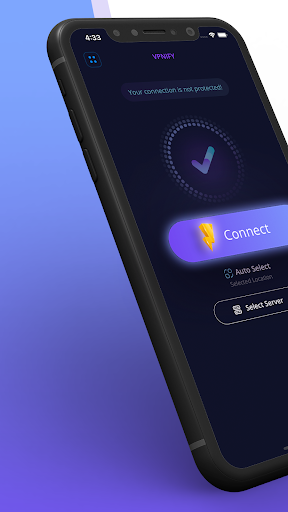
FREE UNLIMITED vpnify is the best VPN & UNLIMITED 100% FREE high speed VPN Proxy on Android. It is highly secure with military-grade encryption so you can safely navigate public, business and school networks. Access all websites securely and privately.
General Features
Easy to use one-click connect to secure your connection
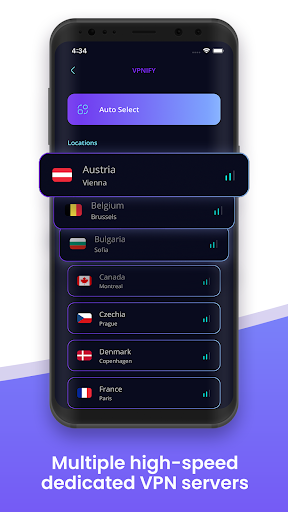
Multiple high-speed dedicated VPN servers
No bandwidth usage limitations for streaming and downloading
There is no VPN trial - Full unlimited VPN, no session capping
No registration necessary
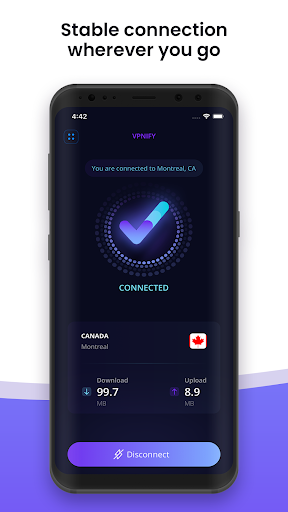
Stable connection wherever you go - home and abroad
Access your favorite content:
Enjoy secure and private access to your favorite content and websites
Ultra-fast VPN speeds for blazing-fast connections
Hotspot VPN protection, a hotspot shield security APP
Stay connected in all types of networks
Browse websites securely and privately
Fast and stable VPN connection speeds
Premium VPN features at zero cost
Security with vpnify:
Encrypted secure DNS to prevent bad actors from snooping
Military-grade cybersecurity traffic encryption
DNS & IP leak-protected connections
We won't store traffic logs, it's a perfect private browsing VPN
Enhanced online privacy with secure connections
vpnify is a free VPN proxy for your Android device. You can browse securely on all your favorite websites and apps. It is a totally unlimited and free virtual private network. Quickly establish a connection simply by touching connect. We provide you with an Internet network: a better Internet.
The use cases for vpnify are unlimited:
A simple way to add an additional layer of security to your privacy
You can use it securely in your school's WiFi to protect your data
Use it in public networks to avoid personal data loss
Protect yourself from harmful APPs that collect your IP and track your geoIP location data
Watch videos and movies securely through a VPN proxy
Access streaming platforms securely using VPN
Connect to social networking sites securely with VPN protection
Use VoIP and messaging chat applications securely with VPN
Play mobile games online with secure connection
In which countries can I use vpnify?
You can use vpnify everywhere in the world. With dozens of servers at multiple locations, we can make sure it's a VPN for Asia, a VPN for Europe, a VPN for South America, and a VPN for the Middle East.
The VPN works great everywhere!
The locations are available as follows:
VPN USA (East and West Coast)
VPN United Kingdom (London and Manchester)
VPN Austria
VPN Belgium
VPN Bulgaria
VPN Canada
VPN Czech Republic
VPN Denmark
VPN France
VPN Germany
VPN Hong Kong
VPN Hungary
VPN Italy
VPN Ireland
VPN Netherlands
VPN Norway
VPN Poland
VPN Romania
VPN Singapore
VPN Slovakia
VPN Spain
VPN Sweden
VPN Switzerland
vpnify, a genuinely free super power VPN.
Dear users, we do our best to cover worldwide usability and bring you a secure and reliable internet experience.
Unfortunately, we cannot guarantee a 100% availability in every country. Should there be problems with connecting in your country, please contact us by submitting feedback within the App , we'll try to make it work.
Tunjukkan Lagi

1. Muat turun pemasang MEmu dan selesaikan persediaan

2. Mulakan MEnu kemudian buka Google Play di desktop

3. Cari vpnify - Unlimited VPN Proxy di Google Play
Install
4. Muat turun dan Pasang vpnify - Unlimited VPN Proxy
5. Apabila selesai pemasangan, menekan ikon itu untuk memulakan

6. Gunakan MENu untuk mengalami vpnify - Unlimited VPN Proxy pada komputer anda
MEmu Play ialah emulator Android terbaik, dengan lebih 100 juta pengguna mengalami pengalaman aplikasi Android yang unggul. Teknologi virtualisasi MEmu membolehkan anda menjalankan beribu-ribu aplikasi Android dengan lancar pada komputer anda, walaupun yang paling mencabar.
Skrin lebih besar dengan grafik yang lebih baik; Tempoh yang panjang, tanpa had bateri atau data mudah alih.
Sokongan Keymapping penuh untuk kawalan tepat papan kekunci dan tetikus atau gamepad.
Pelbagai akaun permainan atau tugas pada satu PC sekaligus dengan pengurus pelbagai contoh.
Use vpnify - Unlimited VPN Proxy on PC by following steps: