WiFi: passwords, hotspots
Dikemas kini
Versi Semasa
v2025.3.31.2759735
Ditawarkan Oleh

Berhentilah bimbang dengan bayaran berlebihan semasa menggunakan WiFi: passwords, hotspots di telefon bimbit anda, bebaskan diri anda dari layar kecil dan nikmati penggunaan aplikasi pada paparan yang jauh lebih besar. Mulai sekarang, dapatkan pengalaman skrin penuh aplikasi anda dengan papan kekunci dan tetikus. MEmu Play semua ciri mengejutkan yang anda harapkan: pemasangan cepat dan penyediaan mudah, kawalan intuitif, tidak ada batasan bateri, data mudah alih, dan panggilan yang mengganggu. MEmu 9 yang baru adalah pilihan terbaik untuk menggunakan WiFi: passwords, hotspots di komputer anda. Dikodkan dengan penyerapan kami, pengurus multi-instance menjadikan pembukaan 2 atau lebih akaun pada masa yang sama mungkin. Dan yang paling penting, mesin emulasi eksklusif kami dapat melepaskan potensi penuh PC anda, menjadikan semuanya lancar dan menyeronokkan.
Tunjukkan Lagi
Nikmati pengalaman hebat menggunakan WiFi: passwords, hotspots di PC dengan MEmu Play. Ia merupakan emulator Android percuma yang hebat yang menyediakan beribu-ribu aplikasi Android untuk versi desktop mereka. Nikmati berhubung dengan rakan-rakan dan menggilap kerja anda dengan kecekapan yang lebih tinggi! osmino: FREE WiFi Lite - lightweight version of the legendary app osmino Wi-Fi.
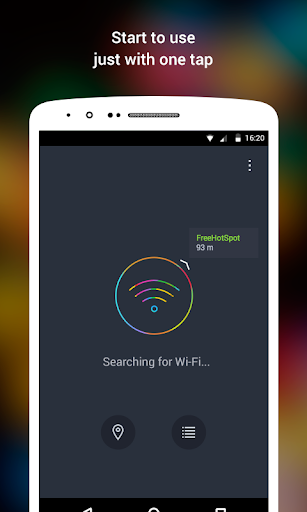
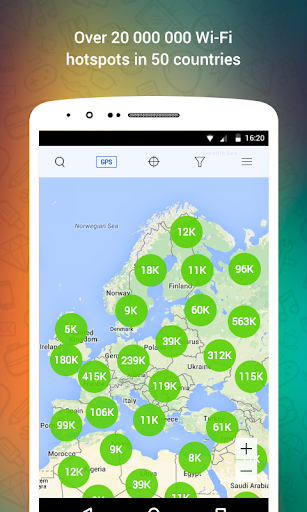
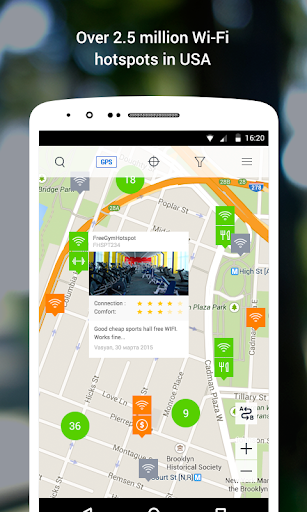
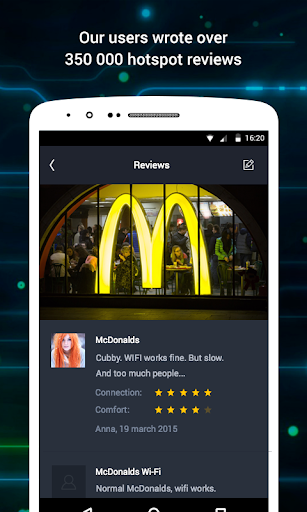
osmino: FREE WiFi Lite - lightweight version of the legendary app osmino Wi-Fi. This is a free Wi-Fi access around the world - more than 20 million wifi hotspots on map. With the help of this easy WiFi-manager you can automatically join free WiFi and share public and private WiFi networks. Automatic search and connection to public WiFi networks start with one tap. No any complicated settings nor terms. You can check the nearest public hotspots on our map.
You get an automatic access to available WiFi hotspots. Without having to know any parameters and network settings – osmino WiFi will do it for you.
You can also share the password to a known WiFi network and make it available to other osmino users, just select "Share" and agree by filling check box.
Information about public hotspots is automatically set on map, according to the data received from users’ devices. When you connect to any public network we receive on our server the network location, name and access settings and automatically show it on the map.
This is how we create the use-proven public WiFi hotspots map based on users’ data. The more users subscribe to osmino, the more disposable wifi hotspots appear on the map.
There are already nearly 20 000 000 wifi hotspots on osmino map in more than 50 countries.
More than 3 000 000 hotspots in USA
Over 3 000 000 wifi hotspots in Korea
Nearly 600 000 hotspots in Mexico and over 400 000 in Brazil
more than 1.5 million hotspots with passwords in Russia
about 170 thousand wifi hotspots in Ukraine
400 000 hotspots on the map of Italy,
200 000 on the map of Spain,
France has more than 550,000 hotspots,
Germany - 350 000
about 100 000 wifi hotspots in India
more than 300 000 wifi spots in Thailand,
about 50 000 wifi networks in Colombia,
100 000 hotspots in Indonesia and Turkey in each,
more than 550 000 wifi hotspots with passwords on Japan map.
Tunjukkan Lagi

1. Muat turun pemasang MEmu dan selesaikan persediaan

2. Mulakan MEnu kemudian buka Google Play di desktop

3. Cari WiFi: passwords, hotspots di Google Play
Install
4. Muat turun dan Pasang WiFi: passwords, hotspots
5. Apabila selesai pemasangan, menekan ikon itu untuk memulakan

6. Gunakan MENu untuk mengalami WiFi: passwords, hotspots pada komputer anda
MEmu Play ialah emulator Android terbaik, dengan lebih 100 juta pengguna mengalami pengalaman aplikasi Android yang unggul. Teknologi virtualisasi MEmu membolehkan anda menjalankan beribu-ribu aplikasi Android dengan lancar pada komputer anda, walaupun yang paling mencabar.
Skrin lebih besar dengan grafik yang lebih baik; Tempoh yang panjang, tanpa had bateri atau data mudah alih.
Sokongan Keymapping penuh untuk kawalan tepat papan kekunci dan tetikus atau gamepad.
Pelbagai akaun permainan atau tugas pada satu PC sekaligus dengan pengurus pelbagai contoh.
Use WiFi: passwords, hotspots on PC by following steps: