想體驗AIMP,可是手機熒幕太小,一載軟體就變燙,怎麼辦?透過逍遙模擬器,在電腦的大熒幕上暢快體驗!用鍵鼠操作更精準流暢,逍遙模擬器滿足您的所有期待。在電腦上下載安裝AIMP,不用擔心電池當掉,想體驗多久就多久,順暢跑一天~全新的逍遙模擬器9,絕對是您體驗AIMP電腦版的最佳選擇。完美的按鍵映射系統讓AIMP如PC軟體般順手;強大的多開功能可同時執行多個任務;獨家虛擬化技術更能徹底釋放電腦效能,保障長時間穩定運作。我們致力於不讓設備限制您的體驗,助您輕鬆高效,暢快無比!
更多
透過逍遙模擬器,在電腦上下載AIMP,享受大熒幕的暢快體驗。 Attention!
Attention!
App may works incorrectly on devices based on M.I.U.I firmware.
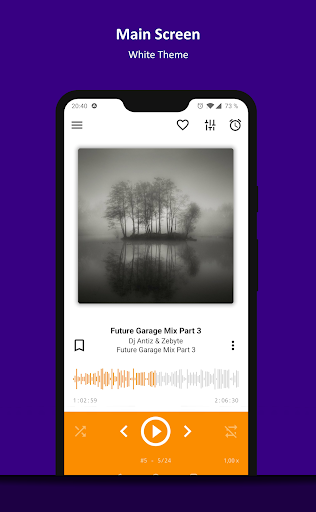
Key features:
+ Supported formats: aac, ape, dff, dsf, flac, it, m4a, m4b, mo3, mod, mp2, mp3, mp4, mpc, mpga, mtm, ogg, opus, s3m, tta, umx, wav, webm, wv, xm
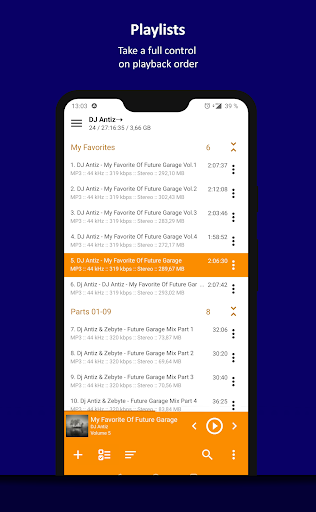
+ Supported playlists: m3u, m3u8, xspf, pls and cue
+ Support for Android Auto and custom Car PCs
+ Support for OpenSL / AudioTrack / AAudio output methods
+ Support for CUE Sheets
+ Support for OTG-storages and custom file providers
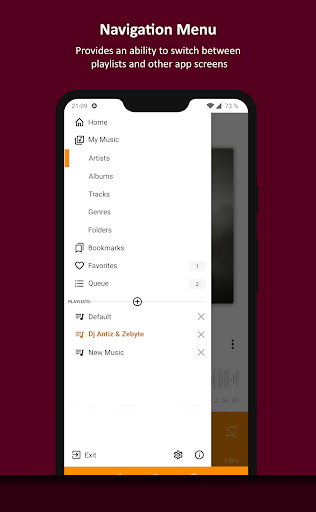
+ Support for user bookmarks
+ Support for user defined playback queue
+ Support for album arts and lyrics
+ Support for multiple playlists and smart-playlists based on folders
+ Support for internet radio (including Http Live Streaming)
+ Automatic detection of tags encoding
+ Built-in 20-band graphic equalizer
+ Balance and playback speed control
+ Volume normalization using replay gain or peak-based normalization
+ Sleep timer feature
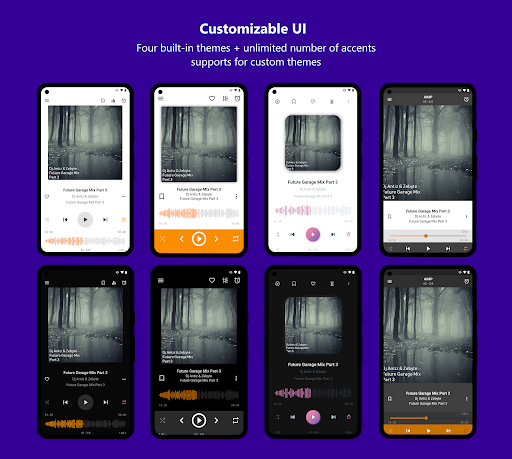
+ Custom themes support
+ Built-in light, dark and black themes
+ Support for night and day mode
Optional features:
+ Automatic music search and indexing
+ An ability to cross-fade tracks
+ An ability to repeat playlist / track / playback without repeating
+ An ability to down mix multi-channels audio files to stereo
+ An ability to down mix audio files to mono
+ An ability to control playback from notification area
+ An ability to control playback via gestures in album art area
+ An ability to control playback via headset
+ An ability to switch the tracks via volume buttons
Additional features:
+ An ability to play files from the File Manager applications
+ An ability to play files from Windows shared folders (only v2 and v3 of samba protocol are supported)
+ An ability to play files from WebDAV-based cloud storage
+ An ability to add to playlist only chosen files / folders
+ An ability to delete files physically
+ An ability to sort files by template / manually
+ An ability to group files by template
+ An ability to search files in filtering mode
+ An ability to share audio files
+ An ability to register playing track as ringtone from player
+ An ability to edit meta of APE, MP3, FLAC, OGG and M4A file formats
Additionally, our app is ads free.
更多

1. 下載逍遙安裝器並完成設置

2. 啟動逍遙後打開位於桌面上的谷歌商店

3. 在谷歌商店中搜尋AIMP
 Install
4. 下載並安裝AIMP
5. 下載完成後點擊圖標來啟動

6. 透過逍遙享受在電腦上體驗AIMP
逍遙安卓是優秀的安卓模擬器,全球超過5000萬用戶的優先選擇。逍遙安卓以虛擬化技術為核心,為用户打造突破手機配備局限的應用平台!
大屏精細展示;無限待機,超越電池和流量限制
鍵鼠,手把操作全面支持,操作更精準
用逍遙多開同時運行多個遊戲、應用。
Use AIMP on PC by following steps: