
AIMP
更新日
現在のバージョン
v4.31.1732 (08.06.2026)
提供元

スマートフォンは不要!パソコンと同じようにキーボードとマウスで操作できます。MEmu Playは、あなたが待ち望んでいたすべての楽しみをお届けします。バッテリー残量や小さな画面を気にすることなく、AIMPをご利用ください。最新のMEmu 9は、AIMPをPCで体験するのに最適です!完璧なキーマッピングシステムにより、PCのようなスムーズな操作性を実現します。マルチインスタンス機能により、複数のアプリケーションを同時に実行できます。独自の仮想化エンジンがPCのパフォーマンスを最大限に引き出します。アプリを使用するだけでなく、高品質な体験を得ることができます。
もっと見る
AIMPをPCでダウンロード!大画面でより楽しむ。電源が落ちてしまうとか通信料が足りないとかの問題を心配する必要がなく、PCの大画面でより快適にゲームを楽しましょう! 注意!
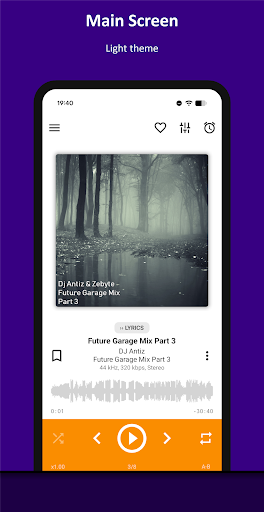
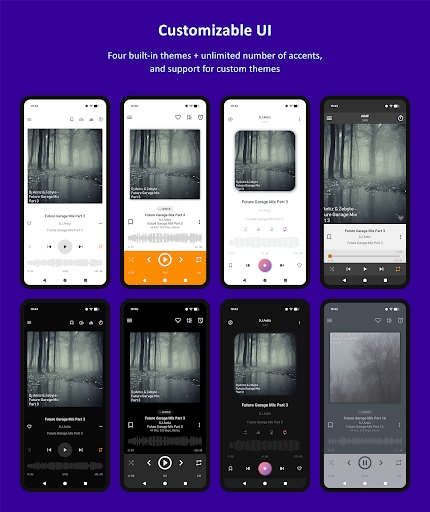
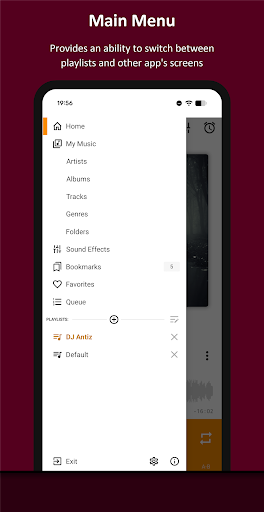
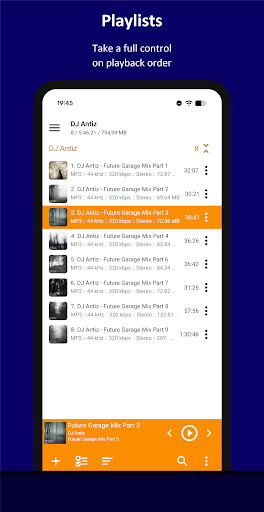
注意!
M.I.U.I ファームウェアを搭載したデバイスでは、アプリが正しく動作しない可能性があります。
主な機能:
+ 対応フォーマット: aac、ape、dff、dsf、flac、it、m4a、m4b、mo3、mod、mp2、mp3、mp4、mpc、mpga、mtm、ogg、opus、s3m、tta、umx、wav、webm、wv、xm
+ 対応プレイリスト: m3u、m3u8、xspf、pls、cue
+ Android AutoおよびカスタムカーPCに対応
+ OpenSL / AudioTrack / AAudio出力方式に対応
+ CUEシートに対応
+ OTGストレージおよびカスタムファイルプロバイダーに対応
+ ユーザーブックマークに対応
+ ユーザー定義の再生キューに対応
+ アルバムアートと歌詞に対応
+ フォルダベースの複数のプレイリストとスマートプレイリストに対応
+ インターネットラジオに対応 (HTTPライブストリーミングを含む)
+ 自動検出タグエンコード
+ 20バンドグラフィックイコライザー内蔵
+ バランス、ピッチ、スピードコントロール
+ A-Bトラックパートリピート
+ リプレイゲインまたはピークベースノーマライゼーションによる音量ノーマライゼーション
+ スリープタイマー機能
+ カスタムテーマ対応
+ ライト、ダーク、ブラックのテーマ内蔵
+ ナイトモードとデイモード対応
オプション機能:
+ 自動音楽検索とインデックス作成
+ トラックのクロスフェード機能
+ プレイリスト/トラック/再生をリピートせずにリピート再生
+ マルチチャンネルオーディオファイルをステレオにダウンミックス
+ オーディオファイルをモノラルにダウンミックス
+ 通知領域からの再生コントロール
+ アルバムアートエリアでのジェスチャーによる再生コントロール
+ ヘッドセットからの再生コントロール
+ 音量ボタンによるトラック切り替え
追加機能:
+ ファイルマネージャーアプリケーションからのファイル再生
+ Windows共有フォルダからのファイル再生(Sambaプロトコルv2およびv3のみ) (対応)
+ WebDAVベースのクラウドストレージからファイルを再生する機能
+ 選択したファイル/フォルダのみをプレイリストに追加する機能
+ ファイルを物理的に削除する機能
+ テンプレート/手動でファイルを並べ替える機能
+ テンプレートでファイルをグループ化する機能
+ フィルタリングモードでファイルを検索する機能
+ オーディオファイルを共有する機能
+ 再生中のトラックをプレーヤーから着信音として登録する機能
+ APE、MP3、FLAC、OGG、M4Aファイル形式のメタデータを編集する機能
さらに、当アプリは広告なしです。
もっと見る

1. MEmuインストーラーをダウンロードしてセットアップを完了する

2. MEmuを起動し、デスクトップでのPlayストアを開く

3. PlayストアでAIMPを検索する
Install
4. AIMPをダウンロードしてインストールする
5. インストールが完了したら、アイコンをクリックしてスタート

6. MEmuを使ってパソコンでAIMPを体験する
MEmu Playは現在、最高の無料Androidエミュレーターであり、5,000万人のユーザーが優れたAndroidアプリ体験を楽しんでいます。MEmuの仮想化テクノロジーにより、数千ものAndroidアプリをコンピューターでスムーズに実行できます。
大画面でより精細;無限の待機、電池とドラフィックの極限を超え
キーボード・マウス・コントローラーを全力でサポート、より快適
マルチインスタンスで複数のゲームを同時に実行
Use AIMP on PC by following steps: