
Jasper Cancer Care Companion
更新日期
目前版本
4.3.0
提供者

想體驗Jasper Cancer Care Companion,可是手機熒幕太小,一載軟體就變燙,怎麼辦?透過逍遙模擬器,在電腦的大熒幕上暢快體驗!用鍵鼠操作更精準流暢,逍遙模擬器滿足您的所有期待。在電腦上下載安裝Jasper Cancer Care Companion,不用擔心電池當掉,想體驗多久就多久,順暢跑一天~全新的逍遙模擬器9,絕對是您體驗Jasper Cancer Care Companion電腦版的最佳選擇。完美的按鍵映射系統讓Jasper Cancer Care Companion如PC軟體般順手;強大的多開功能可同時執行多個任務;獨家虛擬化技術更能徹底釋放電腦效能,保障長時間穩定運作。我們致力於不讓設備限制您的體驗,助您輕鬆高效,暢快無比!
更多
透過逍遙模擬器,在電腦上下載Jasper Cancer Care Companion,享受大熒幕的暢快體驗。 The Jasper Cancer Care Companion makes it easy to keep track of your day to day care while providing recommendations that are personalized to your diagnosis and treatment.


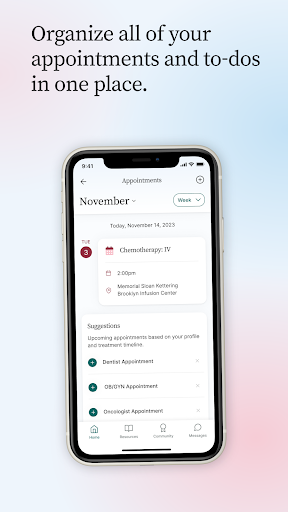
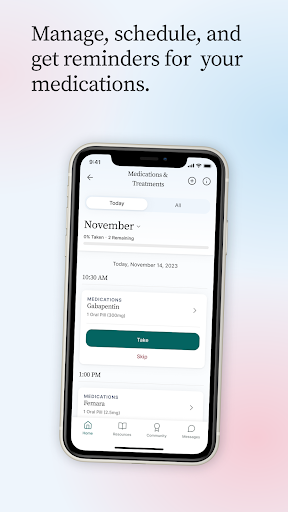
The Jasper Cancer Care Companion makes it easy to keep track of your day to day care while providing recommendations that are personalized to your diagnosis and treatment. Manage your appointments, track your medications, and rate your symptoms and mood, all in one place with Jasper.
Jasper is free and available from any mobile device or computer.
—
Our over 10,000 members are using Jasper to:
GET PERSONALIZED GUIDANCE
- Jasper provides you with personalized information about what to expect throughout your cancer care experience. You’ll see Our Guide for each treatment and appointment you add, recommended activities based on your profile and treatment timeline, and self-care to dos to improve your sense of well-being.
- With Care Coach, you also have access to one-on-one sessions with a clinically-certified oncology expert who can help you find resources and provide guidance about managing your cancer care.
MANAGE APPOINTMENTS & TREATMENTS
- Our auto-create tool helps you quickly add appointments like primary care and treatments like chemotherapy and radiation.
- Jasper sends reminders for every appointment—to you and the caregivers you invite to your Jasper account.
TRACK SYMPTOMS, MOOD, VITAL SIGNS, AND MORE
- Our Daily Tracker helps you log important measurements and feelings throughout the day.
TRACK MEDICATION
- See all of your medications, and how and when to take them, in one easy-to-manage list.
- Jasper reminds you when to take each medication and will alert you if you’ve missed one.
- Plus, you’ll always have a record of the medications you are taking or have taken, so it’s easy when your health care team asks about it.
SHARE TO-DOS
- Track grocery or meal delivery, household and lawn maintenance, medication pick up—whatever you need each week.
- Share items with caregivers you invite to your account, and they can coordinate on what’s left to do.
GET INFORMATION
- The Library has over 100 articles to guide you through treatment, lifestyle changes you may be experiencing, strategies for dealing with stress and anxiety, and more.
On a good day, dealing with cancer is complicated. On a bad day, it can feel impossible. For every day, Jasper is here to help.
—
We take your privacy seriously and will never sell or give away your personal information. Your Jasper account is only viewable by you and the people you directly share it with.
更多

1. 下載逍遙安裝器並完成設置

2. 啟動逍遙後打開位於桌面上的谷歌商店

3. 在谷歌商店中搜尋Jasper Cancer Care Companion
Install
4. 下載並安裝Jasper Cancer Care Companion
5. 下載完成後點擊圖標來啟動

6. 透過逍遙享受在電腦上體驗Jasper Cancer Care Companion
逍遙安卓是優秀的安卓模擬器,全球超過5000萬用戶的優先選擇。逍遙安卓以虛擬化技術為核心,為用户打造突破手機配備局限的應用平台!
大屏精細展示;無限待機,超越電池和流量限制
鍵鼠,手把操作全面支持,操作更精準
用逍遙多開同時運行多個遊戲、應用。
Use Jasper Cancer Care Companion on PC by following steps: