
komoot - hike, bike & run
更新日期
目前版本
1735389892
提供者

想體驗komoot - hike, bike & run,可是手機熒幕太小,一載軟體就變燙,怎麼辦?透過逍遙模擬器,在電腦的大熒幕上暢快體驗!用鍵鼠操作更精準流暢,逍遙模擬器滿足您的所有期待。在電腦上下載安裝komoot - hike, bike & run,不用擔心電池當掉,想體驗多久就多久,順暢跑一天~全新的逍遙模擬器9,絕對是您體驗komoot - hike, bike & run電腦版的最佳選擇。完美的按鍵映射系統讓komoot - hike, bike & run如PC軟體般順手;強大的多開功能可同時執行多個任務;獨家虛擬化技術更能徹底釋放電腦效能,保障長時間穩定運作。我們致力於不讓設備限制您的體驗,助您輕鬆高效,暢快無比!
更多
透過逍遙模擬器,在電腦上下載komoot - hike, bike & run,享受大熒幕的暢快體驗。 Turn your next ride, hike, or run into an adventure with komoot.
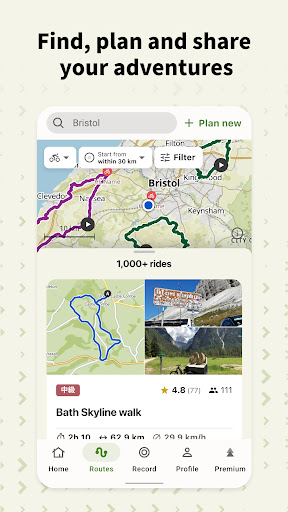
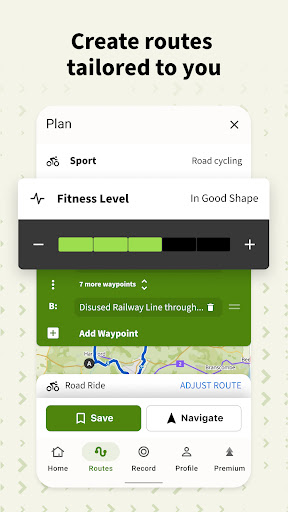
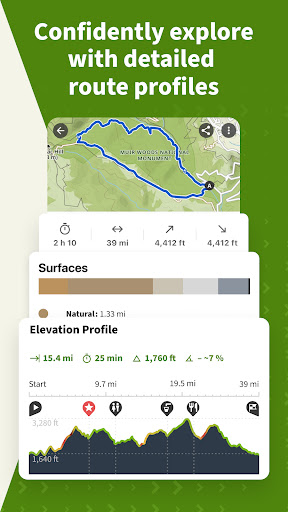
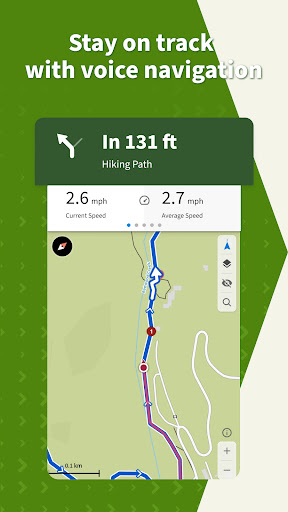
Turn your next ride, hike, or run into an adventure with komoot. Get inspired by tapping into shared community knowledge and recommendations, then bring your adventures to life with the easy route planner. Get your first region for free and say hello to your next adventure!
Plan Your Perfect Hiking, Road Cycling, or Mountain Bike Adventure
Get the route perfect for your sport—be it smooth asphalt for your road bike, singletrack for your mountain bike, silent cycling paths for touring, or natural hiking trails for your hikes. Plan down to the last detail with at-your-fingertips info like surface, difficulty, distance, and elevation profile, and check your running, walking or bicycle progress with the GPS tracker.
Turn-by-Turn GPS Voice Navigation
Never take your eyes off the road with turn-by-turn, GPS voice navigation: Your precise, down-to-the-inch verbal navigator that doesn’t distract you from your surroundings.
Offline Trail Maps for Outdoor Adventures
Download your planned outdoor adventures and save topographic maps with one tap. Navigate the outdoors even when the internet is down or unreliable. Differentiate hiking trails, singletrack, paved roads, MTB trails, terrain, and land cover with one glance.
Browse Highlights: The komoot Community’s Favorite Places
So you can decide on the destination of your next adventure at a glance, see Highlights on the trail map. From peaks, parks, and points of interest, to singletracks, mtb trails, hikes and sandwich shops, these places or segments, showing up as red dots in the planner, are the spots other users think you should check out. And if you’re in the know, you can recommend your own to the community and inspire others to visit your favorite places, too.
Tell Your Story
Map your bicycle, walking and running adventures with the GPS tracker. Add photos, Highlights and tips and build your own personal adventure log that’ll store your favorite experiences—forever. Save them for private use or share them with the komoot community. Follow your friends and like-minded explorers to keep up with their outdoor adventures.
Be a Local Expert. Become a Pioneer.
Contribute photos, tips and Highlights and show you’re a local Expert. Earn more upvotes than anyone else for your sport in your region and become the Pioneer!
Seamless Sync Across Every Device
Whether you prep like a pro on your desktop or plan a route on the go, komoot automatically syncs your bike routes, hiking and running tracks, mtb trail photos across all devices, including your smartphone, desktop, tablet and Wear OS. You can use the komoot complication icon on your Wear OS device to quickly launch the komoot app from your watch’s homescreen. Use the komoot app tiles to easily start navigation or select a planned Tour to begin.
Experience Komoot For Free
When you download komoot, your first region is free—forever. To expand the areas in which komoot has your back, conveniently choose between single regions, region bundles or the World Pack to access offline trail maps, bike routes, turn-by-turn, GPS voice navigation and map your bicycle, walking and running adventures with the GPS tracker wherever you go.
Supported Devices
• Garmin - Download the komoot Garmin app in the IQ store and sync your accounts via Garmin Connect to share komoot walking, running and bike GPS routes with your Garmin device
• Wahoo - Connect your komoot account to your Wahoo ELEMNT or ELEMNT BOLT bike computer to access the best bike GPS routes and sync back your recorded tracks
• Sigma - Sync komoot with your Sigma GPS computer to get directions, distance, and speed in real-time right on your head-unit
• Bosch - Connect komoot with your Kiox or Nyon to record Tours and get navigated on your device
• Visit www.komoot.com/devices for a full breakdown
For support and tips, please visit komoot support./
更多

1. 下載逍遙安裝器並完成設置

2. 啟動逍遙後打開位於桌面上的谷歌商店

3. 在谷歌商店中搜尋komoot - hike, bike & run
Install
4. 下載並安裝komoot - hike, bike & run
5. 下載完成後點擊圖標來啟動

6. 透過逍遙享受在電腦上體驗komoot - hike, bike & run
逍遙安卓是優秀的安卓模擬器,全球超過5000萬用戶的優先選擇。逍遙安卓以虛擬化技術為核心,為用户打造突破手機配備局限的應用平台!
大屏精細展示;無限待機,超越電池和流量限制
鍵鼠,手把操作全面支持,操作更精準
用逍遙多開同時運行多個遊戲、應用。
Use komoot - hike, bike & run on PC by following steps: