Lumi by Nextcare
更新日期
目前版本
6.4.17
提供者

想體驗Lumi by Nextcare,可是手機熒幕太小,一載軟體就變燙,怎麼辦?透過逍遙模擬器,在電腦的大熒幕上暢快體驗!用鍵鼠操作更精準流暢,逍遙模擬器滿足您的所有期待。在電腦上下載安裝Lumi by Nextcare,不用擔心電池當掉,想體驗多久就多久,順暢跑一天~全新的逍遙模擬器9,絕對是您體驗Lumi by Nextcare電腦版的最佳選擇。完美的按鍵映射系統讓Lumi by Nextcare如PC軟體般順手;強大的多開功能可同時執行多個任務;獨家虛擬化技術更能徹底釋放電腦效能,保障長時間穩定運作。我們致力於不讓設備限制您的體驗,助您輕鬆高效,暢快無比!
更多
透過逍遙模擬器,在電腦上下載Lumi by Nextcare,享受大熒幕的暢快體驗。 Whether you’re a new or existing Nextcare insured member, Lumi is here to simplify your health.
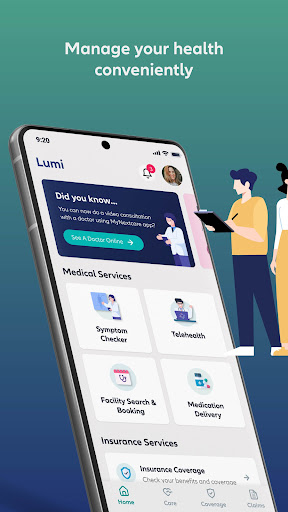
Whether you’re a new or existing Nextcare insured member, Lumi is here to simplify your health. Access a range of features in one convenient app, including submitting and tracking claims, knowing your policy benefits, generating insurance certificates, and downloading your digital health insurance card.
With Lumi, you’ll also have access to a variety of digital health services that are simple to use, fast and easy to navigate, and designed to make life easier for you and your family.
Take charge of your health through features such as:
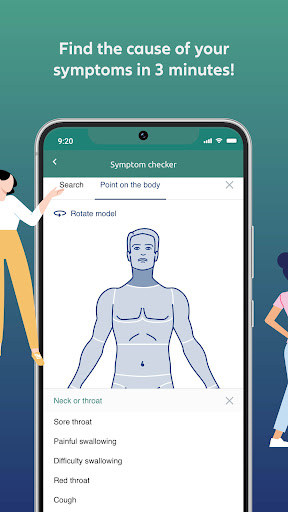
Check Your Symptoms
You can access an AI-powered symptom checker that identifies potential health concerns in 3 minutes and reduces unnecessary visits to the doctor. A great tool for identifying emergency conditions early on.
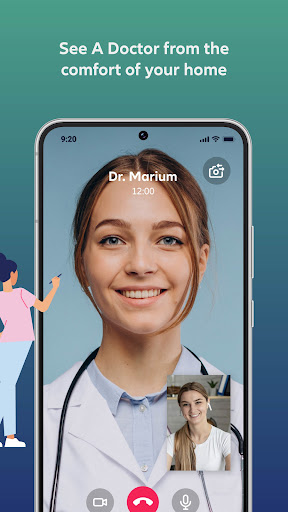
Consult A Doctor Online
You can now engage in a telehealth service with a highly qualified team of doctors who can diagnose, treat, and manage non-emergency conditions from the comfort of your home. Connect with multilingual doctors through a video call who have years of telehealth experience. in diagnosing, treating and managing non-emergency conditions. You can also get professional medical advice from expert doctors through live chat using our Dr. Chat service. You can simply send your health-related questions via chat. Dr. Chat’s AI bot will receive and analyse the queries using advanced NLP techniques to identify the required medical service. Based on the analysis, the AI bot will promptly connect you with the most suitable doctor for a live chat advice.
A distinctive feature that also offers you the convenience of having prescription medication delivered to your doorstep. This service is not only available to patients who have had an online teleconsultation, but also to those with health condition management who can easily have their prescriptions refilled.
Find A Healthcare Provider And Book An Appointment
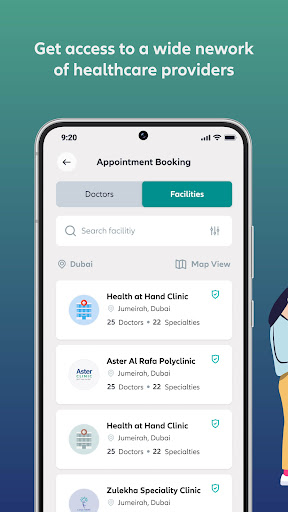
You can also easily find healthcare providers and book doctor appointments by accessing the largest most extensive healthcare provider network. A useful service to easily locate and contact hospitals, clinics, pharmacies, labs, or any medical facility you may need, and to searching for over 20,000 doctors based on specialty, language, availability, location, and rating. And that’s not all: the service allows you to get pre-approval and a quote for your appointment, making the booking process seamless.
Submit & Track Medical Claims
You can now experience an advanced claims management technology allows you to track your claims and receive claims’ reimbursement through your desired payment method by simply uploading medical documents.
Chat With Our Virtual Assistant
Do you have any questions or need support? Access immediate health support whenever you need it, wherever you are by chatting with our friendly virtual assistant, Zoe, for quick solutions to your health queries. Zoe is here to help you find medical providers and facilities in your area that are covered under your insurance network, give instant feedback on the status of your claims and offers solutions or connect you to our care center team for inquiries related to your policy.
Lumi is all about simplicity, speed, and convenience.
Simple to use
Get instant access to the most important insurance features to get the best out of your policy.
Fast & easy app experience
From coverage and benefits to submitting claims, manage your health quickly and easily.
Seamless health services
Gain access to your healthcare services anytime, anywhere.
About Lumi
Lumi is designed to make your health journey easier for you. It combines an array of digital health services in one single app. Our team of health professionals create the most efficient tools and services via decades of expertise to help you manage your health.
Download Lumi now and experience a seamless health journey like never before.
更多

1. 下載逍遙安裝器並完成設置

2. 啟動逍遙後打開位於桌面上的谷歌商店

3. 在谷歌商店中搜尋Lumi by Nextcare
Install
4. 下載並安裝Lumi by Nextcare
5. 下載完成後點擊圖標來啟動

6. 透過逍遙享受在電腦上體驗Lumi by Nextcare
逍遙安卓是優秀的安卓模擬器,全球超過5000萬用戶的優先選擇。逍遙安卓以虛擬化技術為核心,為用户打造突破手機配備局限的應用平台!
大屏精細展示;無限待機,超越電池和流量限制
鍵鼠,手把操作全面支持,操作更精準
用逍遙多開同時運行多個遊戲、應用。
Use Lumi by Nextcare on PC by following steps: