Lumi by Nextcare
تم التحديث
الإصدار الحالي
6.4.17
تقديم

لا داعي للقلق بشأن الشحن الزائد عند استخدام Lumi by Nextcare على هاتفك. تحرر من قيود الشاشة الصغيرة واستمتع به على شاشة أكبر باستخدام لوحة المفاتيح والفأرة. يوفر MEmu جميع الميزات الرائعة التي تتوقعها: تثبيت سريع، إعداد سهل، أدوات تحكم بديهية، ودون قيود على عمر البطارية، أو استخدام البيانات، أو المكالمات الواردة. يُعد MEmu 9 الجديد الخيار الأمثل لتجربة Lumi by Nextcare على جهاز الكمبيوتر. بفضل تقنية التشفير الفريدة، يتيح لك مدير الحسابات المتعددة تشغيل حسابين أو أكثر في وقت واحد. والأهم من ذلك، أن محرك المحاكاة الفريد يستغل أداء جهاز الكمبيوتر بالكامل، مما يُحسّن تجربة التطبيق ويجعل كل شيء سلسًا للغاية.
أظهر المزيد
قم بتنزيل Lumi by Nextcare على الكمبيوتر بإستخدام جهاز مقلد أندروز MEmu.استمتع بمتعة اللعب على الشاشة الكبيرة. Whether you’re a new or existing Nextcare insured member, Lumi is here to simplify your health.
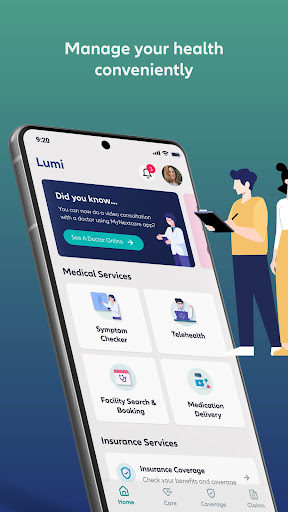
Whether you’re a new or existing Nextcare insured member, Lumi is here to simplify your health. Access a range of features in one convenient app, including submitting and tracking claims, knowing your policy benefits, generating insurance certificates, and downloading your digital health insurance card.
With Lumi, you’ll also have access to a variety of digital health services that are simple to use, fast and easy to navigate, and designed to make life easier for you and your family.
Take charge of your health through features such as:
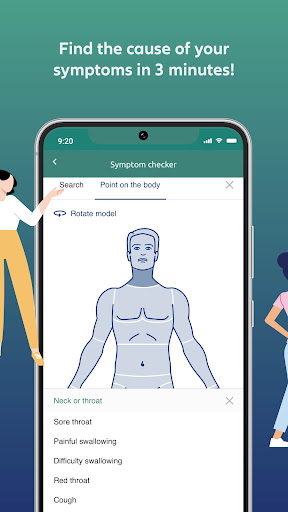
Check Your Symptoms
You can access an AI-powered symptom checker that identifies potential health concerns in 3 minutes and reduces unnecessary visits to the doctor. A great tool for identifying emergency conditions early on.
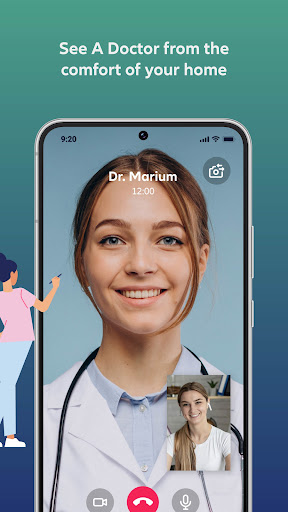
Consult A Doctor Online
You can now engage in a telehealth service with a highly qualified team of doctors who can diagnose, treat, and manage non-emergency conditions from the comfort of your home. Connect with multilingual doctors through a video call who have years of telehealth experience. in diagnosing, treating and managing non-emergency conditions. You can also get professional medical advice from expert doctors through live chat using our Dr. Chat service. You can simply send your health-related questions via chat. Dr. Chat’s AI bot will receive and analyse the queries using advanced NLP techniques to identify the required medical service. Based on the analysis, the AI bot will promptly connect you with the most suitable doctor for a live chat advice.
A distinctive feature that also offers you the convenience of having prescription medication delivered to your doorstep. This service is not only available to patients who have had an online teleconsultation, but also to those with health condition management who can easily have their prescriptions refilled.
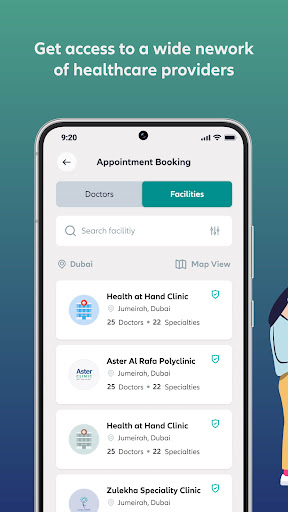
Find A Healthcare Provider And Book An Appointment
You can also easily find healthcare providers and book doctor appointments by accessing the largest most extensive healthcare provider network. A useful service to easily locate and contact hospitals, clinics, pharmacies, labs, or any medical facility you may need, and to searching for over 20,000 doctors based on specialty, language, availability, location, and rating. And that’s not all: the service allows you to get pre-approval and a quote for your appointment, making the booking process seamless.
Submit & Track Medical Claims
You can now experience an advanced claims management technology allows you to track your claims and receive claims’ reimbursement through your desired payment method by simply uploading medical documents.
Chat With Our Virtual Assistant
Do you have any questions or need support? Access immediate health support whenever you need it, wherever you are by chatting with our friendly virtual assistant, Zoe, for quick solutions to your health queries. Zoe is here to help you find medical providers and facilities in your area that are covered under your insurance network, give instant feedback on the status of your claims and offers solutions or connect you to our care center team for inquiries related to your policy.
Lumi is all about simplicity, speed, and convenience.
Simple to use
Get instant access to the most important insurance features to get the best out of your policy.
Fast & easy app experience
From coverage and benefits to submitting claims, manage your health quickly and easily.
Seamless health services
Gain access to your healthcare services anytime, anywhere.
About Lumi
Lumi is designed to make your health journey easier for you. It combines an array of digital health services in one single app. Our team of health professionals create the most efficient tools and services via decades of expertise to help you manage your health.
Download Lumi now and experience a seamless health journey like never before.
أظهر المزيد

1. قم بتنزيل برنامج MEmu واكمال تثبيته

2. قم بتشغيل برنامج MEmu وفتح Google Play على الصفحة الرئيسية

3. ابح Lumi by Nextcare في Google Play
Install
4. تنزيل وتثبيت Lumi by Nextcare
5. انقر على الرمز للتشغيل بعد اكتمال التثبيت

6. استخدم MEmu لتجربة Lumi by Nextcare على جهاز الكمبيوتر الخاص بك.
تطبيق MEmuهو افضل محاكى اندرويد مجانى وبالفعل 50 مليون شخص يستمتعون حاليا بتجربه اللعب عليه. تمكّنك تقنية MEmu الافتراضية من تشغيل آلاف ألعاب Android بسلاسة على الكمبيوتر الشخصي ، حتى أكثرها استخدامًا للرسومات.
شاشة أكبر وجرافيك افضل ووقت أطول بدون حدود البطارية وباقة التليفون
لوحة مفاتيح كاملة تدعم تحكم كامل عن طريق لوحة المفاتيح و الفأره وجيم باد
عدة العاب وحسابات ومهمات علي جهاز الكمبيوتر في وقت معين عن طريق Memu متعدد النوافذ
Use Lumi by Nextcare on PC by following steps: