nExt Camera - USB電腦版

nExt Camera - USB電腦版下載

nExt Camera - USB電腦版

nExt Camera - USB

  • 更新日期

  • 目前版本

    1729786257

  • 提供者

    nExt Camera - USB電腦版

nExt Camera - USB電腦版簡介

想體驗nExt Camera - USB,可是手機熒幕太小,一載軟體就變燙,怎麼辦?透過逍遙模擬器,在電腦的大熒幕上暢快體驗!用鍵鼠操作更精準流暢,逍遙模擬器滿足您的所有期待。在電腦上下載安裝nExt Camera - USB,不用擔心電池當掉,想體驗多久就多久,順暢跑一天~全新的逍遙模擬器9,絕對是您體驗nExt Camera - USB電腦版的最佳選擇。完美的按鍵映射系統讓nExt Camera - USB如PC軟體般順手;強大的多開功能可同時執行多個任務;獨家虛擬化技術更能徹底釋放電腦效能,保障長時間穩定運作。我們致力於不讓設備限制您的體驗,助您輕鬆高效,暢快無比!

更多

nExt Camera - USB電腦版截圖&影片

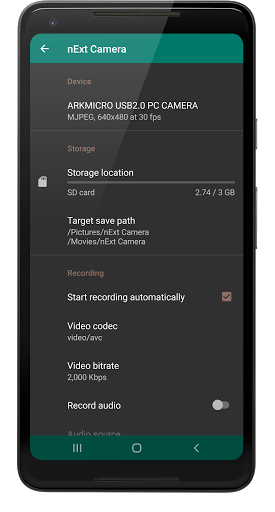
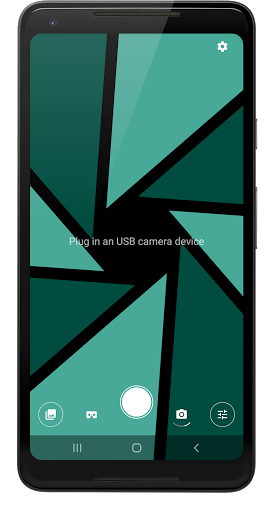
透過逍遙模擬器,在電腦上下載nExt Camera - USB,享受大熒幕的暢快體驗。 nExt Camera is an application that displays a live video feed from any UVC OTG compatible USB camera device.
應用訊息

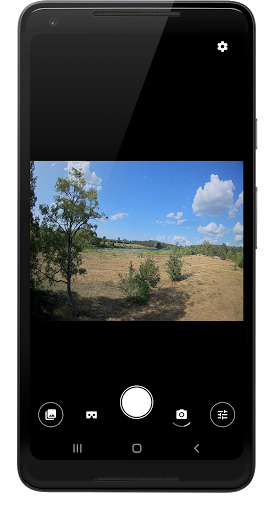
nExt Camera is an application that displays a live video feed from any UVC OTG compatible USB camera device. (no root required)
It let's you preview, take photos and record videos from external sources like endoscopes, microscopes, Webcams, Dash cameras, FPV Receivers, UVC analog video grabbers, HDMI capture cards, etc.

The app was built with top performance and quality in mind. It delivers video feed with almost no delay, which is great for FPV and gaming.

As of now, the app is still under development and the list of supported devices is expanding. So, if you encounter any issues, please report them to us in order to improve the application in future updates.

Requirements:


1. An OTG compatible android device.
2. USB camera with UVC support.
3. OTG cable. (some cameras may require additional power, so a USB Hub may be required)

Features:


External Camera Preview
Displays video feed from connected external USB camera.

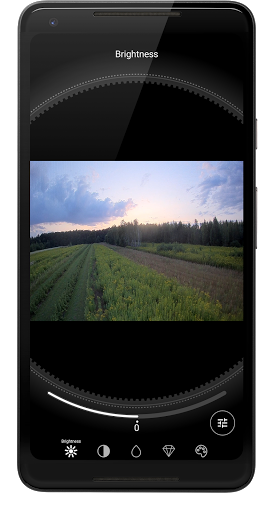
Tuning camera image parameters
Easily tune your camera image on the fly. (More tuning controls coming soon)

VR Support
Switch to Google Cardboard / Daydream and use your android device for FPV.

Video and Audio Recording
Record video and audio from USB camera. Configure video encoder to improve video quality or get smaller file size. Choose audio source, that will be used in the recording.

Background Recording
Start recording and leave the app without worrying, that the recording will be stopped. The app will continue recording even when it's in background. Only the notification will be visible to inform you about ongoing video recording.

Picture-In-Picture Mode
Keep video preview in a neat little window while switching to other apps.

Audio Loopback
Let's you hear live audio feed from your USB device, if available. The latest version adds a visual audio meter, to help in volume levels adjustment.

1D/3D LUT support
Apply one of built-in LUT (Lookup Table) color filters or import and use a custom one. Please note, only a CUBE file format is supported when importing a new LUT to the App. (The LUT title is derived from a TITLE parameter that is found in a CUBE file. For more details see Cube LUT Specification.)

PRO Photography tools
Long-press to display a Waveform scope to analyze displayed image in real time, or show a helper grid to follow the rule of thirds.

Live Video Streaming
Stream from your USB device to any device using a modern SRT protocol. nExt Camera will automatically adjust video bitrate based on your network condition to deliver smooth and uninterrupted experience to your audience.

更多

在電腦上下載nExt Camera - USB

  • nExt Camera - USB電腦版

    1. 下載逍遙安裝器並完成設置

  • nExt Camera - USB電腦版

    2. 啟動逍遙後打開位於桌面上的谷歌商店

  • nExt Camera - USB電腦版

    3. 在谷歌商店中搜尋nExt Camera - USB

  • nExt Camera - USB電腦版 Install

    4. 下載並安裝nExt Camera - USB

  • nExt Camera - USB電腦版

    5. 下載完成後點擊圖標來啟動

  • nExt Camera - USB電腦版
    nExt Camera - USB電腦版 nExt Camera - USB電腦版

    6. 透過逍遙享受在電腦上體驗nExt Camera - USB

為什麼用逍遙體驗nExt Camera - USB

逍遙安卓是優秀的安卓模擬器,全球超過5000萬用戶的優先選擇。逍遙安卓以虛擬化技術為核心,為用户打造突破手機配備局限的應用平台!

  • 大屏精細展示;無限待機,超越電池和流量限制

  • 鍵鼠,手把操作全面支持,操作更精準

  • 用逍遙多開同時運行多個遊戲、應用。

準備體驗了嗎?

熱門話題

nExt Camera - USB - FAQs

  • How to use nExt Camera - USB on PC?

    Use nExt Camera - USB on PC by following steps:

    • Download MEmu, then install and launch it
    • Login to Google Play Store, install the app
    • Enjoy using the app on PC with MEmu
  • What are the minimum system requirements to run nExt Camera - USB on PC?
    • Intel or AMD Processor
    • Microsoft Windows 7 and above
    • 2GB of memory
    • 5GB of free disk space
    • Hardware Virtualization Technology