Per App Volume Control & Mute
更新日期
目前版本
1.0.28
提供者

想體驗Per App Volume Control & Mute,可是手機熒幕太小,一載軟體就變燙,怎麼辦?透過逍遙模擬器,在電腦的大熒幕上暢快體驗!用鍵鼠操作更精準流暢,逍遙模擬器滿足您的所有期待。在電腦上下載安裝Per App Volume Control & Mute,不用擔心電池當掉,想體驗多久就多久,順暢跑一天~全新的逍遙模擬器9,絕對是您體驗Per App Volume Control & Mute電腦版的最佳選擇。完美的按鍵映射系統讓Per App Volume Control & Mute如PC軟體般順手;強大的多開功能可同時執行多個任務;獨家虛擬化技術更能徹底釋放電腦效能,保障長時間穩定運作。我們致力於不讓設備限制您的體驗,助您輕鬆高效,暢快無比!
更多
使用逍遙模擬器在電腦上享受Per App Volume Control & Mute的卓越體驗。這是一款功能強大的免費安卓模擬器,為您提供數千款安卓應用程式的桌面版本。與好友互動,有效率完成工作,盡情享受! AppVolume sets your media volume automatically when an app comes to the foreground, and restores it when you leave.
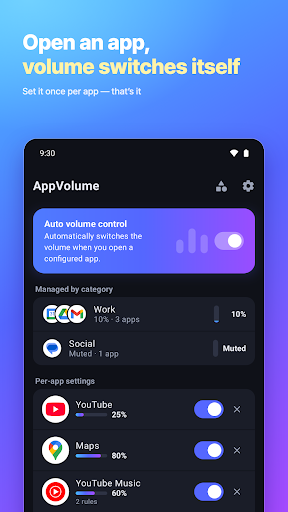
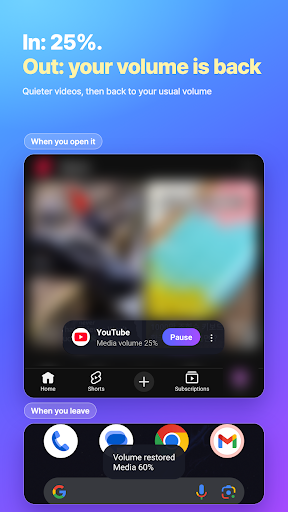
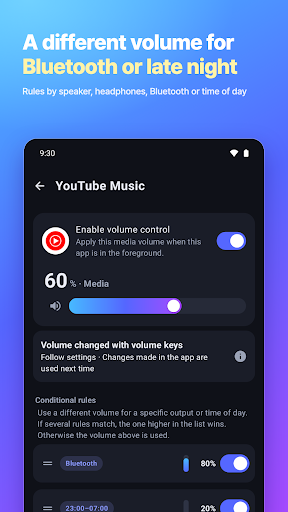
AppVolume sets your media volume automatically when an app comes to the foreground, and restores it when you leave. Mute games and short videos, keep navigation loud, and use another level on Bluetooth, headphones or at night. Built for Pixel and phones without an app volume mixer. No root, no persistent notification.
▶ HOW IT WORKS
1. Pick an app and set its media volume — or mute it
2. Turn on the accessibility service so AppVolume can see which app is on screen
3. Open the app: the volume switches. Leave it: your previous volume comes back
▶ WHAT IT DOES / WHAT IT DOESN'T
Switches the system media volume to your preset while a selected app is in the foreground
Restores your previous volume the moment you leave that app
Mutes an app completely (0%)
It does NOT mix two apps playing at once. Android has one media volume, so while a muted game is on screen, background music is quiet too.
It does NOT control ringtone, notification or alarm volume — media volume only.
Need a true per-app mixer? Samsung (Sound Assistant), Xiaomi, OnePlus and Motorola include one in sound settings. AppVolume is for every other phone, and for automatic switching.
▶ FEATURES
• Individual volume control for each app: 0 to 100%, in 1% steps
• One-tap mute for any app
• Conditional rules: a different volume on the speaker, wired headphones or Bluetooth, or during hours you choose. The rule on top wins — drag to reorder
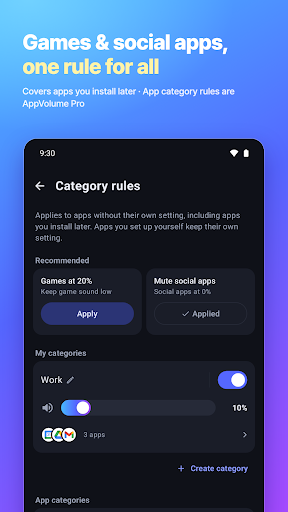
• Category rules (Pro): one volume for Games, Video, Social, Maps & navigation and more, including apps you install later (uses the category each app declares)
• My categories: group your own apps under one volume and its own rules
• Volume buttons in an app: save the change as the new preset, ignore it, or lock the preset — for all apps or per app
• Pause everything or one app: 5 minutes to 6 hours, or until you resume
• Quick Settings tile to pause or resume from the notification shade
• On-screen notice (top or bottom) shows the volume applied or restored. Its menu adjusts the volume, pauses, or stops managing that app
▶ PERFECT FOR
• Games full of loud ads → 0%, automatically
• Instagram Reels, TikTok, YouTube Shorts → quiet or muted before the first clip plays
• Google Maps, Waze and other navigation apps → loud enough to hear in the car
• Bluetooth earbuds and speakers → a different level than the phone speaker
• Late-night videos → quieter during the hours you set
▶ PRIVACY & PERMISSIONS
AppVolume has no account or login. Your settings stay on your device.
The app shows ads (Google AdMob) and sends usage statistics and crash reports to Google (Firebase Analytics, Firebase Crashlytics). App names, package names and your category names are not sent — only the app category assigned by Android (for example game, video or social), the volume level and the output type (speaker, wired or Bluetooth).
Why accessibility? Android doesn't let ordinary apps see which app is on screen. AppVolume uses the accessibility service only to detect the foreground app and apply your volume. It checks only the package name and window class of the active window, and whether a picture-in-picture window is on screen and which app it belongs to — never screen text or what you type — and never taps, scrolls or types for you.
Full privacy policy: https://feelpass.github.io/appvolume/privacy_en.html
Per-app volume, mute, volume button modes, pause and the Quick Settings tile are free — no limit on apps, no subscription.
AppVolume Pro is an optional one-time purchase — pay once, not a subscription:
• No ads
• App category rules — turn on Games, Video, Social and more
• Unlimited conditional rules and custom categories (free: 2 rules, 1 custom category)
• Backup & restore your settings
Rules and categories you've already made stay as they are.
更多

1. 下載逍遙安裝器並完成設置

2. 啟動逍遙後打開位於桌面上的谷歌商店

3. 在谷歌商店中搜尋Per App Volume Control & Mute
Install
4. 下載並安裝Per App Volume Control & Mute
5. 下載完成後點擊圖標來啟動

6. 透過逍遙享受在電腦上體驗Per App Volume Control & Mute
逍遙安卓是優秀的安卓模擬器,全球超過5000萬用戶的優先選擇。逍遙安卓以虛擬化技術為核心,為用户打造突破手機配備局限的應用平台!
大屏精細展示;無限待機,超越電池和流量限制
鍵鼠,手把操作全面支持,操作更精準
用逍遙多開同時運行多個遊戲、應用。
Use Per App Volume Control & Mute on PC by following steps: