
Per App Volume Control & Mute
Bijgewerkt
Huidige Versie
1.0.28
Aangeboden door

Maak je geen zorgen meer over extra kosten bij het gebruik van Per App Volume Control & Mute op je mobiele telefoon, bevrijd jezelf van het kleine scherm en geniet van het gebruik van de app op een veel groter display. Vanaf nu, krijg een volledige schermervaring van je app met toetsenbord en muis. MEmu biedt je alle verrassende functies die je verwachtte: snelle installatie en eenvoudige configuratie, intuïtieve besturing, geen beperkingen meer van batterij, mobiele data en storende oproepen. De gloednieuwe MEmu 9 is de beste keuze voor het gebruik van Per App Volume Control & Mute op je computer. MEmu multi-instance manager maakt het mogelijk om tegelijkertijd 2 of meer accounts te openen. En het belangrijkste, onze exclusieve emulatiemotor kan het volledige potentieel van je PC benutten, waardoor alles soepel en plezierig wordt.
Meer tonen
Geniet van een fantastische ervaring met Per App Volume Control & Mute op je pc met MEmu Play. Het is een krachtige gratis Android-emulator die je duizenden Android-apps biedt voor de desktopversie. Geniet van contact met vrienden en verbeter je werk met hogere efficiëntie! AppVolume sets your media volume automatically when an app comes to the foreground, and restores it when you leave.
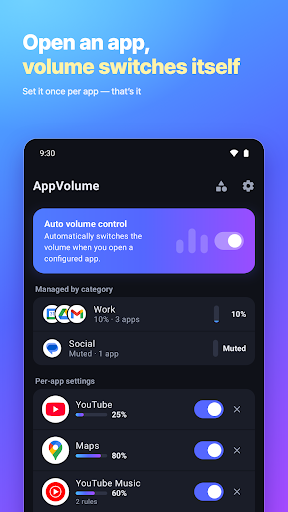
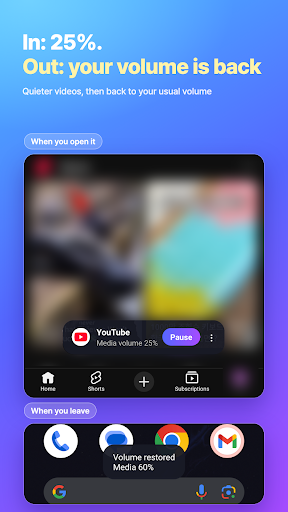
AppVolume sets your media volume automatically when an app comes to the foreground, and restores it when you leave. Mute games and short videos, keep navigation loud, and use another level on Bluetooth, headphones or at night. Built for Pixel and phones without an app volume mixer. No root, no persistent notification.
▶ HOW IT WORKS
1. Pick an app and set its media volume — or mute it
2. Turn on the accessibility service so AppVolume can see which app is on screen
3. Open the app: the volume switches. Leave it: your previous volume comes back
▶ WHAT IT DOES / WHAT IT DOESN'T
Switches the system media volume to your preset while a selected app is in the foreground
Restores your previous volume the moment you leave that app
Mutes an app completely (0%)
It does NOT mix two apps playing at once. Android has one media volume, so while a muted game is on screen, background music is quiet too.
It does NOT control ringtone, notification or alarm volume — media volume only.
Need a true per-app mixer? Samsung (Sound Assistant), Xiaomi, OnePlus and Motorola include one in sound settings. AppVolume is for every other phone, and for automatic switching.
▶ FEATURES
• Individual volume control for each app: 0 to 100%, in 1% steps
• One-tap mute for any app
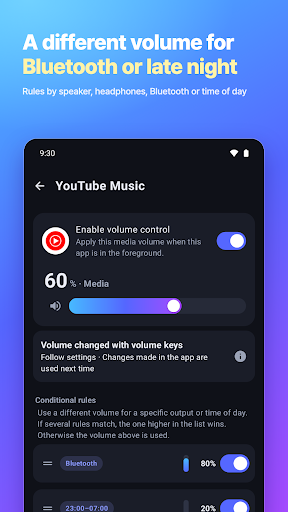
• Conditional rules: a different volume on the speaker, wired headphones or Bluetooth, or during hours you choose. The rule on top wins — drag to reorder
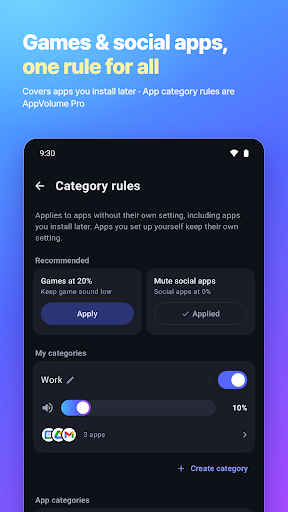
• Category rules (Pro): one volume for Games, Video, Social, Maps & navigation and more, including apps you install later (uses the category each app declares)
• My categories: group your own apps under one volume and its own rules
• Volume buttons in an app: save the change as the new preset, ignore it, or lock the preset — for all apps or per app
• Pause everything or one app: 5 minutes to 6 hours, or until you resume
• Quick Settings tile to pause or resume from the notification shade
• On-screen notice (top or bottom) shows the volume applied or restored. Its menu adjusts the volume, pauses, or stops managing that app
▶ PERFECT FOR
• Games full of loud ads → 0%, automatically
• Instagram Reels, TikTok, YouTube Shorts → quiet or muted before the first clip plays
• Google Maps, Waze and other navigation apps → loud enough to hear in the car
• Bluetooth earbuds and speakers → a different level than the phone speaker
• Late-night videos → quieter during the hours you set
▶ PRIVACY & PERMISSIONS
AppVolume has no account or login. Your settings stay on your device.
The app shows ads (Google AdMob) and sends usage statistics and crash reports to Google (Firebase Analytics, Firebase Crashlytics). App names, package names and your category names are not sent — only the app category assigned by Android (for example game, video or social), the volume level and the output type (speaker, wired or Bluetooth).
Why accessibility? Android doesn't let ordinary apps see which app is on screen. AppVolume uses the accessibility service only to detect the foreground app and apply your volume. It checks only the package name and window class of the active window, and whether a picture-in-picture window is on screen and which app it belongs to — never screen text or what you type — and never taps, scrolls or types for you.
Full privacy policy: https://feelpass.github.io/appvolume/privacy_en.html
Per-app volume, mute, volume button modes, pause and the Quick Settings tile are free — no limit on apps, no subscription.
AppVolume Pro is an optional one-time purchase — pay once, not a subscription:
• No ads
• App category rules — turn on Games, Video, Social and more
• Unlimited conditional rules and custom categories (free: 2 rules, 1 custom category)
• Backup & restore your settings
Rules and categories you've already made stay as they are.
Meer tonen

1. Download de MEmu-installatie en voltooi de setup

2. Start MEmu en open vervolgens Google Play op het bureaublad

3. Zoek Per App Volume Control & Mute in Google Play
Install
4. Download en installeer Per App Volume Control & Mute
5. Klik op het icoon om te starten na het voltooien van de installatie

6. Ervaar Per App Volume Control & Mute op pc met MEmu
MEmu Play is de beste Android-emulator, met meer dan 100 miljoen gebruikers die genieten van de superieure Android-app-ervaring. Dankzij de virtualisatietechnologie van MEmu kun je duizenden Android-apps soepel op je computer draaien, zelfs de meest veeleisende.
Groter scherm met betere graphics; Lange duur, zonder beperking van batterij of mobiele data.
Volledige Keymapping-ondersteuning voor nauwkeurige besturing van toetsenbord en muis of gamepad.
Meerdere game-accounts of taken op één PC tegelijk met Multi-Instance manager.
Gebruik Per App Volume Control & Mute op PC door de volgende stappen te volgen: