
Quickpic Gallery Photo & Video
更新日期
目前版本
0.0.58
提供者

想體驗Quickpic Gallery Photo & Video,可是手機熒幕太小,一載軟體就變燙,怎麼辦?透過逍遙模擬器,在電腦的大熒幕上暢快體驗!用鍵鼠操作更精準流暢,逍遙模擬器滿足您的所有期待。在電腦上下載安裝Quickpic Gallery Photo & Video,不用擔心電池當掉,想體驗多久就多久,順暢跑一天~全新的逍遙模擬器9,絕對是您體驗Quickpic Gallery Photo & Video電腦版的最佳選擇。完美的按鍵映射系統讓Quickpic Gallery Photo & Video如PC軟體般順手;強大的多開功能可同時執行多個任務;獨家虛擬化技術更能徹底釋放電腦效能,保障長時間穩定運作。我們致力於不讓設備限制您的體驗,助您輕鬆高效,暢快無比!
更多
透過逍遙模擬器,在電腦上下載Quickpic Gallery Photo & Video,享受大熒幕的暢快體驗。 Quickpic Gallery 圖庫應用程式是保存和管理照片和影片的最佳圖庫應用程式。
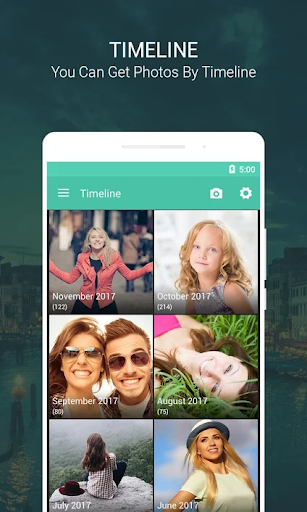
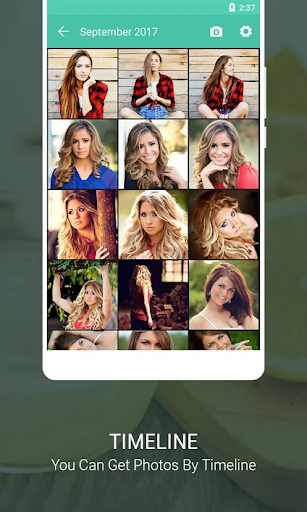
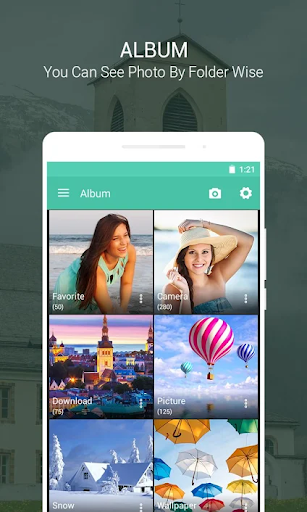
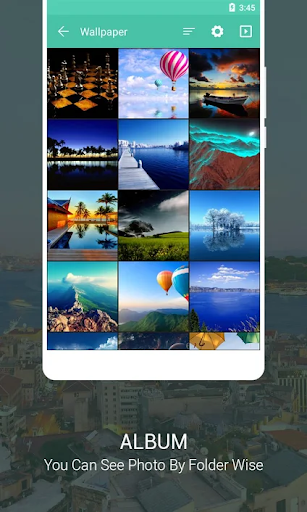
Quickpic Gallery 圖庫應用程式是保存和管理照片和影片的最佳圖庫應用程式。
如果您正在尋找圖庫應用程式或照片庫應用程序,當您需要圖庫管理應用程式時,您可以嘗試這個Quickpic Gallery圖庫應用程式
免費使用 Quickpic Gallery,輕鬆管理您的所有圖像和影片!這是一款適用於 Android 的圖庫應用程序,可讓您輕鬆舒適地瀏覽和排列所有媒體文件,並且您將毫無困難地弄清楚它的方式。
讓它成為你的
Quickpic Gallery 的高度可自訂設計使您可以按照您想要的方式設計照片應用程式的外觀、感覺和工作方式。從 UI 到底部工具列上的功能按鈕,Quickpic Gallery 為您提供圖庫應用程式所需的創作自由。
您需要的所有文件
Quickpic Gallery 支援多種不同的檔案類型,包括 JPEG、PNG、MP4、MKV、RAW、SVG、GIF、全景照片、影片等,因此您在選擇格式時享有充分的靈活性。有沒有想過「我可以在 Android 上使用這種格式嗎」?現在答案是肯定的。
進階照片編輯器
使用 Quickpic Gallery 改進的文件管理器和相冊,將照片編輯變得輕而易舉。直覺的手勢使動態編輯影像變得非常容易。裁剪、翻轉、旋轉和調整圖片大小,或套用時尚的濾鏡,讓它們瞬間流行起來。
保護您的私人照片、影片和文件
請放心,您的相簿是安全的。透過 Quickpic Gallery 卓越的安全功能,您可以使用圖釘、圖案或裝置的指紋掃描器來限制誰可以查看或編輯選定的照片和影片或存取重要文件。您甚至可以保護應用程式本身或鎖定檔案管理器的特定功能。
恢復已刪除的照片和視頻
永遠不用擔心意外刪除您無法替換的珍貴照片或影片。 Quickpic Gallery 允許您快速恢復任何已刪除的照片和視頻,這意味著 Quickpic Gallery 除了是 Android 上最好的媒體庫之外,還可以兼作令人驚嘆的照片庫應用程式。
核心功能:
- 將所有檔案(例如圖像和影片)顯示為圖庫。
- 複製、移動、重新命名、隱藏影像和影片檔案。
- 使用者可以建立新的文件和資料夾。
- 使用者輕鬆刪除檔案和資料夾。
- 圖片修改。
- 其他資料夾中的照片或影片移動。
圖庫應用程式的主要特點:
- 在圖庫應用程式中快速搜尋多媒體文件,例如圖像、影片、GIF 和資料夾。
- 在圖庫應用程式中按時間軸查看所有圖片和影片。
- 深色模式,提供出色的觀賞體驗。
- 易於查看且時尚的圖庫應用程式。
- 將您的照片保存為最愛。
- 使用文字、貼紙、濾鏡、裁剪等進行照片編輯。
- 此圖庫應用程式中的專用影片播放器。
- 回收站可保存意外刪除的照片。
- 透過使用 Pin、密碼和指紋的應用程式鎖定隱私,確保圖庫應用程式的安全。
- 圖庫應用程式提供圖像和影片的全景視圖。
- 對文件進行排序以組織和管理此圖庫應用程式中的資料夾。
- 在各種社交媒體帳戶上快速分享文件。
- 圖庫應用程式提供了在電子郵件和其他官方平台上無縫共享文件的簡單方法。
- 使用手勢縮放圖片。
- 圖庫應用程式可讓您透過編輯、重新命名甚至完全刪除來修改檔案。
- 透過此圖庫應用程式中的投影片獲得現代且完整的圖像視圖。
Quickpic Gallery 應用程式是免費的,並且可以離線使用,有任何問題。我們相信您一定會喜歡使用這個圖庫應用程式。度過豐富多彩的一天。
下載這個令人驚嘆的畫廊應用程式並享受您的回憶!
注意:我們無法收集任何個人資訊以及任何文件或照片和影片。
更多

1. 下載逍遙安裝器並完成設置

2. 啟動逍遙後打開位於桌面上的谷歌商店

3. 在谷歌商店中搜尋Quickpic Gallery Photo & Video
Install
4. 下載並安裝Quickpic Gallery Photo & Video
5. 下載完成後點擊圖標來啟動

6. 透過逍遙享受在電腦上體驗Quickpic Gallery Photo & Video
逍遙安卓是優秀的安卓模擬器,全球超過5000萬用戶的優先選擇。逍遙安卓以虛擬化技術為核心,為用户打造突破手機配備局限的應用平台!
大屏精細展示;無限待機,超越電池和流量限制
鍵鼠,手把操作全面支持,操作更精準
用逍遙多開同時運行多個遊戲、應用。
Use Quickpic Gallery Photo & Video on PC by following steps: