US Public Weather
更新日期
目前版本
2.41
提供者

想體驗US Public Weather,可是手機熒幕太小,一載軟體就變燙,怎麼辦?透過逍遙模擬器,在電腦的大熒幕上暢快體驗!用鍵鼠操作更精準流暢,逍遙模擬器滿足您的所有期待。在電腦上下載安裝US Public Weather,不用擔心電池當掉,想體驗多久就多久,順暢跑一天~全新的逍遙模擬器9,絕對是您體驗US Public Weather電腦版的最佳選擇。完美的按鍵映射系統讓US Public Weather如PC軟體般順手;強大的多開功能可同時執行多個任務;獨家虛擬化技術更能徹底釋放電腦效能,保障長時間穩定運作。我們致力於不讓設備限制您的體驗,助您輕鬆高效,暢快無比!
更多
使用逍遙模擬器在電腦上享受US Public Weather的卓越體驗。這是一款功能強大的免費安卓模擬器,為您提供數千款安卓應用程式的桌面版本。與好友互動,有效率完成工作,盡情享受! Get fast, reliable forecasts, live radar, and severe weather alerts powered by publicly available data from the U.
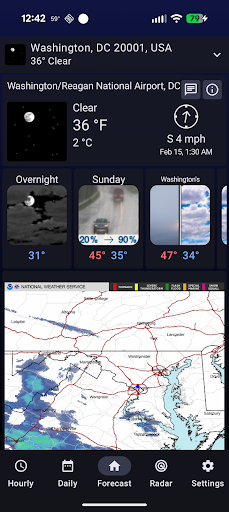
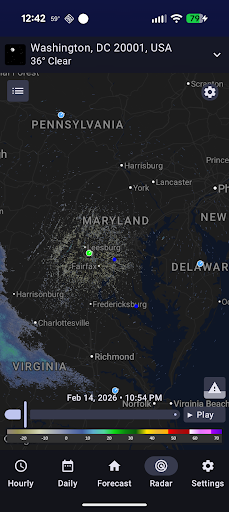
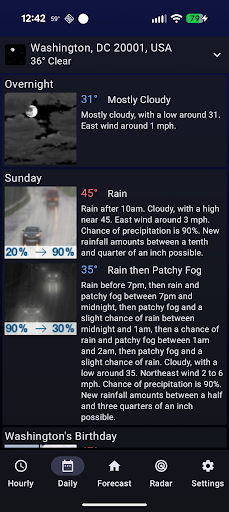
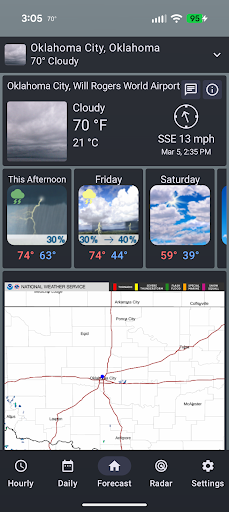
Get fast, reliable forecasts, live radar, and severe weather alerts powered by publicly available data from the U.S. National Weather Service (NWS).
This app is designed to make critical weather information easier to access, faster to read, and simpler to understand — so you can stay prepared when it matters most.
Accurate U.S. Weather Forecasts
Access detailed hourly and 7-day forecasts built from National Weather Service forecast models. See temperature, wind, precipitation, humidity, and more in a clean, easy-to-read layout designed for everyday use.
Real-Time Weather Alerts
Stay safe with official severe weather warnings and advisories issued by the National Weather Service, including:
• Tornado warnings
• Severe thunderstorm warnings
• Flash flood alerts
• Winter storm warnings
• Heat and cold advisories
• And more life-saving alerts
Receive notifications the moment alerts are issued for your locations.
Live Weather Radar
Track storms in real time using high-resolution radar imagery based on National Weather Service radar products. Monitor precipitation, storm movement, and developing weather hazards as they happen.
Hourly & Weekly Planning
Plan your day and week with confidence:
• Hour-by-hour forecast breakdowns
• 7-day outlook for long-range planning
• Detailed precipitation timing
• Wind speed and direction insights
Perfect for commuting, travel, outdoor plans, and daily life.
Forecast Discussions from Meteorologists
Go beyond the forecast numbers and read detailed forecast discussions written by National Weather Service meteorologists. Understand the reasoning and science behind upcoming weather patterns.
Custom Locations & Widgets
Personalize the app to match your needs:
• Save multiple locations
• Use GPS for local weather
• Home screen widgets for quick updates
• Fast access to critical weather info
Built for Speed & Clarity
• Clean, modern interface
• Quick loading radar and forecasts
• No clutter covering critical alerts
• Designed for fast access during severe weather
Trusted U.S. Government Weather Data
This app uses publicly available forecasts, alerts, and radar products provided by the U.S. National Weather Service. Our goal is to make important weather information easier to access and faster to understand.
Common Searches
Users often find this app when searching for:
NWS weather, NWS radar, National Weather Service app, NOAA weather, government weather, severe weather alerts, and weather.gov forecasts.
Disclaimer
This app is not affiliated with, endorsed by, or sponsored by the National Weather Service or NOAA. Weather data is retrieved from publicly available U.S. government APIs.
更多

1. 下載逍遙安裝器並完成設置

2. 啟動逍遙後打開位於桌面上的谷歌商店

3. 在谷歌商店中搜尋US Public Weather
Install
4. 下載並安裝US Public Weather
5. 下載完成後點擊圖標來啟動

6. 透過逍遙享受在電腦上體驗US Public Weather
逍遙安卓是優秀的安卓模擬器,全球超過5000萬用戶的優先選擇。逍遙安卓以虛擬化技術為核心,為用户打造突破手機配備局限的應用平台!
大屏精細展示;無限待機,超越電池和流量限制
鍵鼠,手把操作全面支持,操作更精準
用逍遙多開同時運行多個遊戲、應用。
Use US Public Weather on PC by following steps: