YI IoT
更新日期
目前版本
4.5.3_20241227
提供者

想體驗YI IoT,可是手機熒幕太小,一載軟體就變燙,怎麼辦?透過逍遙模擬器,在電腦的大熒幕上暢快體驗!用鍵鼠操作更精準流暢,逍遙模擬器滿足您的所有期待。在電腦上下載安裝YI IoT,不用擔心電池當掉,想體驗多久就多久,順暢跑一天~全新的逍遙模擬器9,絕對是您體驗YI IoT電腦版的最佳選擇。完美的按鍵映射系統讓YI IoT如PC軟體般順手;強大的多開功能可同時執行多個任務;獨家虛擬化技術更能徹底釋放電腦效能,保障長時間穩定運作。我們致力於不讓設備限制您的體驗,助您輕鬆高效,暢快無比!
更多
透過逍遙模擬器,在電腦上下載YI IoT,享受大熒幕的暢快體驗。 ****Attention!
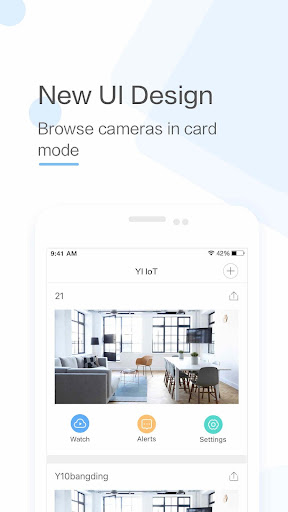
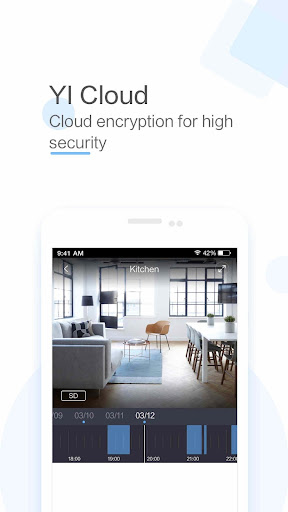
****Attention!!! This app only supports International Version YI IoT Camera. For people who use China Version YUNYI Smart Camera, please download the suitable app in Mi Store. ****
-YI IoT Camera connects you with your family through real-time video and audio anytime and anywhere just a fingertip away
-Equipped with a 111° wide-angle lens, you can extend the area of coverage to enable a clear view of specific areas and objects. Simply double click to activate 4x digital zoom to focus on details
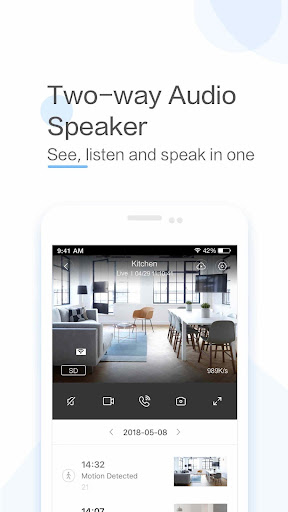
-With a simple tap on your mobile phone, you can initiate a 2-way conversation with your family remotely. Its specially designed microphone and speaker ensures loud and clean voice quality
-By simply panning your mobile phone left and right, a complete panoramic view will be displayed to provide a better viewing experience. The gyroscope support, integrated in the Yi Smart App, is able to follow the mobile phone orientation, making it easier to see every corner being monitored
Functions:
-The YI IoT camera uses all glass lenses with f/2.0 aperture to produce bright and crystal images. With HD resolution (1280x720), it still delivers excellent image quality even if your enlarged to view small details
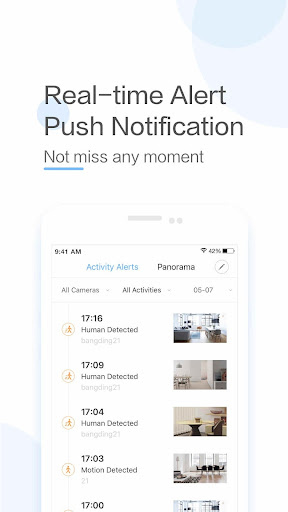
-YI IoT camera always keeps an eye on things that is important to you.With built-in high accuracy motion detection technology, the camera sends notification to your mobile phone detailing when, where, and what movement was detected so you always stay on top of things that you care about, instantly!
-Support up to 32GB SD card, it stores video and audio of special moments, fully indexed, for you to cherish at the touch of your fingertip. Best yet, a built-in mode triggers store action only when image change is detected to achieve best storage capacity optimization
-Our adaptive streaming technology automatically adjust to the optimal viewing quality based on your network conditions
更多

1. 下載逍遙安裝器並完成設置

2. 啟動逍遙後打開位於桌面上的谷歌商店

3. 在谷歌商店中搜尋YI IoT
Install
4. 下載並安裝YI IoT
5. 下載完成後點擊圖標來啟動

6. 透過逍遙享受在電腦上體驗YI IoT
逍遙安卓是優秀的安卓模擬器,全球超過5000萬用戶的優先選擇。逍遙安卓以虛擬化技術為核心,為用户打造突破手機配備局限的應用平台!
大屏精細展示;無限待機,超越電池和流量限制
鍵鼠,手把操作全面支持,操作更精準
用逍遙多開同時運行多個遊戲、應用。
Use YI IoT on PC by following steps: