
Aloft
تازہ کاری
موجودہ ورژن
پیشکش بذریعہ

Aloft کھیلنے کے اپنے پورے جنون کے دوران آپ کے ہاتھ آپ کے فون کی ایک چھوٹی سی اسکرین تک محدود نہیں ہونے چاہئیں۔ پرو کی طرح کھیلیں اور کی بورڈ اور ماؤس کے سہارے اپنے گیم پر مکمل کنٹرول حاصل کریں۔ MEmu آپ کو وہ تمام چیزیں پیش کرتا ہے جس کی آپ امید کرتے ہیں۔ پی سی پر Aloft ڈاؤن لوڈ کریں اور کھیلیں۔ جتنی دیر تک آپ چاہیں کھیلیں، بیٹری، موبائل ڈیٹا کی کوئی حد نہیں ہے اور پریشان کن کالز نہیں ہیں۔ نئے برانڈ کا MEmu 9 پی سی پر Aloft کھیلنے کا بہترین اختیار ہے۔ ہماری مہارت کی مدد سے تیار کردہ، شاندار پری سیٹ کی میپنگ سسٹم Aloft کو ایک ریئل پی سی گیم بناتا ہے۔ MEmu کثیر نظیری منیجرایک ہی ڈیوائس پر 2 یا زیادہ اکاؤنٹس پلے کرنا ممکن بناتا ہے۔ اور سب سے اہم بات یہ ہے کہ، ہمارا خصوصی ایمولیشن انجن آپ کے پی سی کی مکمل طاقت ریلیز کرتے ہوئے ہر چیز ہموار بنا سکتا ہے۔
مزید دکھائیں
Download Aloft on PC with MEmu Android Emulator. Enjoy playing on big screen. Embark on a breathtaking journey among the clouds in Aloft, a captivating co-op sandbox survival game set in a whimsical world of floating islands.
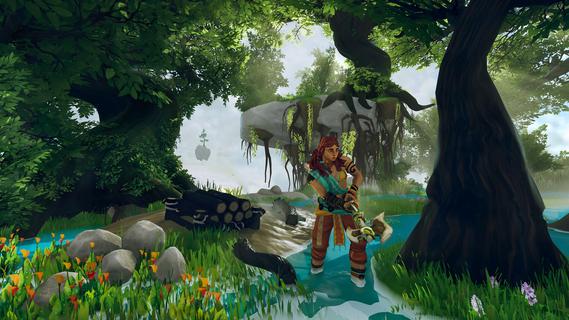
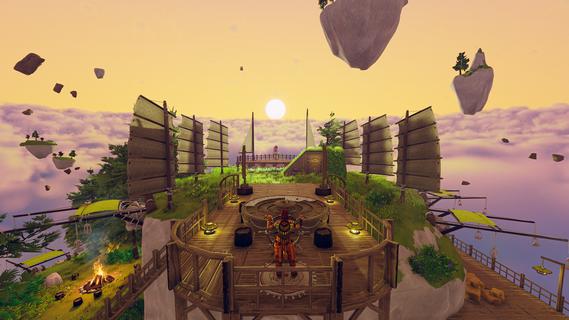
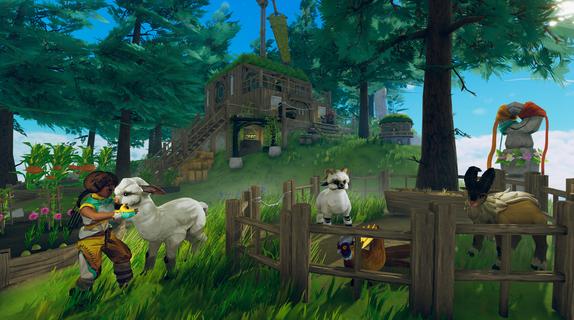
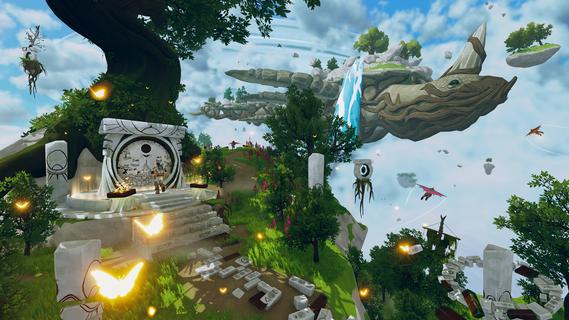
Embark on a breathtaking journey among the clouds in Aloft, a captivating co-op sandbox survival game set in a whimsical world of floating islands. Developed by Astrolabe Interactive and published by Funcom, Aloft invites players to master the skies, build their own airborne sanctuaries, and restore a shattered ecosystem. Released in Early Access in early 2025, Aloft blends crafting, exploration, and base-building with unique aerial mechanics, offering a fresh take on the survival genre. Setting and PremiseIn Aloft, players find themselves stranded on a mysterious floating island after a crash landing. The world is fragmented, with islands scattered across the sky, each holding unique resources, hidden treasures, and secrets waiting to be uncovered. However, a fungal corruption threatens to devour all life3, and it's up to you to cure it. Gameplay and FeaturesThe core gameplay of Aloft revolves around flying between islands, gathering resources, crafting tools and structures, and ultimately transforming any island into a skyship. Unlike traditional survival games, where players traverse vast landscapes on foot, Aloft emphasizes aerial exploration and island-to-island survival.Flying Mechanics: Players have two primary means of aerial locomotion: gliders and airships. Gliding offers a smooth and simple entry point, allowing players to soar through the skies with ease. Airships, on the other hand, introduce more complex piloting challenges. Managing elevation, direction, and speed requires practice, but mastering these airborne behemoths brings significant rewards.Base Building: Each floating island serves as a potential outpost, farm, or home base. Players can construct windmills, pulley systems, and other contraptions to automate resource gathering and create efficient pathways through the clouds.Crafting System: Aloft features an engaging crafting system that encourages experimentation. Instead of explicitly listing all possible recipes, the game presents question marks for undiscovered combinations, turning crafting into a fun guessing game of trial and error.Co-op Gameplay: Aloft shines as a cooperative experience, allowing up to eight players to team up and build their skyborne empires together. Friends can bring their customized airships into each other's games, forming mobile villages that traverse the clouds.Restoring the Ecosystem: Beyond survival, players must work to cure the fungal corruption that plagues the world. This involves uncovering lost knowledge, brewing powerful antidotes, enriching biodiversity, and restoring balance to the airborne ecosystem. With its captivating aerial mechanics, engaging crafting system, and emphasis on cooperative gameplay, Aloft offers a breath of fresh air in the survival genre. As you transform floating islands into skyships, explore a shattered world, and fight to restore the ecosystem, Aloft promises a skybound adventure unlike any other.
مزید دکھائیں

1. MEmu انسٹالر ڈاؤن لوڈ کریں اور سیٹ اپ مکمل کریں

2. MEmu شروع کریں اسکے بعد ڈیسکٹاپ پر Google Play کھولیں

3. Google Play میں Aloft تلاش کریں
Install
4. Aloft ڈاؤن لوڈ کریں اور انسٹال کریں
5. انسٹال مکمل ہونے کے بعد سٹارٹ کرنے کے لیے آئیکن پر کلک کریں

6. MEmu کے ساتھ پی سی پر Aloft کھیلنے کا لطف لیں
MEmu پلے بہترین اینڈرائڈ ایمولیٹر ہے اور 100 ملین لوگ اس کے زبردست اینڈرائڈ گیمنگ تجربہ سے لطف اندوز ہو رہے ہیں۔ MEmu کی ورچولائزیشن ٹیکنالوجی آپ کو اپنے PC پر ہزاروں اینڈرائڈ گیمز یہاں تک کہ انتہائی گرافک والے گیمز باسہولت کھیلنے کی طاقت دیتی ہے۔
بہتر گرافکس کے ساتھ بڑی اسکرین؛ طویل دورانیہ، بیٹری یا لامحدود موبائل ڈیٹا کے بغیر۔
کی بورڈ اور ماؤس یا گیم پیڈ کے عین مطابق کنٹرول کے لیے کی میپنگ کا پورا سپورٹ۔
کثیر مثالی منیجر کے ساتھ بیک وقت ایک پی سی پر متعدد گیم اکاؤنٹس یا ٹاسکس۔
پی سی پر درج ذیل مراحل پر عمل کرتے ہوئے Aloft کھیلیں: