Cadbury PlayPad: Learn Play AR
تازہ کاری
موجودہ ورژن
4.70
پیشکش بذریعہ

Cadbury PlayPad: Learn Play AR کھیلنے کے اپنے پورے جنون کے دوران آپ کے ہاتھ آپ کے فون کی ایک چھوٹی سی اسکرین تک محدود نہیں ہونے چاہئیں۔ پرو کی طرح کھیلیں اور کی بورڈ اور ماؤس کے سہارے اپنے گیم پر مکمل کنٹرول حاصل کریں۔ MEmu آپ کو وہ تمام چیزیں پیش کرتا ہے جس کی آپ امید کرتے ہیں۔ پی سی پر Cadbury PlayPad: Learn Play AR ڈاؤن لوڈ کریں اور کھیلیں۔ جتنی دیر تک آپ چاہیں کھیلیں، بیٹری، موبائل ڈیٹا کی کوئی حد نہیں ہے اور پریشان کن کالز نہیں ہیں۔ نئے برانڈ کا MEmu 9 پی سی پر Cadbury PlayPad: Learn Play AR کھیلنے کا بہترین اختیار ہے۔ ہماری مہارت کی مدد سے تیار کردہ، شاندار پری سیٹ کی میپنگ سسٹم Cadbury PlayPad: Learn Play AR کو ایک ریئل پی سی گیم بناتا ہے۔ MEmu کثیر نظیری منیجرایک ہی ڈیوائس پر 2 یا زیادہ اکاؤنٹس پلے کرنا ممکن بناتا ہے۔ اور سب سے اہم بات یہ ہے کہ، ہمارا خصوصی ایمولیشن انجن آپ کے پی سی کی مکمل طاقت ریلیز کرتے ہوئے ہر چیز ہموار بنا سکتا ہے۔
مزید دکھائیں
Download Cadbury PlayPad: Learn Play AR on PC with MEmu Android Emulator. Enjoy playing on big screen. • Overview.

• Overview
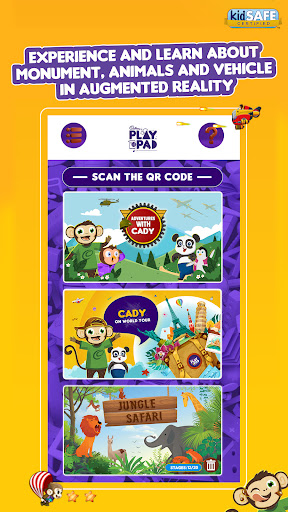
Learn, play, have fun and explore a world full of limitless possibilities on the PlayPad app. Here’s what our app has in store for you and your child:
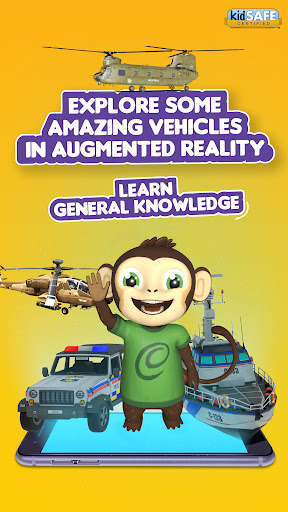
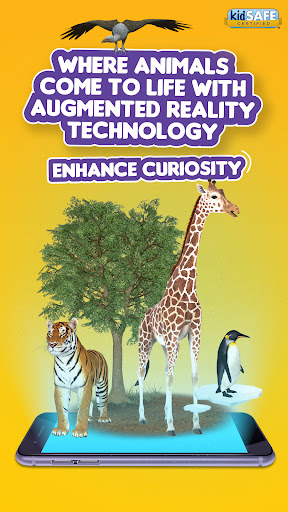
Enjoy incredible Augmented Reality experiences and enhance your child’s development by letting them learn fun facts about animals, monuments, vehicles and more.
Play 2D games that are fun for the entire family.
Interact with India’s most beloved cartoon characters like Chhota Bheem and Little Singham.
Draw, paint and express your creativity in the activity zone.
• How is PlayPad beneficial to my child’s development?
With PlayPad, your child can learn history, geography and general knowledge with fun facts about animals, monuments and vehicles.
The app also enhances your child’s curiosity with interactive AR experiences.
You can help your child sharpen their motor skills with some incredibly fun 2D games.
The activity zone is the perfect place for your child to express their creativity and also bring their creations alive.
All of these activities and experiences put together help your child learn and develop in a holistic manner.
• Advantages of using Augmented Reality (AR) on PlayPad to help kids learn:
- AR puts kids in an immersive learning environment.
- AR has the power to inculcate the love for learning in them.
- It doesn’t require any complicated or expensive equipment, all you need is a smartphone.
- Kids generally have a very limited attention span when it comes to learning, however AR is interactive and feeds the inherent curiosity of children.
- AR helps kids learn anywhere and at anytime.
• Learn with Caddy and Friends.
The PlayPad app is home to exclusive content featuring Chhota Bheem and Little Singham, two of India’s most beloved cartoon characters. These specially curated experiences are meant to delight kids and help them learn in a more meaningful and engaging way. Let Chhota Bheem be your guide on an exciting world tour or go on an adventure and explore some amazing vehicles with Little Singham, take your pick.
So, Happy play-padding!
______________________________________________________
Made for Android: 5.0 (Lollipop) and above.
Minimum 2 GB RAM recommended.
For details please refer to the website: https://cadburyplaypad.com
مزید دکھائیں

1. MEmu انسٹالر ڈاؤن لوڈ کریں اور سیٹ اپ مکمل کریں

2. MEmu شروع کریں اسکے بعد ڈیسکٹاپ پر Google Play کھولیں

3. Google Play میں Cadbury PlayPad: Learn Play AR تلاش کریں
Install
4. Cadbury PlayPad: Learn Play AR ڈاؤن لوڈ کریں اور انسٹال کریں
5. انسٹال مکمل ہونے کے بعد سٹارٹ کرنے کے لیے آئیکن پر کلک کریں

6. MEmu کے ساتھ پی سی پر Cadbury PlayPad: Learn Play AR کھیلنے کا لطف لیں
MEmu پلے بہترین اینڈرائڈ ایمولیٹر ہے اور 100 ملین لوگ اس کے زبردست اینڈرائڈ گیمنگ تجربہ سے لطف اندوز ہو رہے ہیں۔ MEmu کی ورچولائزیشن ٹیکنالوجی آپ کو اپنے PC پر ہزاروں اینڈرائڈ گیمز یہاں تک کہ انتہائی گرافک والے گیمز باسہولت کھیلنے کی طاقت دیتی ہے۔
بہتر گرافکس کے ساتھ بڑی اسکرین؛ طویل دورانیہ، بیٹری یا لامحدود موبائل ڈیٹا کے بغیر۔
کی بورڈ اور ماؤس یا گیم پیڈ کے عین مطابق کنٹرول کے لیے کی میپنگ کا پورا سپورٹ۔
کثیر مثالی منیجر کے ساتھ بیک وقت ایک پی سی پر متعدد گیم اکاؤنٹس یا ٹاسکس۔
پی سی پر درج ذیل مراحل پر عمل کرتے ہوئے Cadbury PlayPad: Learn Play AR کھیلیں: