Grand Theft Auto III
تازہ کاری
موجودہ ورژن
1.10.106
پیشکش بذریعہ

Grand Theft Auto III کھیلنے کے اپنے پورے جنون کے دوران آپ کے ہاتھ آپ کے فون کی ایک چھوٹی سی اسکرین تک محدود نہیں ہونے چاہئیں۔ پرو کی طرح کھیلیں اور کی بورڈ اور ماؤس کے سہارے اپنے گیم پر مکمل کنٹرول حاصل کریں۔ MEmu آپ کو وہ تمام چیزیں پیش کرتا ہے جس کی آپ امید کرتے ہیں۔ پی سی پر Grand Theft Auto III ڈاؤن لوڈ کریں اور کھیلیں۔ جتنی دیر تک آپ چاہیں کھیلیں، بیٹری، موبائل ڈیٹا کی کوئی حد نہیں ہے اور پریشان کن کالز نہیں ہیں۔ نئے برانڈ کا MEmu 9 پی سی پر Grand Theft Auto III کھیلنے کا بہترین اختیار ہے۔ ہماری مہارت کی مدد سے تیار کردہ، شاندار پری سیٹ کی میپنگ سسٹم Grand Theft Auto III کو ایک ریئل پی سی گیم بناتا ہے۔ MEmu کثیر نظیری منیجرایک ہی ڈیوائس پر 2 یا زیادہ اکاؤنٹس پلے کرنا ممکن بناتا ہے۔ اور سب سے اہم بات یہ ہے کہ، ہمارا خصوصی ایمولیشن انجن آپ کے پی سی کی مکمل طاقت ریلیز کرتے ہوئے ہر چیز ہموار بنا سکتا ہے۔
مزید دکھائیں
MEmu Play کے ساتھ PC پر Grand Theft Auto III ڈاؤن لوڈ کریں۔ بڑی اسکرین پر کھیلنے کا لطف اٹھائیں۔ The sprawling crime epic that changed open-world games forever.
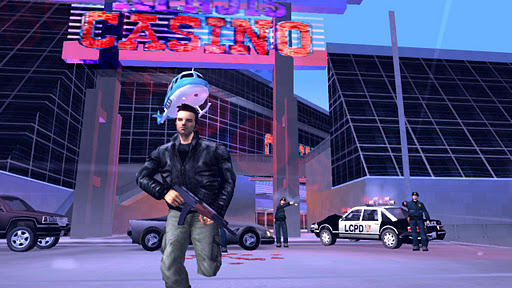
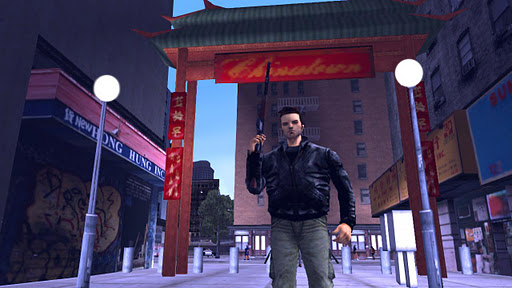
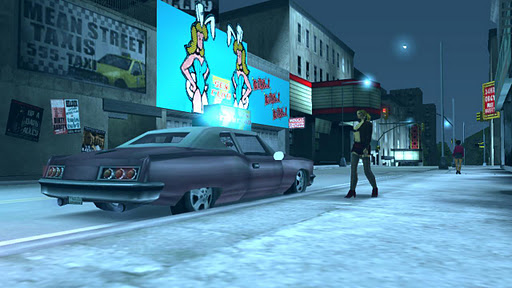
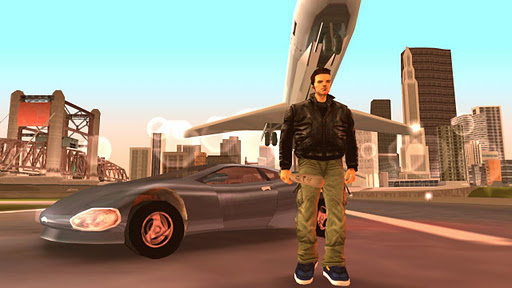
The sprawling crime epic that changed open-world games forever.
Welcome to Liberty City. Where it all began.
Rockstar Games celebrates the 10th anniversary of one of the most influential games of all time. The critically acclaimed blockbuster Grand Theft Auto III comes to mobile devices, bringing to life the dark and seedy underworld of Liberty City. With a massive and diverse open world, a wild cast of characters from every walk of life and the freedom to explore at will, Grand Theft Auto III puts the dark, intriguing and ruthless world of crime at your fingertips.
With stellar voice acting, a darkly comic storyline, a stunning soundtrack and revolutionary open-world gameplay, Grand Theft Auto III is the game that defined the open world genre for a generation.
Features:
• Visually stunning updated graphics, character and vehicle models
• HD quality resolution
• Gameplay optimized for touch screen devices
• Custom controls for the mobile platform
• Countless hours of gameplay
• Gamepad Support for select USB controllers
• Integrated with Immersion Haptic Vibration Feedback
• Tailor your visual experience with new video display settings
Languages Supported: English, French, Italian, German, Spanish & Japanese.
For optimal performance, we recommend re-booting your device after downloading and closing other applications when playing Grand Theft Auto III: 10 Year Anniversary Edition.
Please ensure you have at least 1GB of free space before installing Grand Theft Auto III: 10 Year Anniversary Edition.
*******************************************************
For more information about Grand Theft Auto III: 10 Year Anniversary Edition, visit:
http://www.rockstargames.com/newswire/tags#?tags=501
For technical support, visit:
http://support.rockstargames.com/forums/20575411-GTA-III-for-Android-iOS?locale=1
Port developed by War Drum Studios
http://www.wardrumstudios.com
مزید دکھائیں

1. MEmu انسٹالر ڈاؤن لوڈ کریں اور سیٹ اپ مکمل کریں

2. MEmu شروع کریں اسکے بعد ڈیسکٹاپ پر Google Play کھولیں

3. Google Play میں Grand Theft Auto III تلاش کریں
Install
4. Grand Theft Auto III ڈاؤن لوڈ کریں اور انسٹال کریں
5. انسٹال مکمل ہونے کے بعد سٹارٹ کرنے کے لیے آئیکن پر کلک کریں

6. MEmu کے ساتھ پی سی پر Grand Theft Auto III کھیلنے کا لطف لیں
MEmu پلے بہترین اینڈرائڈ ایمولیٹر ہے اور 100 ملین لوگ اس کے زبردست اینڈرائڈ گیمنگ تجربہ سے لطف اندوز ہو رہے ہیں۔ MEmu کی ورچولائزیشن ٹیکنالوجی آپ کو اپنے PC پر ہزاروں اینڈرائڈ گیمز یہاں تک کہ انتہائی گرافک والے گیمز باسہولت کھیلنے کی طاقت دیتی ہے۔
بہتر گرافکس کے ساتھ بڑی اسکرین؛ طویل دورانیہ، بیٹری یا لامحدود موبائل ڈیٹا کے بغیر۔
کی بورڈ اور ماؤس یا گیم پیڈ کے عین مطابق کنٹرول کے لیے کی میپنگ کا پورا سپورٹ۔
کثیر مثالی منیجر کے ساتھ بیک وقت ایک پی سی پر متعدد گیم اکاؤنٹس یا ٹاسکس۔
پی سی پر درج ذیل مراحل پر عمل کرتے ہوئے Grand Theft Auto III کھیلیں: