Advanced LT for NISSAN
تازہ کاری
موجودہ ورژن
2.0
پیشکش بذریعہ

اپنے موبائل فون پر Advanced LT for NISSAN کا استعمال کرتے وقت زیادہ چارج ہونے کی فکر نہ کریں، خود کو چھوٹی اسکرین سے آزاد کریں اور ایپ کو زیادہ بڑے ڈسپلے پر استعمال کرنے کا لطف اٹھائیں۔ اس کے بعد سے کی بورڈ اور ماؤس کے ساتھ اپنے ایپ کا فل اسکرین کا تجربہ حاصل کریں۔ MEmu آپ کو وہ تمام حیران کن خصوصیات پیش کرتا ہے جن کی آپ کو توقع کرتے ہیں: فوری انسٹال اور آسان سیٹ اپ، وجدانی کنٹرول، مزید بیٹری، موبائل ڈیٹا کی کوئی حد نہیں اور اب مزید پریشان کن کالز نہیں۔ نئے برانڈ کا MEmu 9 آپ کے کمپیوٹر پر Advanced LT for NISSAN استعمال کرنے کے لیے بہترین اختیار ہے۔ MEmu کثیر نظیری منیجر بیک وقت 2 یا اس سے زیادہ اکاؤنٹس کھولنا ممکن بناتا ہے۔ اور سب اہم بات، ہمارا خصوصی ایمولیشن انجن آپ کے پی سی کی پوری طاقت ریلیز کرتے ہوئے ہر چیز ہموار اور قابل تفریح بناتا ہے۔
مزید دکھائیں
MEmu Play کے ساتھ PC پر Advanced LT for NISSAN استعمال کرنے کے شاندار تجربے سے لطف اٹھائیں۔ یہ ایک طاقتور مفت اینڈرائیڈ ایمولیٹر ہے جو آپ کو ان کے ڈیسک ٹاپ ورژن کے لیے ہزاروں اینڈرائیڈ ایپس فراہم کرتا ہے۔ دوستوں کے ساتھ جڑنے اور اعلی کارکردگی کے ساتھ اپنے کام کو چمکانے کا لطف اٹھائیں! Monitor specific NISSAN parameters in real-time, including engine advanced sensor data by adding this plugin to Torque Pro.
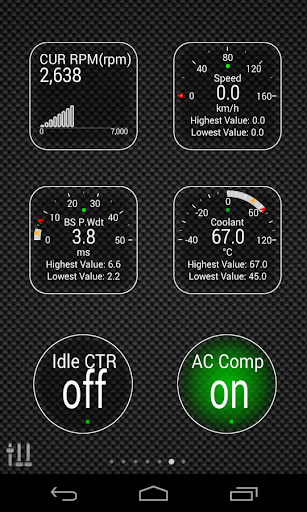
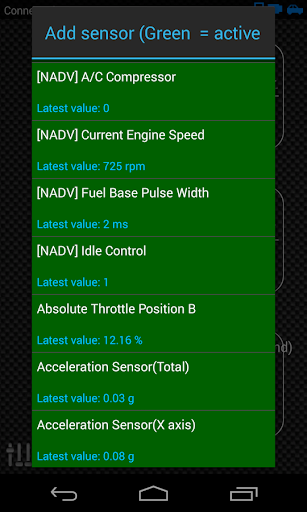
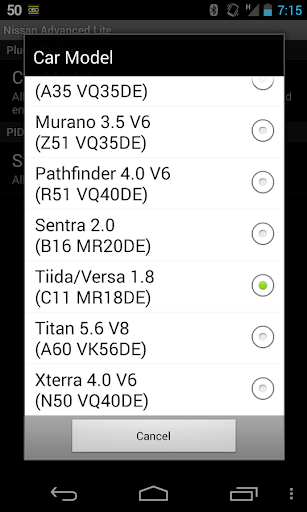
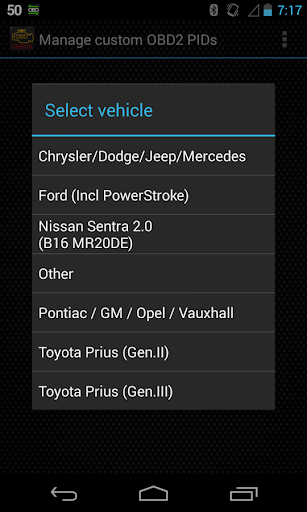
Monitor specific NISSAN parameters in real-time, including engine advanced sensor data by adding this plugin to Torque Pro.
Advanced LT is a plugin for Torque Pro, extending the PID/Sensor list with specific parameters from NISSAN vehicles, allowing you to try the plugin with limited sensors before buying. This version does not include calculated sensors like Injector Duty Cycle (%).
*PLEASE NOTE* that other NISSAN models/engines may be supported, but the plugin was tested only on the following models/engines equipped with DiagOnCan (CANBUS ONLY):
* 370Z 3.7 V6 (Z34 VQ37VHR)
* Altima 2.5 (L32 QR25DE)
* Altima 3.5 V6 (L32 VQ35DE)
* Armada 5.6 V8 (TA60 VK56DE)
* Frontier 2.5 (D40 QR25DE)
* Frontier 4.0 V6 (D40 VQ40DE)
* March/Micra 1.6 (K13 HR16DE)
* Maxima 3.5 V6 (A35 VQ35DE)
* Murano 3.5 V6 (Z51 VQ35DE)
* Pathfinder 4.0 V6 (R51 VQ40DE)
* Rogue 2.5 (S35 QR25DE)
* Sentra 2.0 (B16 MR20DE)
* Tiida/Versa 1.8 (C11 MR18DE)
* Titan 5.6 V8 (A60 VK56DE)
* Xterra 4.0 V6 (N50 VQ40DE)
* X-Trail 2.0 (T31 MR20DE)
* X-Trail 2.5 (T31 QR25DE)
For more information about NISSAN engines, visit http://en.wikipedia.org/wiki/List_of_NISSAN_engines
Advanced LT requires the latest version of Torque Pro installed in order to function. This is *NOT* a standalone application and will *NOT* work without Torque Pro.
Plugin Installation
-------------------------
1) After downloading the plugin on Google Play, make sure that you see the plugin listed on your Android device installed applications list.
2) Launch Torque Pro and click on the "Advanced LT" icon
3) Select the appropriate engine type and return to Torque Pro main screen
4) Go to Torque Pro "Settings"
5) Make sure that you can see the plugin listed also on Torque Pro by clicking "Settings" > "Plugins"> "Installed Plugins".
6) Scroll down to "Manage extra PIDs/Sensors"
7) Usually this screen will not display any entries, unless you have added any pre-defined or custom PIDs in the past.
8) From the menu, choose "Add predefined set"
9) You may see predefined sets for other NISSAN engine types, so make sure you pick the right one.
10) After clicking on the entry from the previous step, you should see additional entries on the Extra PIDs/Sensors list.
Adding Displays
------------------------
1) After adding the additional sensors, go to the Realtime Information/Dashboard.
2) Press the menu key and then click on "Add Display"
3) Select the appropriate display type (Dial, Bar, Graph, Digital Display, etc)
4) Select the appropriate sensor from the list. Sensors provided by Advanced LT begins with "[NADV]" and should be listed right after the time sensors in the top of the list.
More features/parameters will be added in further releases. If you have comments and/or suggestions please just let me know.
مزید دکھائیں

1. MEmu انسٹالر ڈاؤن لوڈ کریں اور سیٹ اپ مکمل کریں

2. MEmu شروع کریں اسکے بعد ڈیسکٹاپ پر Google Play کھولیں

3. Google Play میں Advanced LT for NISSAN تلاش کریں
Install
4. Advanced LT for NISSAN ڈاؤن لوڈ کریں اور انسٹال کریں
5. انسٹال مکمل ہونے کے بعد سٹارٹ کرنے کے لیے آئیکن پر کلک کریں

6. MEmu کے ساتھ پی سی پر Advanced LT for NISSAN کھیلنے کا لطف لیں
MEmu پلے بہترین اینڈرائڈ ایمولیٹر ہے اور 100 ملین لوگ اس کے زبردست اینڈرائڈ گیمنگ تجربہ سے لطف اندوز ہو رہے ہیں۔ MEmu کی ورچولائزیشن ٹیکنالوجی آپ کو اپنے PC پر ہزاروں اینڈرائڈ گیمز یہاں تک کہ انتہائی گرافک والے گیمز باسہولت کھیلنے کی طاقت دیتی ہے۔
بہتر گرافکس کے ساتھ بڑی اسکرین؛ طویل دورانیہ، بیٹری یا لامحدود موبائل ڈیٹا کے بغیر۔
کی بورڈ اور ماؤس یا گیم پیڈ کے عین مطابق کنٹرول کے لیے کی میپنگ کا پورا سپورٹ۔
کثیر مثالی منیجر کے ساتھ بیک وقت ایک پی سی پر متعدد گیم اکاؤنٹس یا ٹاسکس۔
پی سی پر درج ذیل مراحل پر عمل کرتے ہوئے پر Advanced LT for NISSAN استعمال کریں: u003c/p>