Appblock - Block Apps & Sites
تازہ کاری
موجودہ ورژن
7.15.3
پیشکش بذریعہ

اپنے موبائل فون پر Appblock - Block Apps & Sites کا استعمال کرتے وقت زیادہ چارج ہونے کی فکر نہ کریں، خود کو چھوٹی اسکرین سے آزاد کریں اور ایپ کو زیادہ بڑے ڈسپلے پر استعمال کرنے کا لطف اٹھائیں۔ اس کے بعد سے کی بورڈ اور ماؤس کے ساتھ اپنے ایپ کا فل اسکرین کا تجربہ حاصل کریں۔ MEmu آپ کو وہ تمام حیران کن خصوصیات پیش کرتا ہے جن کی آپ کو توقع کرتے ہیں: فوری انسٹال اور آسان سیٹ اپ، وجدانی کنٹرول، مزید بیٹری، موبائل ڈیٹا کی کوئی حد نہیں اور اب مزید پریشان کن کالز نہیں۔ نئے برانڈ کا MEmu 9 آپ کے کمپیوٹر پر Appblock - Block Apps & Sites استعمال کرنے کے لیے بہترین اختیار ہے۔ MEmu کثیر نظیری منیجر بیک وقت 2 یا اس سے زیادہ اکاؤنٹس کھولنا ممکن بناتا ہے۔ اور سب اہم بات، ہمارا خصوصی ایمولیشن انجن آپ کے پی سی کی پوری طاقت ریلیز کرتے ہوئے ہر چیز ہموار اور قابل تفریح بناتا ہے۔
مزید دکھائیں
MEmu Play کے ساتھ PC پر Appblock - Block Apps & Sites استعمال کرنے کے شاندار تجربے سے لطف اٹھائیں۔ یہ ایک طاقتور مفت اینڈرائیڈ ایمولیٹر ہے جو آپ کو ان کے ڈیسک ٹاپ ورژن کے لیے ہزاروں اینڈرائیڈ ایپس فراہم کرتا ہے۔ دوستوں کے ساتھ جڑنے اور اعلی کارکردگی کے ساتھ اپنے کام کو چمکانے کا لطف اٹھائیں! Block Apps, Websites & Social Media to stay focused on important things!

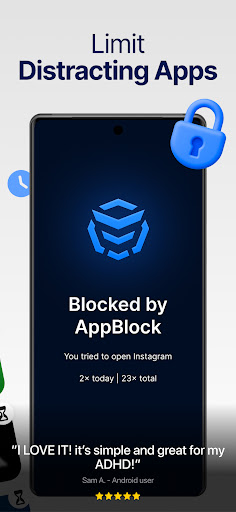
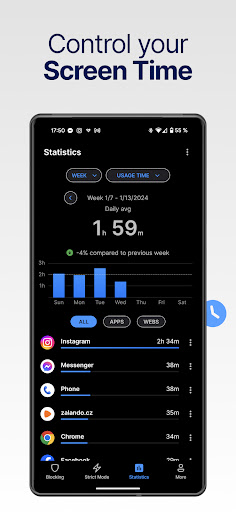
Block Apps, Websites & Social Media to stay focused on important things!
AppBlock is a must-have screen time management tool that helps you block apps, websites and social media, keeping you focused on what matters most. Take charge of your day by controlling your screen time with just a click. Discover why our web and app blocker has over 10,000,000+ success stories!
Limit screen time, achieve digital wellbeing!
With AppBlock, an enhanced app blocker and website blocker, you can easily manage your ADHD, reduce distractions, limit screen time and gain self-control. Whether you want to be more productive, study more effectively or do a digital detox, our app blocker has you covered. Say goodbye to distractions and embrace productivity with our powerful screen time management and app blocker tool!
Benefits of our app blocker:
- 32% less screen time in the first week
- 95% of our users save at least 2 hours daily by blocking apps and sites
- 94% of strict mode users have 60% less screen time
Control screen time, block apps, websites or social media, and transform your digital life. Prioritize tasks, boost productivity and enhance your digital wellbeing.
Why AppBlock?
App Blocker: From blocking social media to games, to blocking distracted apps and websites
Screen Time Management: Monitor and limit app screen time usage
Website Blocker: Use Block Site feature to restrict access to time-wasting websites
⏳ Customizable Blocking Schedules: Automatically enforce focus during work or study hours based on time, location, or Wi-Fi networks.
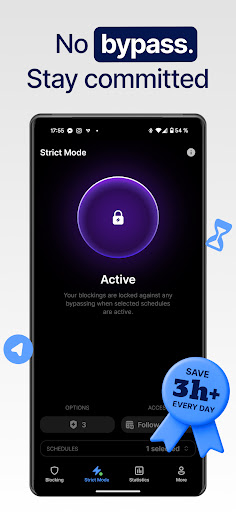
Strict Mode: Prevent bypassing set restrictions, reinforcing your commitment to focused work.
Maximize Productivity & Digital Wellbeing:
With AppBlock's web and app blocker features, you can control your screen time, stay focused on your goals and be more productive!
No more collecting pointless rewards or distractions — it's time for a real shift toward effective app and website blocking to help you stay focused and transform your habits.
Block apps to boost your study efficiency
AppBlock supports students on their journey by enhancing their digital wellbeing. By blocking distracting apps and sites, sturends can get optimal study environment for better focus and productivity.
Tailored Study Sessions: AppBlock creates distraction-free study environments, enabling deep concentration and effective exam preparation.
Academic Performance: Improve focus by blocking distracting websites and apps during study times.
Effective Time Management: Students can schedule study sessions and manage downtime, ensuring a balanced approach to academics and personal life.
Resource Accessibility: Access educational resources without distractions from notifications and apps.
Customized Learning Environment: Appblock allows students to adapt their devices to their study needs, enabling a personalized learning journey.
AppBlock Benefits:
Focus on what matters: Enhance productivity by aligning your digital environment with your goals.
Support Mental Health: Achieve mindfulness and relaxation with less screen time.
Digital Wellbeing: Foster a balanced approach to technology, improving overall life quality.
Take Control of Your Digital Life
Manage ADHD and easily block websites and inappropriate content to maintain a healthy digital lifestyle. Avoid temptation, stay focused and boost productivity. Block porn or other unwanted sites in one click.
AppBlock Privacy Commitment
We value your privacy by utilizing Accessibility services for secure content blocking.
Download AppBlock and take control of your screen time. Block apps, websites or social media and stay focused on what truly matters during your offtime! Our app blocker and web blocker tool will boost your productivity!
Improve your digital wellbeing with App Block!
Help: support@appblock.app or visit www.appblock.app
مزید دکھائیں

1. MEmu انسٹالر ڈاؤن لوڈ کریں اور سیٹ اپ مکمل کریں

2. MEmu شروع کریں اسکے بعد ڈیسکٹاپ پر Google Play کھولیں

3. Google Play میں Appblock - Block Apps & Sites تلاش کریں
Install
4. Appblock - Block Apps & Sites ڈاؤن لوڈ کریں اور انسٹال کریں
5. انسٹال مکمل ہونے کے بعد سٹارٹ کرنے کے لیے آئیکن پر کلک کریں

6. MEmu کے ساتھ پی سی پر Appblock - Block Apps & Sites کھیلنے کا لطف لیں
MEmu پلے بہترین اینڈرائڈ ایمولیٹر ہے اور 100 ملین لوگ اس کے زبردست اینڈرائڈ گیمنگ تجربہ سے لطف اندوز ہو رہے ہیں۔ MEmu کی ورچولائزیشن ٹیکنالوجی آپ کو اپنے PC پر ہزاروں اینڈرائڈ گیمز یہاں تک کہ انتہائی گرافک والے گیمز باسہولت کھیلنے کی طاقت دیتی ہے۔
بہتر گرافکس کے ساتھ بڑی اسکرین؛ طویل دورانیہ، بیٹری یا لامحدود موبائل ڈیٹا کے بغیر۔
کی بورڈ اور ماؤس یا گیم پیڈ کے عین مطابق کنٹرول کے لیے کی میپنگ کا پورا سپورٹ۔
کثیر مثالی منیجر کے ساتھ بیک وقت ایک پی سی پر متعدد گیم اکاؤنٹس یا ٹاسکس۔
پی سی پر درج ذیل مراحل پر عمل کرتے ہوئے پر Appblock - Block Apps & Sites استعمال کریں: u003c/p>