Bheema Tanpura
تازہ کاری
موجودہ ورژن
4.1.48
پیشکش بذریعہ

اپنے موبائل فون پر Bheema Tanpura کا استعمال کرتے وقت زیادہ چارج ہونے کی فکر نہ کریں، خود کو چھوٹی اسکرین سے آزاد کریں اور ایپ کو زیادہ بڑے ڈسپلے پر استعمال کرنے کا لطف اٹھائیں۔ اس کے بعد سے کی بورڈ اور ماؤس کے ساتھ اپنے ایپ کا فل اسکرین کا تجربہ حاصل کریں۔ MEmu آپ کو وہ تمام حیران کن خصوصیات پیش کرتا ہے جن کی آپ کو توقع کرتے ہیں: فوری انسٹال اور آسان سیٹ اپ، وجدانی کنٹرول، مزید بیٹری، موبائل ڈیٹا کی کوئی حد نہیں اور اب مزید پریشان کن کالز نہیں۔ نئے برانڈ کا MEmu 9 آپ کے کمپیوٹر پر Bheema Tanpura استعمال کرنے کے لیے بہترین اختیار ہے۔ MEmu کثیر نظیری منیجر بیک وقت 2 یا اس سے زیادہ اکاؤنٹس کھولنا ممکن بناتا ہے۔ اور سب اہم بات، ہمارا خصوصی ایمولیشن انجن آپ کے پی سی کی پوری طاقت ریلیز کرتے ہوئے ہر چیز ہموار اور قابل تفریح بناتا ہے۔
مزید دکھائیں
Download Bheema Tanpura on PC with MEmu Android Emulator. Enjoy playing on big screen. Bheema Tanpura, is a concert quality tanpura synthesizer, with 6 strings and advanced controls.
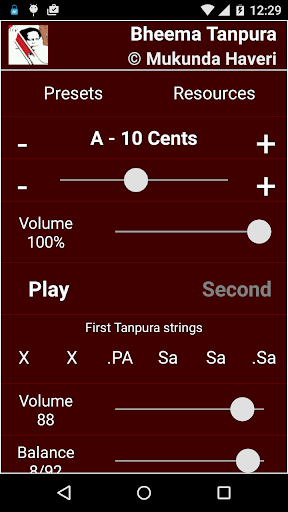
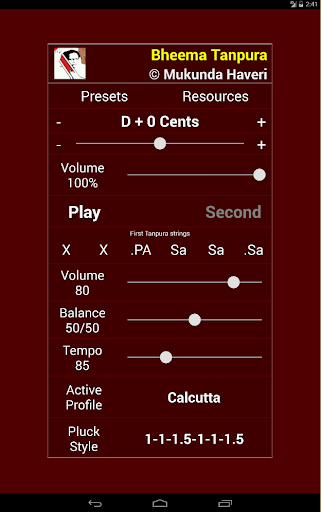
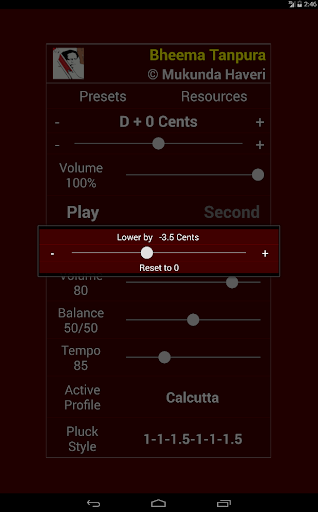
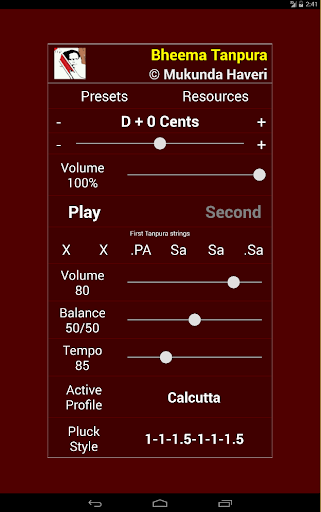
Bheema Tanpura, is a concert quality tanpura synthesizer, with 6 strings and advanced controls.
I am a signal processing engineer by profession and Hindustani classical singer by passion. I have developed this app after rigorous analysis of the resonance of instrument. Connect your android device to good speakers and enjoy the sound in high fidelity. Ideally place the speakers at least 3 to 4 feet away for the best effect.
I have included several digitized tanpura profiles. Use them and adjust the tempo/pluck-style to get the best combination that suits your taste.
The fully functional version will run for few minutes before terminating.
FYI : My great grand father made wonderful tanpuras from wood, about 80 years ago and in this digital age I have taken to computing !!! I will update the app with the profile of the only available tanpura he made..
* About Bheema Tanpura *
"This application takes its name from one of the greatest hindustani classical singers of our times, Pt Bhimsen Joshi, the maestro of Kiraana School of North-Indian classical music. He has been an inspiration for me and I belong to his school of Music; this software is a tribute to that great personality"
Enjoy the Naada and your new pair of tanpuras
Mukunda
* Acknowledgements *
Calcutta tanpura : Courtesy, Omkarnath Havaldar of Bangalore
مزید دکھائیں

1. MEmu انسٹالر ڈاؤن لوڈ کریں اور سیٹ اپ مکمل کریں

2. MEmu شروع کریں اسکے بعد ڈیسکٹاپ پر Google Play کھولیں

3. Google Play میں Bheema Tanpura تلاش کریں
Install
4. Bheema Tanpura ڈاؤن لوڈ کریں اور انسٹال کریں
5. انسٹال مکمل ہونے کے بعد سٹارٹ کرنے کے لیے آئیکن پر کلک کریں

6. MEmu کے ساتھ پی سی پر Bheema Tanpura کھیلنے کا لطف لیں
MEmu پلے بہترین اینڈرائڈ ایمولیٹر ہے اور 100 ملین لوگ اس کے زبردست اینڈرائڈ گیمنگ تجربہ سے لطف اندوز ہو رہے ہیں۔ MEmu کی ورچولائزیشن ٹیکنالوجی آپ کو اپنے PC پر ہزاروں اینڈرائڈ گیمز یہاں تک کہ انتہائی گرافک والے گیمز باسہولت کھیلنے کی طاقت دیتی ہے۔
بہتر گرافکس کے ساتھ بڑی اسکرین؛ طویل دورانیہ، بیٹری یا لامحدود موبائل ڈیٹا کے بغیر۔
کی بورڈ اور ماؤس یا گیم پیڈ کے عین مطابق کنٹرول کے لیے کی میپنگ کا پورا سپورٹ۔
کثیر مثالی منیجر کے ساتھ بیک وقت ایک پی سی پر متعدد گیم اکاؤنٹس یا ٹاسکس۔
پی سی پر درج ذیل مراحل پر عمل کرتے ہوئے پر Bheema Tanpura استعمال کریں: u003c/p>